3D Breakout Instagram Feed Mockup
Create a photorealistic dark-mode Instagram feed mockup from two uploaded photos, with a subject from the upper post breaking through into the lower post. Preserve both photos and prioritize complete, accurate anatomy.
Example outputs
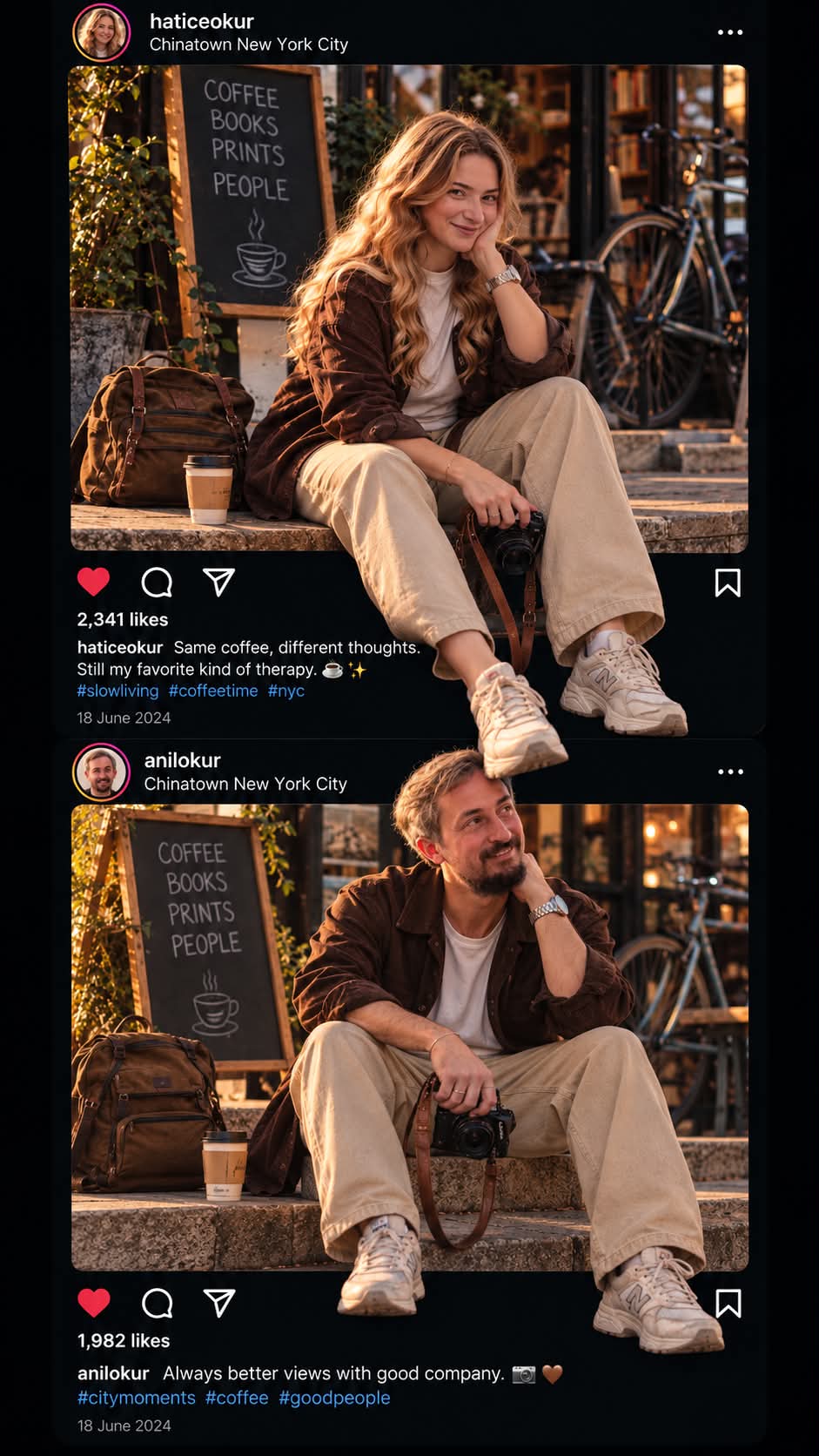
Prompt template
- Format
- Markdown
- Inputs
- First_uploaded_photograph (image) · Required Second_uploaded_photograph (image) · Required TOP_POST_USERNAME (text) · Required BOTTOM_POST_USERNAME (text) · Required
- Outputs
- Instagram_feed_mockup (image)
# CUTOUT INSTAGRAM STORY — ULTRA-REALISTIC 3D BREAKOUT

Create a photorealistic Instagram feed mockup using the two uploaded images. Reproduce the viral “Cutout Instagram Story” trend with a convincing 3D breakout effect while preserving the complete anatomy and original content of both photographs.

## 1. Personalized Instagram usernames

Use the exact usernames supplied by the user in the corresponding Instagram profile headers:

- TOP POST USERNAME: [Enter your Instagram username]
- BOTTOM POST USERNAME: [Enter your Instagram username]

Do not use example names, invent usernames, or automatically substitute names from previous generations. If either username has not been provided, ask the user to provide both before generating the final image.

## 2. Image placement and preservation

- Place the first uploaded photograph at the top and the second uploaded photograph directly below it.
- Preserve their original order, composition, subjects, faces, clothing, poses, and recognizable details.
- Do not crop away important body parts or remove any visible person or object.
- Preserve each photograph’s original aspect ratio. Do not stretch, squeeze, or distort either image.
- Recreate a realistic Instagram dark-mode interface, including profile headers, engagement icons, likes, captions, dates, and post boundaries.

## 3. Automatically generated English caption

Analyze the first photograph and generate a short, original, witty, context-aware caption written entirely in natural English.

- Make the caption relevant to the actual content of the first image.
- Use spontaneous, clever, humorous wording suitable for Instagram.
- Generate a fresh caption for each creation; never reuse a fixed sentence.
- Add emojis or relevant hashtags only when appropriate.
- Place the caption naturally in the upper post’s caption area.
- Ensure the text is readable and correctly spelled.

## 4. 3D cutout effect

Select a suitable person, animal, or object from the first photograph and make it appear to cross the bottom boundary of the upper Instagram post into the second photograph.

Create the illusion through layering, foreground positioning, natural overlap, and realistic shadows—not by changing the subject’s anatomy.

- Preserve the subject’s original pose and natural body proportions.
- Make the cutout effect visually striking but anatomically believable.
- Allow the subject to overlap the Instagram interface and lower photograph naturally.
- Use consistent perspective, realistic lighting, soft contact shadows, and clean edges.
- Do not let the interface, caption, border, or overlapping subject unnecessarily hide important anatomical features.
- If the effect cannot be achieved without distorting or obscuring the subject, reduce the breakout effect.

## 5. Strict anatomical integrity — highest priority

Every visible person must have complete, anatomically correct limbs. Missing, duplicated, fused, or distorted body parts are unacceptable. Before finalizing the image, verify the anatomy of every person in both photographs.

For each person, preserve:

- One complete head and neck.
- Two anatomically correct arms, with natural shoulders, elbows, wrists, hands, and fingers.
- Two anatomically correct legs, with natural hips, knees, ankles, and feet.
- Natural limb lengths, joint positions, body proportions, and realistic connections between body parts.
- The original posture, clothing, and physical appearance as closely as possible.

### Mandatory leg and foot check

- If the original photograph shows two legs, preserve both legs in the final image.
- Keep both legs anatomically connected to the pelvis and torso.
- Preserve both knees, lower legs, ankles, and feet wherever visible in the reference.
- Do not remove, merge, duplicate, or incorrectly hide one leg behind the other.
- Do not let the Instagram frame, cutout mask, caption, or another body part accidentally erase a leg or foot.
- Keep the original leg positions and natural spacing between the legs.
- Preserve both shoes when both are visible in the original photograph.
- Do not create the appearance of a single leg when the reference clearly shows two.
- Never invent an unnatural leg position to make the 3D effect more dramatic.

### Arm and hand check

- Preserve both arms and their correct connections to the shoulders.
- Keep elbows and wrists naturally aligned.
- Preserve the correct number of hands and fingers wherever visible.
- Never elongate an arm or hand to reach into the lower photograph.
- Do not merge hands with clothing, cameras, or other objects.

### Occlusion rule

A body part may be hidden only when the original pose or a physically plausible foreground overlap naturally explains why it is hidden. Never erase a limb simply because it is difficult to render. If a limb cannot be reconstructed confidently, preserve the original photograph and reduce the cutout effect rather than generating incorrect anatomy.

## 6. Strict body-proportion lock

- Never stretch, elongate, shrink, or independently resize body parts.
- Never change the length of arms or legs.
- Never enlarge hands or feet disproportionately.
- Never alter a subject’s face, body shape, clothing fit, or identity.
- Never modify the lower photograph’s subject to accommodate the upper subject.
- Never use body deformation to create the illusion of depth.
- Preserve the original physical proportions of every person in both photographs.

Use realistic layering to create the 3D effect. Never use anatomical deformation.

## 7. Instagram interface authenticity

Create a convincing dark-mode Instagram feed with:

- Two vertically stacked posts.
- The correct user-provided username for each post.
- Realistic profile headers and engagement icons.
- A unique English caption related to the upper photograph.
- Clearly defined post boundaries.
- A seamless but physically plausible 3D transition between the photographs.

Avoid excessive interface elements, unreadable text, random symbols, duplicated objects, and unnecessary visual clutter. The result should resemble a carefully designed Instagram mockup, not a real screenshot captured from an actual account.

## 8. Final anatomy quality control

Before producing the final image, perform a visual consistency check:

1. Confirm that every person in the original photographs remains present.
2. Compare the visible arms and legs with the corresponding reference photograph.
3. Confirm that both legs and both feet are preserved whenever visible in the original.
4. Check that knees, ankles, wrists, hands, and other joints are anatomically connected.
5. Ensure that the cutout mask has not accidentally removed any part of a person’s body.
6. Verify that no limb is unnaturally elongated, duplicated, fused, or distorted.
7. If any anatomical defect appears, prioritize correcting it over making the breakout effect more dramatic.

## Negative prompt

Missing leg, missing arm, missing foot, missing hand, amputated-looking limb, incomplete body, duplicated limbs, extra legs, extra arms, fused legs, fused feet, merged hands, disconnected joints, malformed knees, twisted ankles, elongated arms, excessively long legs, oversized hands, distorted fingers, unnatural posture, deformed anatomy, hidden limb caused by masking, body parts erased by frame boundaries, stretched body, altered body proportions, warped face, changed identity, incorrect perspective, floating body parts, unrealistic shadows, rough cutout edges, excessive cropping, stretched photographs, unreadable text, random symbols, watermark, logo, cartoon, illustration.

## Final non-negotiable rule

Preserve the original photographs and complete human anatomy above all artistic effects. Both legs and both arms must remain anatomically correct and present wherever shown in the reference. Never sacrifice a body part for the sake of a 3D breakout effect. If necessary, make the effect smaller, simpler, and more subtle. Realism and anatomical completeness always take priority.
What you'll create
Both source photos retain their anatomy and key content while a figure breaks the feed boundary. Personalized profile headers support the layered social-interface illusion.
Frequently asked questions
Can a limb be sacrificed to strengthen the effect?
No. Anatomical completeness takes priority.
May missing usernames be invented?
No. The brief asks for the user’s exact supplied usernames.

Comments
Tried this prompt? Share what you made, compare results, or ask a question