MECHABUILD Tower Assembly FPV Video
Create a continuous, photoreal CGI video of a tower assembling through fast, mechanically grounded component installations.
Example outputs
AI-generated video of an approximately 10-floor ivory-and-glass tower assembles as an FPV camera races through its structure and pulls back to reveal the completed building.
Download video result 1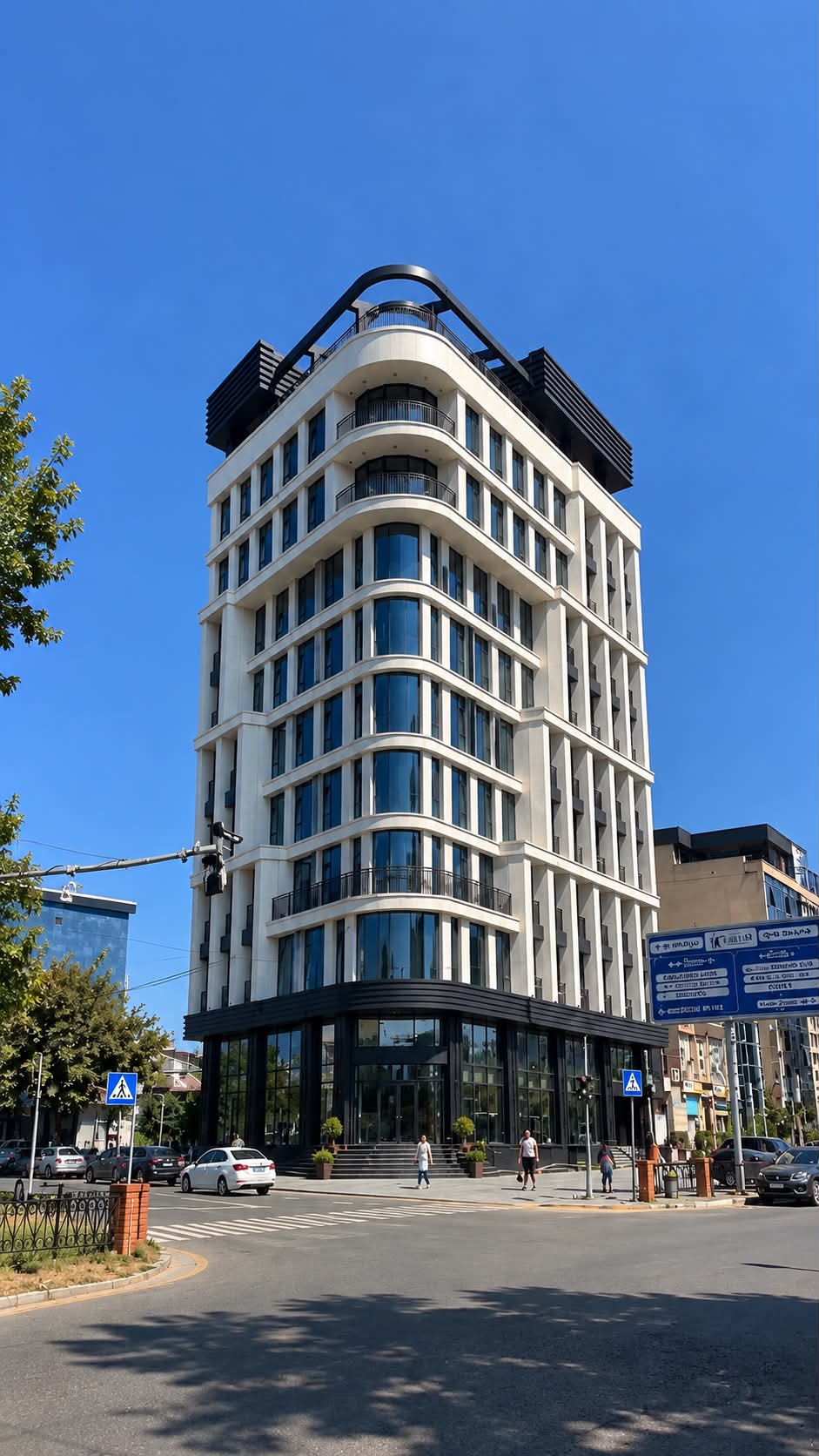
Prompt template
- Format
- Text
- Inputs
- Image1 (image) · Required Image2 (image) · Required
- Outputs
- Video (video)
Use Image 1 as the storyboard reference and Image 2 as the strict building reference. Reproduce its exact geometry and floor rhythm: an approximately 10-floor tower with ivory-white stone, rounded balconies and continuous curved bands, blue panoramic glass, black rails, a dark ground-level podium, and a black arched rooftop crown.

Create an exactly 10-second, vertical 9:16, ultra-photorealistic CGI video. Use one continuous 14mm FPV camera shot with no visible cuts, teleportation, clipping, or morphing. Set the scene in a city at noon under a blue sky. Show realistic concrete, steel, glass, dust, motion blur, and physical weight. Use no more than 4–8 major components.

Every component must follow this visible mechanical sequence: FAST LAUNCH → HARD BRAKE → ALIGN → INSERT → CLAMP → LOCK → LOAD TRANSFER. Show rails, guides, and pins; nothing assembles by magic.

0–0.5 sec: Show an empty aerial building footprint. Dust moves inward and the ground compresses with a physical 360-degree dust-pressure effect. The FPV camera accelerates from 0 to 300 toward the center.

0.5–1 sec: Foundation sockets and rebar rise, rotate, and seat as the camera banks into a corkscrew.

1–1.5 sec: A giant column rises, brakes two meters above its destination, aligns on guide pins, descends into a socket, and locks with clamps.

1.5–2 sec: Two columns rise opposite one another, align, insert, and clamp as the camera flies through the gate they form.

2–2.5 sec: A primary steel beam rises and rotates 90 degrees. It brakes, aligns at its end plate, and rolls into the bay before insertion and pinning.

2.5–3 sec: Opposing and cross beams form a gate and lock behind the camera as it makes a 300-degree flight and barrel roll.

3–3.5 sec: A slab rises in a corkscrew, brakes level, follows guide rails, and seats on the beam. Show heavy settlement and load transfer.

3.5–4 sec: Invert beneath the second floor as columns rise, enter sockets, and clamp. Fly a slalom through the frame.

4–4.5 sec: Chase the joint. A beam brakes and aligns; the camera passes through the zone before the end plate locks, then makes a whip turn.

4.5–5 sec: Perform a complete barrel roll synchronized with a column lock, beam insertion, cross-brace rotation, opposing-beam lock, and the rise of the next slab.

5–5.5 sec: Dive into the final bay. A slab rises, brakes, and follows guides. Escape vertically before the seating process closes the route.

5.5–6 sec: Navigate a structural maze of a left beam, right brace, and lower slab. Dive, roll 90 degrees, bank, and escape vertically as openings close behind the camera.

6–6.5 sec: Curved facade support rails rise and clamp. Race along the rounded exterior.

6.5–7 sec: A blue glass unit rises, brakes, rotates vertically, slides into channels, seats, and clamps. Escape through an adjacent opening.

7–7.5 sec: Ivory panels and glass rise sequentially around the curved corner, align with rails, seat, and clamp. The completed facade closes behind the camera.

7.5–8 sec: Fly through an upper opening at 100–300. A beam, pin, slab, and glazing close behind the camera.

8–8.5 sec: Upper connectors rotate from 0 to 90 degrees and lock as the camera performs a synchronized 360-degree corkscrew.

8.5–9 sec: The black crown rises. The camera rockets through its open center and brakes at the roof supports, with four points exposed.

9–9.5 sec: Show the connection sequence: joint insertion, clamping, pinning, and the fourth insertion. The crown seats.

9.5–10 sec: Four crown locks clamp through 90 degrees. End with a metallic clunk and a millimeter-scale settling of the building; all motion stops. Pull backward and upward to reveal the complete, exact tower and city.

Do not show demolition, explosions, glow, floating fasteners, duplicated components, interiors, text, logos, or music.
What you'll create
A continuous FPV shot follows major building components launching, braking and locking into a roughly ten-floor tower. Ivory stone, curved balconies and blue panoramic glazing resolve into a completed noon city view.
Frequently asked questions
Can parts assemble by magic?
No. Rails, guides, pins, clamps and load transfer must remain visible.
How many major components are allowed?
The brief limits the assembly to four to eight major components.


Comments
Tried this prompt? Share what you made, compare results, or ask a question