- Category
- Design & Image
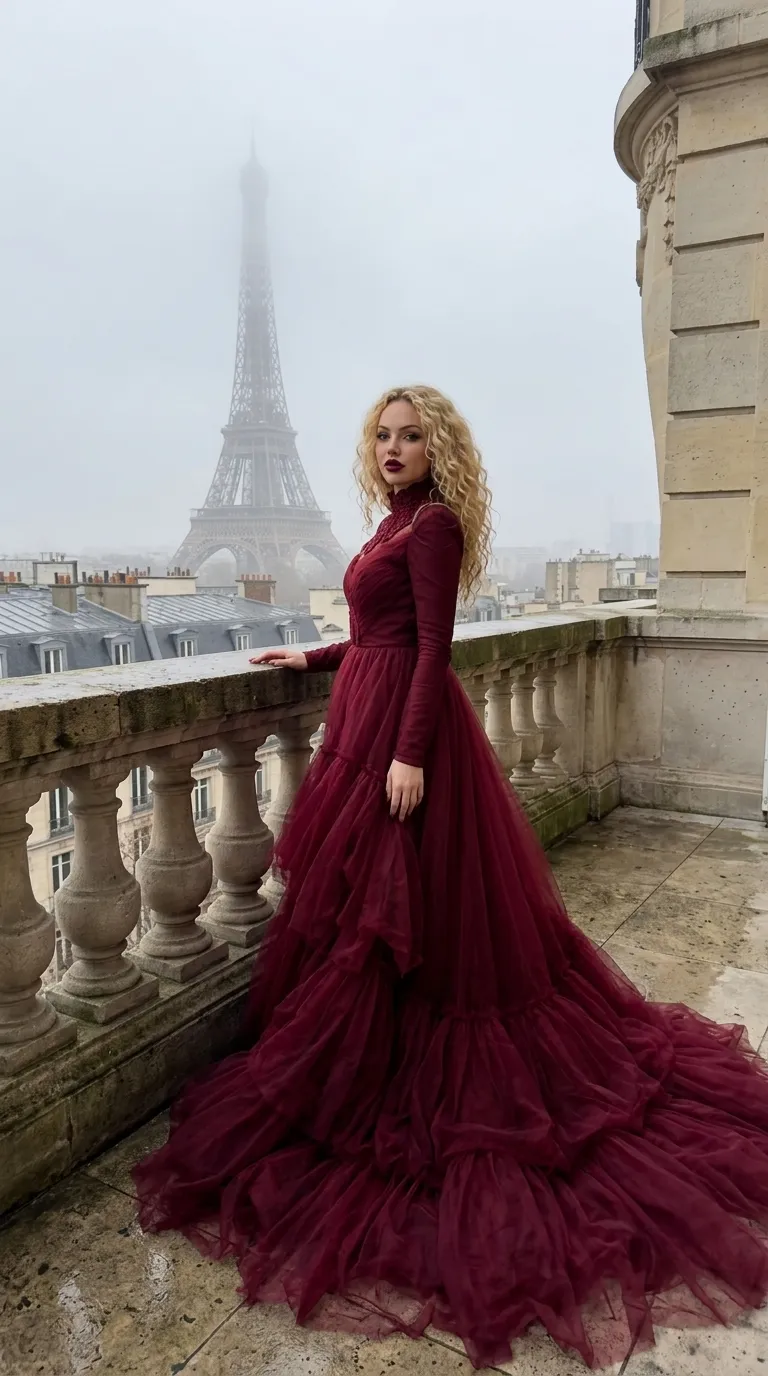
Couture Portrait on a Paris Balcony
Create a realistic 9:16 fashion portrait of a young woman in a dramatic couture gown overlooking the Eiffel Tower.
By Threads — Published on — Modified on
Example images
Prompt template
- Format
- Text Parameterized
- Inputs
- Photo_reference (image) · Required Setting (text) · Optional · Default: Paris, with the Eiffel Tower in the background Weather (text) · Optional · Default: cloudy, foggy day Gown_color (text) · Optional · Default: dark red
- Outputs
- Generated_image (image)
Replace the ${…} placeholders with your values
before using this prompt. See parameters
and defaults below.
Create a realistic image in a 9:16 aspect ratio. A young woman stands on a stone balcony in ${setting:Paris, with the Eiffel Tower in the background} on a ${weather:cloudy, foggy day}. Use the photo reference to match her facial features, age, and hairstyle. She wears a luxurious ${gown-color:dark red} haute couture gown with a high collar, long sleeves, and a gigantic, voluminous tulle train flowing down to the floor. Give her expressive evening makeup, emphasizing the eyes, with dark matte lipstick. Photograph it on an iPhone 15 Pro Max with a 24 mm lens at f/1.78. Use natural lighting and a candid, unedited look with realistic texture.Parameters
Replace each placeholder with your own value, or use its default when one is provided.
${setting:Paris, with the Eiffel Tower in the background}
setting
Default: Paris, with the Eiffel Tower in the background
${weather:cloudy, foggy day}
weather
Default: cloudy, foggy day
${gown-color:dark red}
gown-color
Default: dark red


Comments — 0