Low-Key Smartphone Selfie Portrait
Create a candid, photorealistic close-up portrait with dramatic makeup, soft low-key lighting, and a natural smartphone-photo look.
Example outputs
Prompt template
- Format
- Text Parameterized
- Inputs
- aspect_ratio (text) · Optional · Default: 3:4
- Outputs
- Portrait (image)
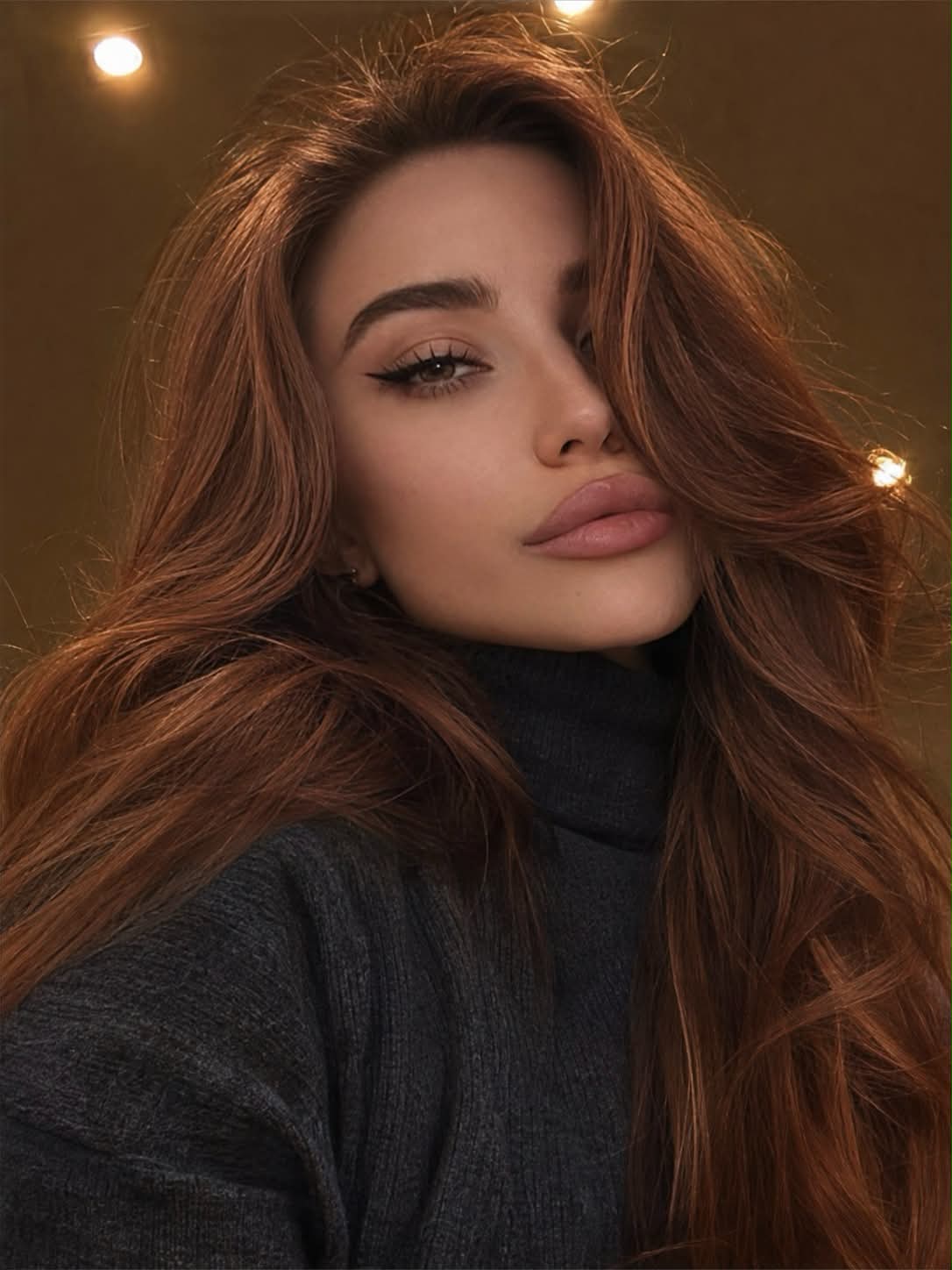
Create a photorealistic, tightly framed close-up photograph of a woman from the shoulders upward. She poses with her head slightly tilted toward her shoulder and her face turned partially sideways toward the camera. Her expression is sultry and relaxed, with a dreamy, half-lidded gaze.

Makeup: even skin tone, neatly groomed dark laminated eyebrows, long dramatic black winged eyeliner, subtle cheekbone contouring, voluminous black lash extensions with a wispy, textured effect, and nude-pink lip liner accentuating the natural shape of her lips.

Outfit: a dark charcoal-gray turtleneck sweater with a high neckline.

Background: a ceiling with recessed spotlights emitting warm light. The overhead lighting creates a rim-light effect along her hair.

Lighting: dim, subdued, low-key lighting with soft shadows. The main illumination comes from the phone screen, creating a natural, intimate selfie atmosphere.

Photography style: highly detailed natural skin texture, realistic fabric texture, and authentic environmental details. Add slight motion blur for a candid, spontaneous feel. Use iPhone 17 camera quality, subtle digital noise, soft sharpness, slightly underexposed exposure, and delicate film grain. The result should look like a genuine, unedited smartphone photograph rather than an artificial or overly polished AI image.

Aspect ratio: ${aspect-ratio:3:4}
Replace the ${…} placeholders with your values
before using this prompt. See parameters
and defaults below
Parameters
Replace each placeholder with your own value, or use its default when one is provided
${aspect-ratio:3:4}
aspect-ratio
Default: 3:4
What you'll create
A woman tilts her head toward one shoulder below warm ceiling spotlights. Screen light, subtle motion blur and soft grain retain a subdued close-up phone-photo appearance.
Generation settings
Aspect ratio: 3:4
Usage instructions
No reference image is required; the prompt specifies the subject and scene. The lighting and makeup details shape the intimate portrait, while the aspect ratio controls the image proportions. Adjust the aspect ratio if you want a different crop.
Frequently asked questions
What provides the main facial illumination?
The phone screen.
Is pristine studio sharpness intended?
No. Slight blur, soft sharpness and digital noise add a candid quality.




Comments
Tried this prompt? Share what you made, compare results, or ask a question