Luxury Fashion Smartphone Gallery
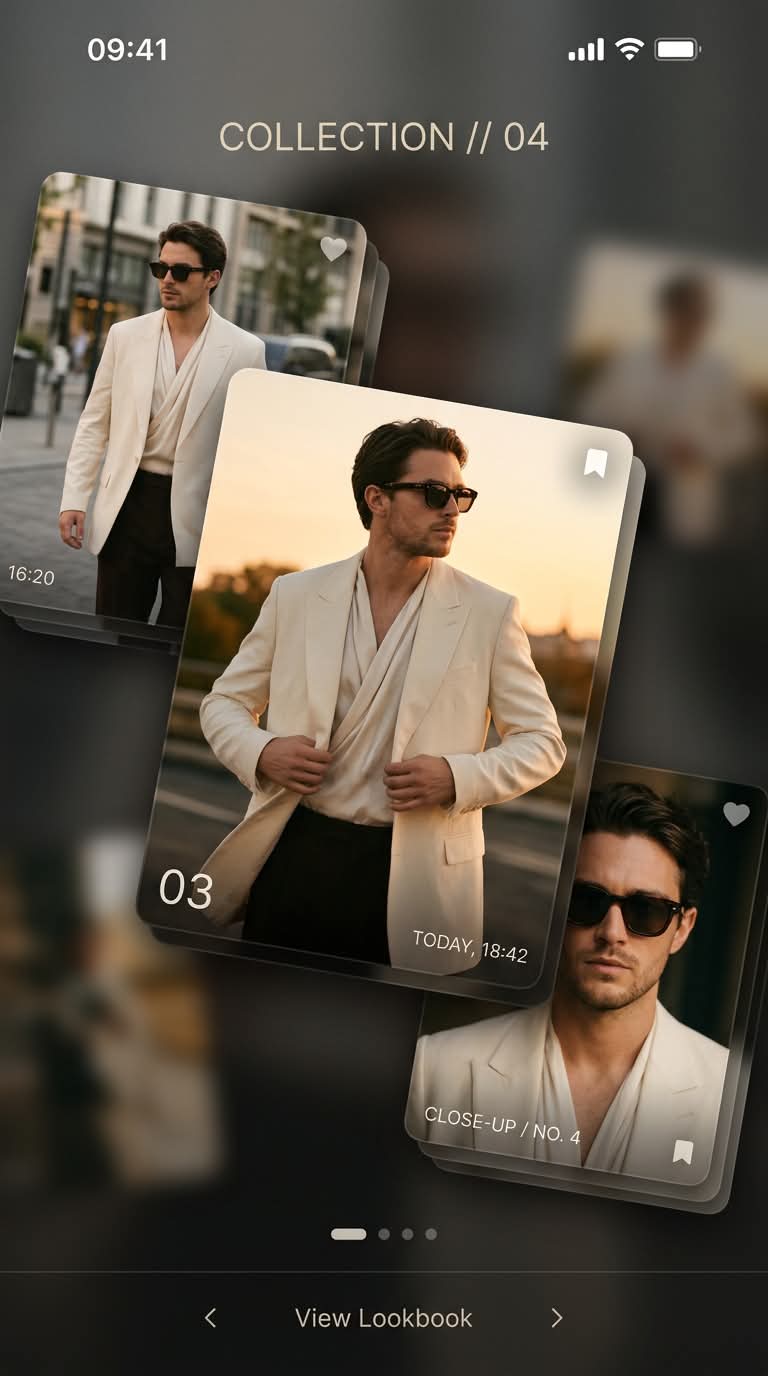
Create a premium fashion campaign image presented as a modern smartphone gallery interface, with layered editorial cards and a central sunset-toned portrait.
Example outputs
Prompt template
- Format
- Text
- Outputs
- Fashion_galary_interface_image (image)
Aspect ratio 4:5. Create an ultra-modern fashion editorial designed like a luxury smartphone gallery interface. Stack multiple floating image cards with subtle depth, each showing the same male fashion model in different editorial poses. Add UI elements such as timestamps, minimal captions, and soft shadows to enhance realism. Enlarge the central card and give it a warm, glowing sunset tone. Dress the model in an elegant cream blazer, a silk top, and statement sunglasses. Use a clean, modern design language, a luxury social-media aesthetic, soft blur transitions, and an ultra-detailed, realistic finish with the style of a premium fashion campaign.What you'll create
A clean 4:5 editorial layout arranges floating portraits of one model in a cream blazer and silk top. Soft blur transitions, restrained captions and timestamps give the fashion cards a premium smartphone-gallery feel.
Frequently asked questions
What makes the cards feel dimensional?
Subtle depth and soft cast shadows separate the stacked images.
What accessories complete the model’s styling?
Statement sunglasses accompany the cream blazer and silk top.




Comments
Tried this prompt? Share what you made, compare results, or ask a question