Photorealistic Portrait with a Miniature 3D Double
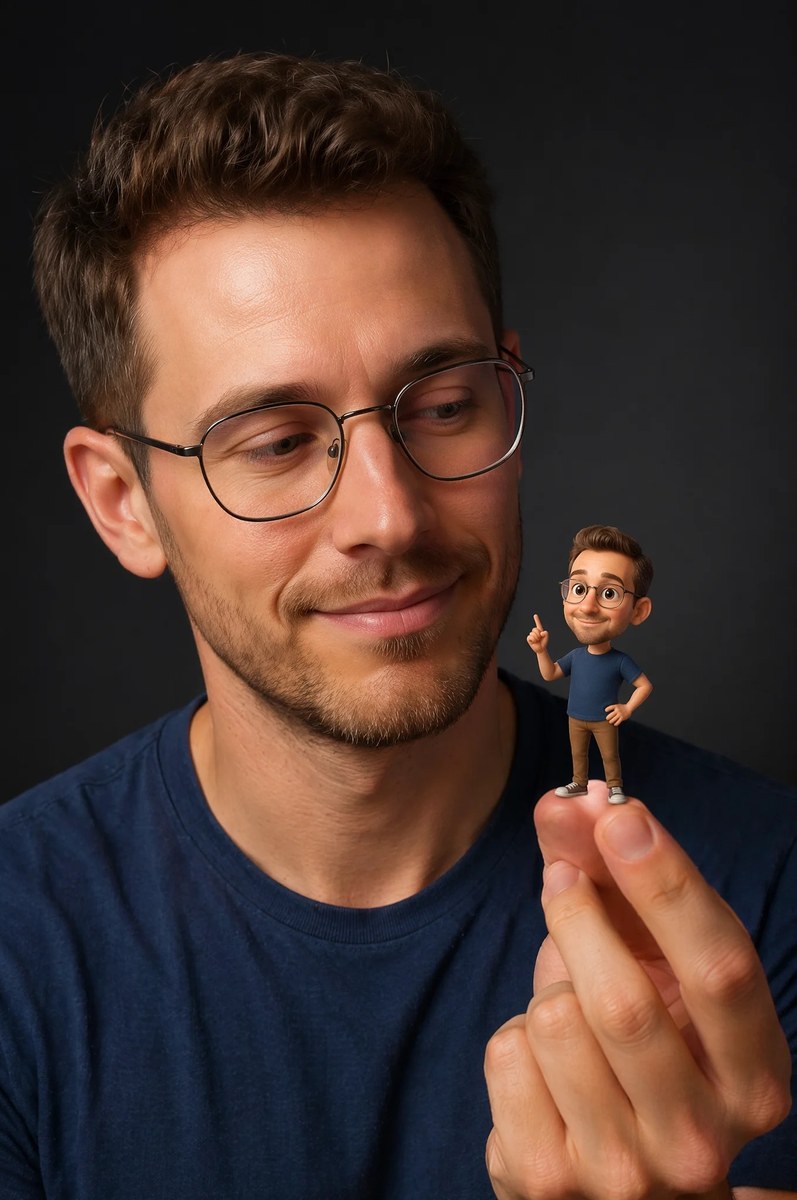
Create a close-up studio portrait of a man interacting with a tiny 3D cartoon version of himself. The shirt color is customizable, while the miniature is specified to match the main subject’s hairstyle and outfit
Example outputs
Prompt template
- Format
- Markdown Parameterized
- Inputs
- Reference_picture (image) · Required shirt_color (text) · Optional · Default: blue
- Outputs
- Portrait (image)
Use the uploaded reference picture as the visual reference for the main subject.

{
  "Objective": "Create a hyper-realistic studio portrait blending photorealism with a whimsical 3D cartoon miniature character",
  "PersonaDetails": {
    "PrimarySubject": {
      "Type": "Young man",
      "Appearance": {
        "Hair": "Light brown hair, neatly styled",
        "FacialHair": "Neatly trimmed beard",
        "Skin": "Photorealistic, natural texture"
      },
      "Expression": "Soft, warm smile",
      "Gaze": "Looking at the miniature character on his fingertips",
      "Wardrobe": "${shirt-color:blue} t-shirt"
    },
    "SecondarySubject": {
      "Type": "Tiny 3D cartoon version of the man",
      "Scale": "Miniature, resting on fingertips",
      "Style": "Pixar-style 3D character design",
      "Proportions": "Exaggerated cute proportions",
      "Features": {
        "Eyes": "Large, expressive",
        "Expression": "Friendly, playful pose"
      },
      "Consistency": "Matching hairstyle and outfit of the main subject"
    }
  },
  "Composition": {
    "Framing": "Close-up studio portrait",
    "Focus": "Ultra-sharp focus on both faces",
    "DepthOfField": "Shallow depth of field with soft background blur",
    "Balance": "Clean, centered composition emphasizing interaction"
  },
  "LightingAndMood": {
    "LightingStyle": "Cinematic soft studio lighting",
    "Highlights": "Gentle highlights on skin and miniature character",
    "Background": "Dark neutral backdrop",
    "Mood": "Modern, whimsical, warm"
  },
  "ArtDirection": {
    "StyleFusion": [
      "Photorealistic human portrait",
      "Pixar-style 3D character rendering"
    ],
    "DetailLevel": "High detail with clean textures",
    "RealismBalance": "Realistic human combined with stylized miniature"
  },
  "PhotographyStyle": {
    "Genre": "Professional studio portrait photography",
    "LensLook": "85mm lens perspective",
    "ImageQuality": "High resolution, ultra-sharp clarity"
  },
  "ColorAndTone": {
    "ColorPalette": "Natural skin tones with soft, modern colors",
    "Contrast": "Balanced contrast, smooth tonal transitions"
  },
  "NegativePrompt": [
    "cartoon human",
    "uncanny valley",
    "harsh lighting",
    "oversaturated colors",
    "blurry faces",
    "low detail",
    "messy composition"
  ],
  "ResponseFormat": {
    "Type": "Single image",
    "Orientation": "Portrait",
    "AspectRatio": "2:3"
  }
}
Replace the ${…} placeholders with your values
before using this prompt. See parameters
and defaults below
Parameters
Replace each placeholder with your own value, or use its default when one is provided
${shirt-color:blue}
shirt-color
Default: blue
What you'll create
This prompt creates a close-up studio portrait of a man smiling at a tiny 3D cartoon version of himself on his fingertips. It combines realistic skin and soft cinematic lighting with a centered composition, shallow background blur, and a dark neutral backdrop
Usage instructions
Frequently asked questions
What should the reference picture guide?
Use it as a visual reference for the main subject; the prompt specifies the miniature’s matching hairstyle and outfit
Can I change the shirt color?
Yes. Change the shirt_color value; the miniature is still instructed to match the main subject’s outfit
What image format does the prompt request?
A single portrait-oriented image with a 2:3 aspect ratio



Comments
Tried this prompt? Share what you made, compare results, or ask a question