Dramatic Two-Tone Close-Up Selfie
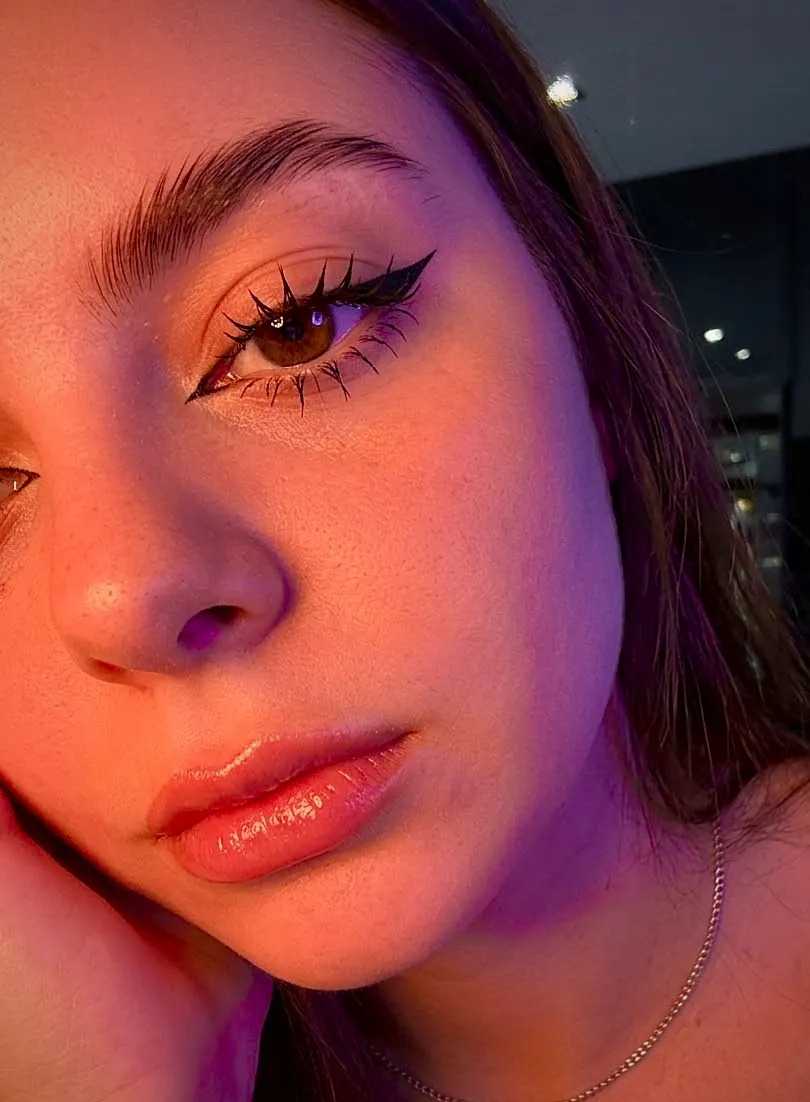
Create an extreme close-up, photorealistic front-camera selfie using a reference image to preserve the subject’s appearance, with vivid orange-red and purple-blue lighting.
Example outputs
Prompt template
- Format
- Text
- Inputs
- Reference_image (image) · Required
- Outputs
- Selfie (image)
Create an extreme close-up, photorealistic (pow) selfie taken with the front camera. Preserve the girl’s appearance from the reference image 100% without changing her face. Show only part of her face in the frame: one eye, half her nose, her cheekbones, and her lips; crop out the rest. Give her a drowsy gaze, with her head turned slightly to the side and her hair hanging loosely over her shoulder. She wears a thin silver chain around her neck.

Makeup: even skin tone, long graphic black winged eyeliner, wet-look manga lashes, thick laminated brows, and full, glossy lips with nude-pink contouring.

Use contrasting two-tone lighting on her face: rich orange-red light falls on her cheekbone and lips, while purple-blue shadows stretch along her temple and the edge of her hand. Keep the lighting tones natural-looking; do not make her skin look like a neon mask. Set the scene in a dark, modern interior with subtle detail.

Add slight digital grain and a little noise in the shadows, with the soft sharpness of a front camera. Preserve natural pores and lip texture. Create a spontaneous Live Photo effect, without CGI or excessive processing, with iPhone 15 Pro quality. Use a 3:4 aspect ratio.
What you'll create
A reference-guided face is partly visible through one eye, nose and lips. Loose hair, glossy nude makeup and fine phone grain soften the dark interior while contrasting light shapes the cheek and temple.
Usage instructions
Provide the reference image whose appearance should be preserved. The prompt controls the close crop, makeup, and contrasting light; adjust the orange-red and purple-blue tones to change the color balance.
Frequently asked questions
Does the whole face fit within the frame?
No. Much of it is deliberately cropped out.
Should colored light become an opaque neon mask?
No. Skin texture and natural-looking color remain visible.





Comments
Tried this prompt? Share what you made, compare results, or ask a question