My One-of-a-Kind School Backpack
Create a vertical product-catalog image featuring a personalized 2.5-head-tall collectible doll wearing an original school backpack, with matching detail views of the backpack.
Example outputs
Prompt template
- Format
- Text Parameterized
- Inputs
- Person_reference_photo (image) · Required Preferred_color (text) · Required Favorite_motif (text) · Required Preferred_material (text) · Required Decoration_preferences (text) · Required Hardware_preferences (text) · Required Nameplate_text (text) · Required Other_backpack_preferences (text) · Optional Creator_ID (text) · Optional · Default: taigatora44 other_preferences (text) · Required
- Outputs
- Product_catalog_image (image)
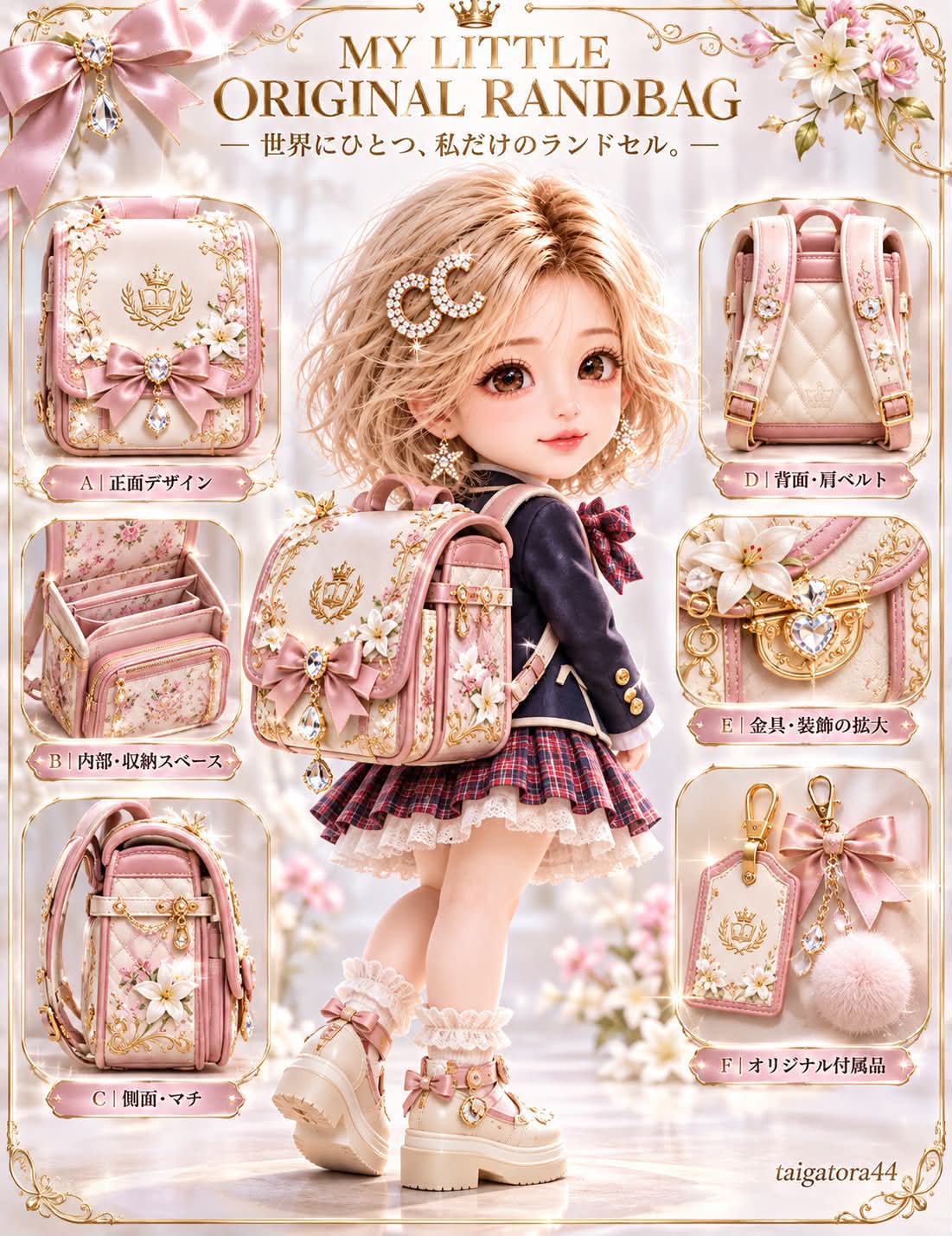
MY LITTLE ORIGINAL RANDBAG

“One-of-a-kind in the world, just for me.”

Create a high-quality product-catalog image featuring a personalized collectible doll and a completely original school backpack. The design must work for a person of any gender.

## 1. Main concept

Use the uploaded photo of a person as the reference for a cute, high-quality fashion collectible doll that retains recognizable traits of that person. Give the doll an approximately 2.5-head-tall chibi-like proportion, with a large head, small body, and charming expression.

Show the doll wearing its own completely original school backpack as the main subject. Arrange several detailed views of that same backpack around the doll to show its features.

## 2. Resemblance and doll-like appearance — highest priority

Use the uploaded photo as the reference for the person. Take cues from the person’s eyes, eyebrows, nose, mouth, face shape, hairstyle, hair color, bangs, hair length, personality, and overall character. Preserve the person’s recognizable appearance and gender expression. Do not turn them into someone else or change their face to an unrelated one, and do not excessively beautify them.

Give the doll the appearance of a cute, premium collectible doll—not a realistic miniature adult. Use a relatively large head; a softly rounded face; slightly large, clear, sparkling doll eyes; a small, naturally charming nose and mouth; subtly rosy cheeks; and a gentle, friendly, cute smile. Give the skin a smooth, premium doll-material finish, with delicate details around the eyes and mouth and an appealing, polished doll-like look.

Avoid a realistic adult face, a face that looks like the photograph merely shrunk down, overly realistic skin or emphasized pores, an excessively infant-like face, an unnatural anime face, or extreme distortion. The goal is an endearing doll that retains the person’s distinctive features.

## 3. Proportions and three-dimensional form

Use approximately 2.5-head-tall proportions: a large head, compact body, and short limbs with natural rounded forms. Give the figure a cute, rounded silhouette and carefully sculpt even the small hands and feet. Use the three-dimensional quality of a premium collectible doll, not a cheap plastic toy. Keep the proportions of the head and body consistent.

## 4. Gender-inclusive clothing

Match gender expression to the person in the reference photo. For a woman, choose an appropriately cute and elegant outfit such as a dress, blouse, skirt, or cardigan; ribbons and small accessories may be included. For a man, choose a neat, cute outfit such as a shirt, jacket, cardigan, or trousers; a tie or bow tie may be included. Let the AI choose an outfit that suits the person’s appearance. Keep the cute doll aesthetic consistent across genders, coordinate the outfit with the backpack’s colors and design, and allow free fashion expression regardless of gender.

## 5. Pose and composition

Show the doll’s full body, with its body turned at a three-quarter angle facing away from the camera so the back and backpack are clearly visible. Turn only the face back over the shoulder toward the viewer, with the eyes looking at the camera and a natural, cute smile.

Have the doll wear the backpack correctly, with one shoulder strap over each shoulder and the bag resting naturally against the back. Make both the doll and the backpack design easy to see.

## 6. Completely original school backpack

Design a new backpack for this person rather than copying an existing product. Reflect the person’s personality and preferences in a one-of-a-kind design.

Combine suitable design elements such as main and accent colors; leather-like, enamel-like, or matte materials; gold or silver hardware; original embroidery or patches; ribbons, gems, flowers, stars, or animal motifs; a nameplate or charm; patterned lining; zippers and pockets; and an original emblem. Freely combine colors, materials, and decorations while maintaining a cohesive design that suits the person’s character and the preferences provided below.

Make the backpack slightly large in proportion to the doll and large enough to cover the back. Give it adequate side-gusset depth and the recognizable three-dimensional box shape of a school backpack. Depict the shoulder straps and fasteners accurately. Do not let the bag intersect the body unnaturally or float away from it.

## 7. Backpack detail views

Arrange 4–6 detail views around the main doll. Every view must show the same backpack, with identical design, colors, materials, and decorations. Select 4–6 views that best suit the design from the following:

A. Front: show the flap, fastener, embroidery or emblem, nameplate, and original decorations.

B. Interior and storage: show the main compartment, lining, inner pocket, divider, and zippered storage. Show the backpack open so its interior construction is visible.

C. Side and gusset: show the backpack’s depth, side pocket, side embroidery or decoration, and hardware such as a side hook.

D. Back and shoulder straps: show the back panel, both shoulder straps, strap material and stitching, adjustment hardware, and padded back structure.

E. Close-up of hardware and decorations: show the fastener, metal parts, embroidery, charm, and original emblem.

F. Original accessories: show a name tag, keychain, charm, or other small items coordinated with the backpack.

## 8. Layout

Use a high-quality, vertical product-catalog layout. Place the 2.5-head-tall doll prominently in the center, with both the doll’s face and backpack clearly visible. Arrange the backpack detail views around the doll at a size that makes their features easy to inspect. Use thin lines or restrained explanatory labels if needed, leave suitable open space, and do not overlap the doll with the detail views. Keep the overall catalog clean and well organized.

## 9. Background and photographic treatment

Use a clean studio-like background and soft natural light, with delicate shadows like a product photograph. Render the backpack’s materials and stitching precisely, and show the dimensional quality of the doll’s eyes and hair beautifully. Aim for the finish of a premium collectible doll. Avoid excessive background decoration.

## 10. Quality requirements and exclusions

Do not change the person’s face into someone else’s, and maintain the cute doll-like face rather than making it realistically adult. Match the person’s gender expression to the reference. Do not add people who are absent from the reference photo. The doll must wear the backpack; do not have it carry the backpack in its hands. Keep the shoulder-strap connections and backpack construction coherent. Do not omit the interior details or alter the backpack’s design between the main view and detail views. Do not change its colors or decorations arbitrarily. Avoid unnatural hands, limbs, or fingers. Do not add unwanted text, logos, or watermarks, and do not obscure the face or backpack with text or decorations.

## 11. Creator ID

Place the creator ID ${creator-id:taigatora44} at the lower-right corner of the artwork. Make it small, elegant, legible, and correctly spelled. Use a color that blends naturally with the background. Keep it unobtrusive, do not display it as a large watermark, and do not repeat it elsewhere. Do not omit, alter, or misspell it.

## 12. Optional backpack preferences

Preferred color: ${preferred-color}
Favorite motif: ${favorite-motif}
Preferred material: ${preferred-material}
Decoration preferences: ${decoration-preferences}
Hardware preferences: ${hardware-preferences}
Text for the nameplate: ${nameplate-text}
Other preferences: ${other-preferences}

Treat any blank preference as a choice for the AI to make. Even when no preferences are supplied, design a different backpack to suit the person’s personality and overall appearance. Prioritize the preferences that are supplied as much as possible, and make all design elements cohesive.

## 13. Final image

The center of the composition features a very cute 2.5-head-tall collectible doll that retains the person’s distinctive features, with large, charming doll eyes, a gentle expression, and a small, rounded body. The doll wears a large, original school backpack designed just for them. Around the doll are detail views of that backpack’s front, interior, side, back, decorations, and other selected features.

Make the design appealing for a person of any gender and create a special product-catalog image that showcases both the person’s individuality and the backpack’s custom details. Place the creator ID “${creator-id:taigatora44}” at the lower right.

A one-of-a-kind school backpack, just for me.

MY LITTLE ORIGINAL RANDBAG
Replace the ${…} placeholders with your values
before using this prompt. See parameters
and defaults below
Parameters
Replace each placeholder with your own value, or use its default when one is provided
${creator-id:taigatora44}
creator-id
Default: taigatora44
${preferred-color}
preferred-color
Required
${favorite-motif}
favorite-motif
Required
${preferred-material}
preferred-material
Required
${decoration-preferences}
decoration-preferences
Required
${hardware-preferences}
hardware-preferences
Required
${nameplate-text}
nameplate-text
Required
${other-preferences}
other-preferences
Required
What you'll create
A reference-guided chibi doll wears a unique backpack while surrounding views show its front, interior, sides and decorations. Large-head proportions and a small lower-right creator credit complete the product presentation.
Usage instructions
Frequently asked questions
Are the surrounding views different backpack designs?
No. They show features of the same original backpack.
Must the doll use realistic adult body proportions?
No. The brief specifies roughly two-and-a-half-head chibi proportions.




Comments
Tried this prompt? Share what you made, compare results, or ask a question