Create a Personalized Keyring Product Image
Generate a realistic product photograph of a custom keyring inspired by the user, with an optional photo-based mini-me charm.
Example outputs
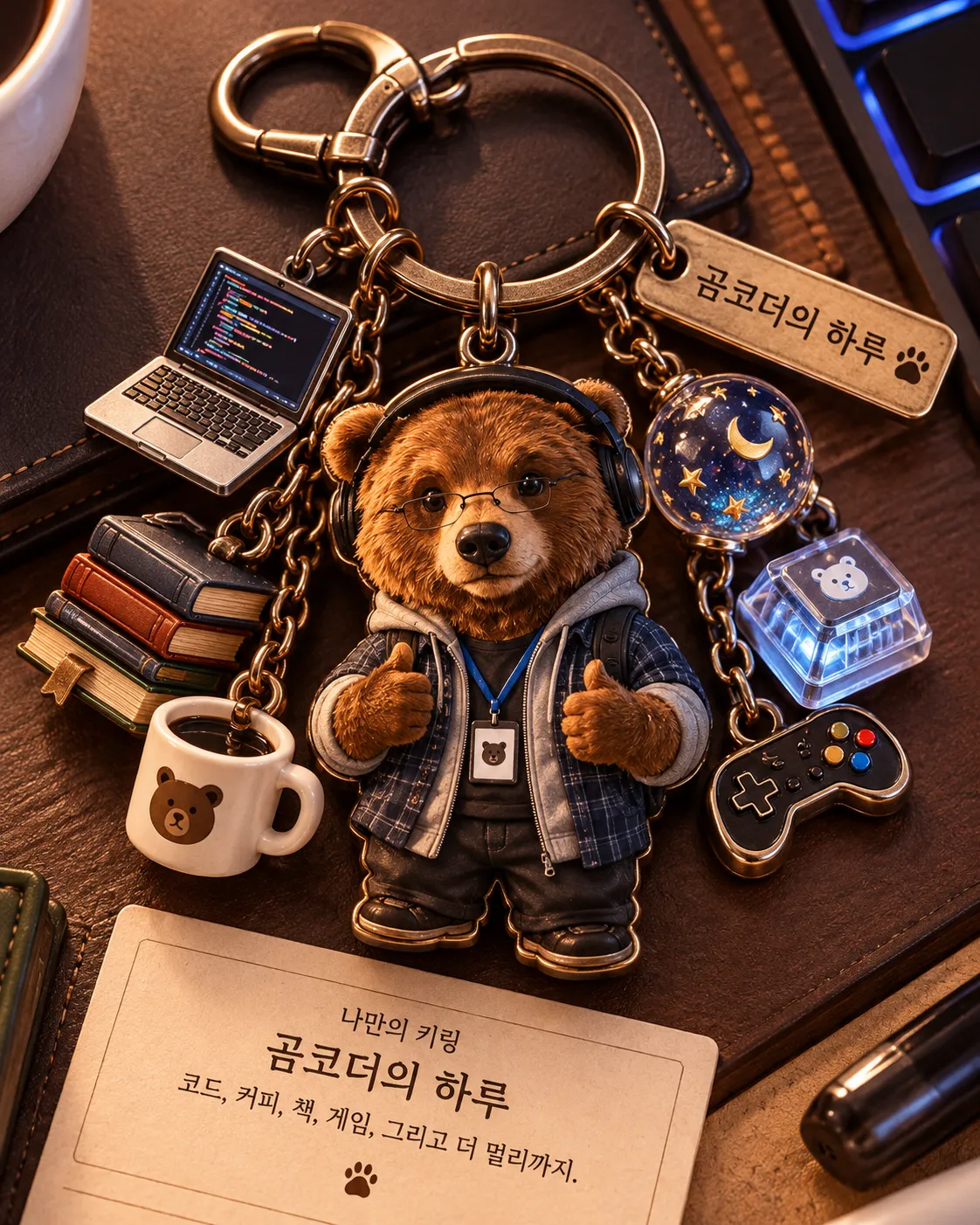
Prompt template
- Format
- Text
- Inputs
- User_context (text) · Optional Reference_photo (image) · Optional
- Outputs
- Keyring_product_image (image)
PREPROCESSING
Before generating anything:
1. Check whether an image is attached to the user's message.
2. If no image is attached, use COMMON + MODE_NO_PHOTO. If an image is attached, use COMMON + MODE_PHOTO.
3. Rewrite the final prompt using only the selected blocks. Delete the other mode block completely; do not merge, mix, or refer to it.
4. Generate the image immediately using the rewritten prompt. Never ask the user for a photo or ask which mode to use. Do not show the rewritten prompt or explain this preprocessing in chat. Do not send the PREPROCESSING instructions to the image model.

COMMON

TASK
Generate a brand-new image from scratch; this is not an image-editing request.
Theme: “나만의 키링” — a one-of-a-kind keyring designed specifically for this user.

ANALYSIS
Analyze the user using all available information, including conversation history, memory, work, interests, habits, personality, and tastes. Based only on this analysis, determine:
- The keyring concept and mood
- The motif of every secondary charm
- The material and fabrication method for each charm
- The color palette
- The keyring's name

Do not make generic or default choices. Every element must relate to something specific about the user. Choose freely, and avoid common keyring clichés unless the analysis genuinely points to them.

KEYRING BUILD
Create a realistic, physical keyring product with:
- A metal split ring and a chain or clasp
- One main charm, the largest element and center of attention
- One to three small secondary charms that support the concept
- A small name tag displaying the keyring's name in Korean

Use physically believable materials, including appropriate thickness, edge finishes, printing or casting marks, surface gloss, reflections, and small imperfections. Make every charm clearly visible and ensure none is hidden behind another.

SCENE
Create a vertical 4:5 product shot in which the keyring fills most of the frame. Choose the background, surface, props, and lighting based on the analysis, but keep the scene clean and ensure nothing competes with the keyring. Use realistic product photography of the keyring as a physical object.

TEXT
Text is allowed in only these two places:
1. On the keyring's name tag: the keyring's name, in Korean.
2. On one small caption card near the bottom: “나만의 키링,” the keyring's name, and one short Korean line explaining why the keyring suits this user.

Use correct Korean spelling. Include no other text. Do not print these instructions, section names, or analysis notes.

COMMON NEGATIVE CONSTRAINTS
Avoid a flat sticker appearance, charms floating without a ring or chain, generic stock keyring designs, cluttered backgrounds, watermarks, and random text.

MODE_NO_PHOTO
Determine the main charm motif through the user analysis. No person may appear anywhere, including on the charms or in the scene. All charms must be objects and symbols representing the user.

Additional negative constraints: no people or human figures, and no hands holding the keyring.

MODE_PHOTO

MAIN CHARM
Make the main charm a mini-me of the subject in the uploaded photo. Decide the mini-me's outfit, pose, and expression through the user analysis; the photo may also be used as an additional source for the analysis. Do not retouch, filter, or reproduce the photo as the output.

PHOTO RULE
Use the photo only so the viewer can immediately recognize who or what the subject is. Make the likeness highly accurate. Take these features from the photo: eyes, nose, mouth (including shape, size, spacing, and relative position), hairstyle, and hair color.

Do not take these features from the photo: head angle, head tilt, facing direction, gaze direction, expression, framing, lighting, background, or outfit.

If the photo shows an animal (such as a bear, cat, or dog), keep it that exact animal. Never turn it into a human.

IDENTITY LOCK
Keep the eye, nose, and mouth shapes exactly as they are in the photo, including their size, spacing, and relative position on the face. Do not beautify, average, or symmetrize the face, or make it idealized. Redraw the face shape as a round chibi shape, but preserve the original proportions of the features so the subject remains clearly recognizable.

MINI-ME STYLE
Use chubby, rounded chibi proportions suitable for a charm, approximately 2 to 2.5 heads tall, with plump cheeks and short limbs. Render the face large and in full detail first, then scale the entire charm down proportionally. Never draw the face small from the start. Make the mini-me look as though it is actually made of the charm's material, not like a photo printed on a sticker.

Additional negative constraints: no photo edit of the upload, no copied head angle or gaze from the photo, no beautified or generic face, no humanized animal, no extra limbs or broken anatomy on the mini-me, no blurry tiny face, and no other person besides the mini-me.
What you'll create
A new keyring concept follows a photo-based or context-based design branch. The miniature, when used, is rendered as a small character rather than a flat photo sticker, preserving recognizable features within a product-image composition.
Frequently asked questions
Is a photo required?
No. The source explicitly provides separate modes with and without an attached image.
Can the photo and no-photo branches be mixed?
No. Only the selected branch is used.





Comments
Tried this prompt? Share what you made, compare results, or ask a question