Me on the Camera’s LCD Screen
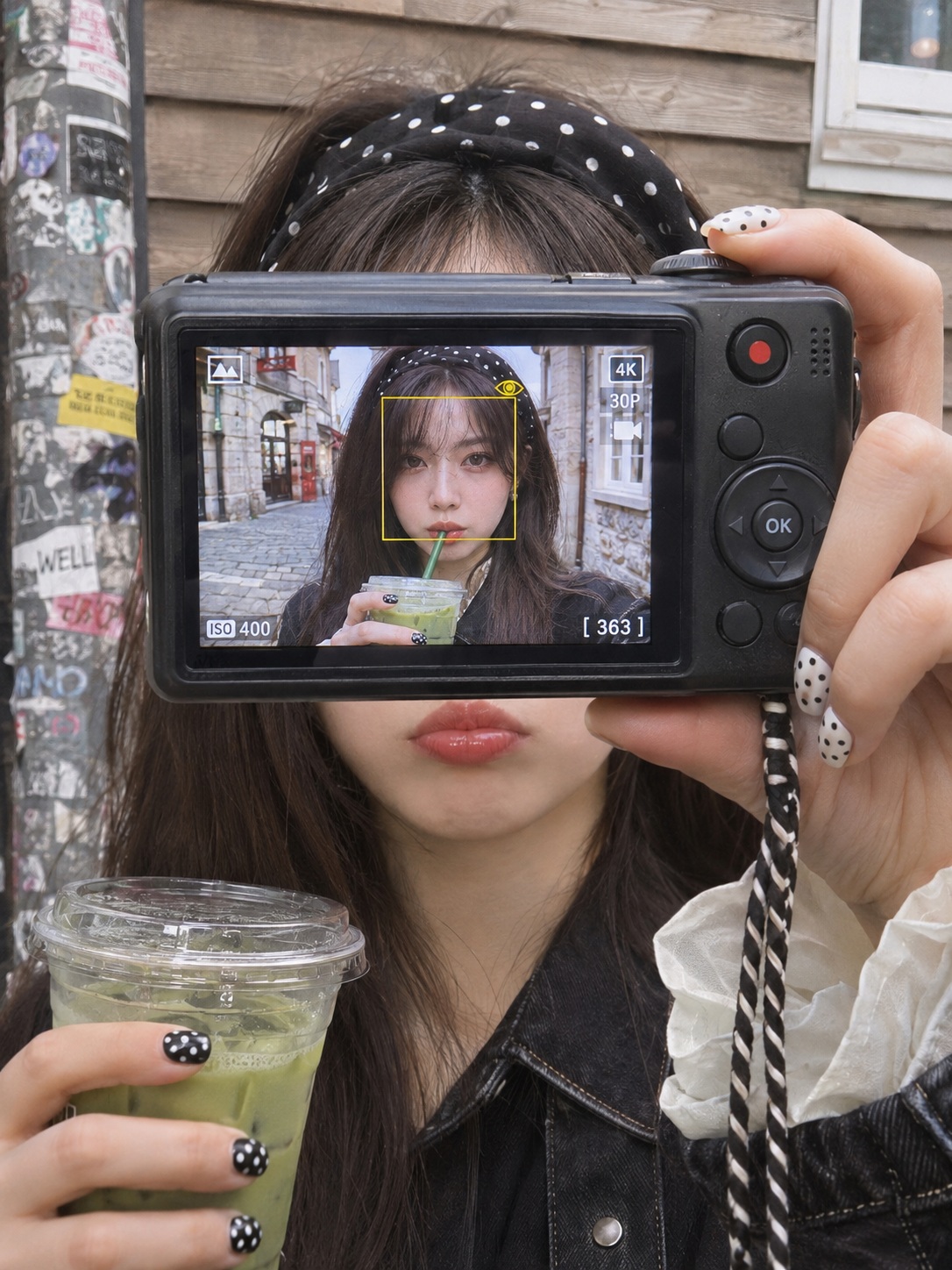
Create a photorealistic street snapshot of a woman holding a compact camera, with a close-up photo of herself displayed on its LCD screen.
Example outputs
Prompt template
- Format
- Markdown
- Inputs
- Reference_photo (image) · Required
- Outputs
- Photorealistic_image (image)
Create a brand-new photorealistic vertical 3:4 smartphone street snapshot. Use the uploaded photo only as a reference for the shape, size, spacing, and relative placement of the eyes, nose, and mouth. Do not edit the uploaded photo.

There is only one person in the scene: the person shown on the camera’s LCD screen and the real person behind the camera are the same person.

## Facial reference rules
Use only these features from the uploaded photo:
- Eyes: horizontal length, distance between the eyes, direction of the outer corners, presence and line of double eyelids, and eyelid thickness.
- Nose: bridge height and width, tip shape, and nostril wing width.
- Mouth: upper-to-lower lip thickness ratio, mouth width, mouth-corner shape, and philtrum length.

Create the face shape fresh, but preserve the eyes, nose, and mouth—including their size, spacing, and relative position on the face—exactly as in the reference. Do not beautify, average, or symmetrize the features. The person should be instantly recognizable as the person in the photo.

Do not take the overall face outline, skin tone or texture, hairstyle or hair color, forehead or hairline, head or face angle, gaze, expression, lighting, background, clothing, or glasses from the reference photo. Do not copy the reference photo’s expression; create the expressions described below. Apply these rules to both the face on the LCD screen and the real lips and chin visible below the camera. The person wears no glasses anywhere in the image.

## Composition
The person holds a compact digital camera in front of her face, with its back LCD screen facing the viewer. Hold the camera slightly farther out toward the shooting lens so that it appears larger. The camera body is horizontally centered, slightly above the vertical center, and fills about 75% of the frame width. The LCD screen is about 47% of the total frame width.

The camera covers the face from just below the forehead to just above the upper lip. The headband and hair peek over the camera’s top edge, and the real lips and chin are visible directly below its bottom edge. Do not cover the lips with the camera. Because the camera is closer to the lens, the hands holding it also appear slightly larger in natural perspective. Keep the person’s body and head size unchanged.

## Person behind the camera
- Hair: long, straight, dark brown hair falling below the shoulders.
- Headband: wide black fabric with white polka dots.
- Outfit: black denim jacket with a black shirt collar; voluminous white ruffled blouse cuffs spill out of the sleeves.
- Lips: red lipstick; mouth closed in a slightly pushed-out, unimpressed pout. The mouth area is slightly softer in focus than the camera.
- Right hand, on the right side of the frame: grips the camera’s right end, with the index finger on top near the shutter, the other fingers wrapping around the right side, and the thumb supporting the bottom. Nails are white with black polka dots.
- Left hand, at the lower left of the frame: holds a clear plastic cup below and to the left of the chin, with fingers wrapped around it. The cup is half filled with a green matcha drink and has a flat clear lid. Nails are black with white polka dots.
- A black-and-white twisted wrist strap hangs from the lower right of the camera to the bottom edge of the frame.

## Camera
Show a dark gunmetal or black compact digital camera. On the back, the LCD screen occupies the left two-thirds and the controls are on the right. Include a red movie-record button at the top right, small speaker holes, a round directional dial with an OK button in the center, and a few small buttons around it. Do not show a brand logo or lettering.

## Photo displayed on the LCD screen
The screen shows a photo of the same person standing in a cobblestone alley in a European old town. The background includes old-building windows, a red shop sign, and an overcast daytime sky.

Frame the person in a close upper-body shot, from the top of the head to the chest. The face is large—about 30% of the LCD screen’s width—and centered slightly toward the top. She wears the same polka-dot headband, has long dark brown hair, and wears a black jacket with white ruffled cuffs. She wears no glasses. She holds the green matcha cup in her right hand and sips through a green straw. Her lips are pushed around the straw in an unimpressed expression. Her eyes are naturally open and look straight into the lens. Her head faces forward and is not tilted.

Keep the eyes, nose, and mouth on the screen clear and sharp enough for instant recognition. Nothing covers the eyes. Add a thin yellow square face-detection box with a small eye icon around the face. Include small white camera UI only along the screen edges: a scene-mode icon at the top left, video-quality icons on the right, "[ 363]" remaining shots at the bottom right, and an ISO indicator at the bottom left. Do not let the UI cover the face. The LCD glows slightly like a real screen and has a very faint reflection.

## Background
Show a beige or grayish-brown horizontal wooden-siding wall, with part of a white window frame at the upper right. On the left, include a vertical pole covered with stickers and graffiti. Keep the background only slightly blurred.

## Lighting and quality
Use soft natural overcast daylight, with no hard shadows and slightly muted colors. Focus precisely on the camera and LCD screen; the real person behind the camera is very slightly soft. Use natural smartphone-photo texture and realistic skin, hands, and plastic. Do not use an illustration or CG look. Do not add a watermark. The only text allowed is the LCD camera UI.
What you'll create
A camera screen sharply presents the reference-informed subject while the real person beyond remains slightly softer. Natural hand, plastic and skin textures support the new vertical street snapshot.
Usage instructions
Provide a reference photo; the prompt uses only the shape and placement of the eyes, nose, and mouth while specifying the rest of the scene independently. The camera size and LCD framing are explicit composition controls, so adjust those proportions if you want the camera or the screen image to occupy more or less of the frame.
Frequently asked questions
Does the screen show a second person?
No; the screen subject and the real person behind the camera are the same individual.


Comments
Tried this prompt? Share what you made, compare results, or ask a question