Photorealistic Snowy Night Selfie
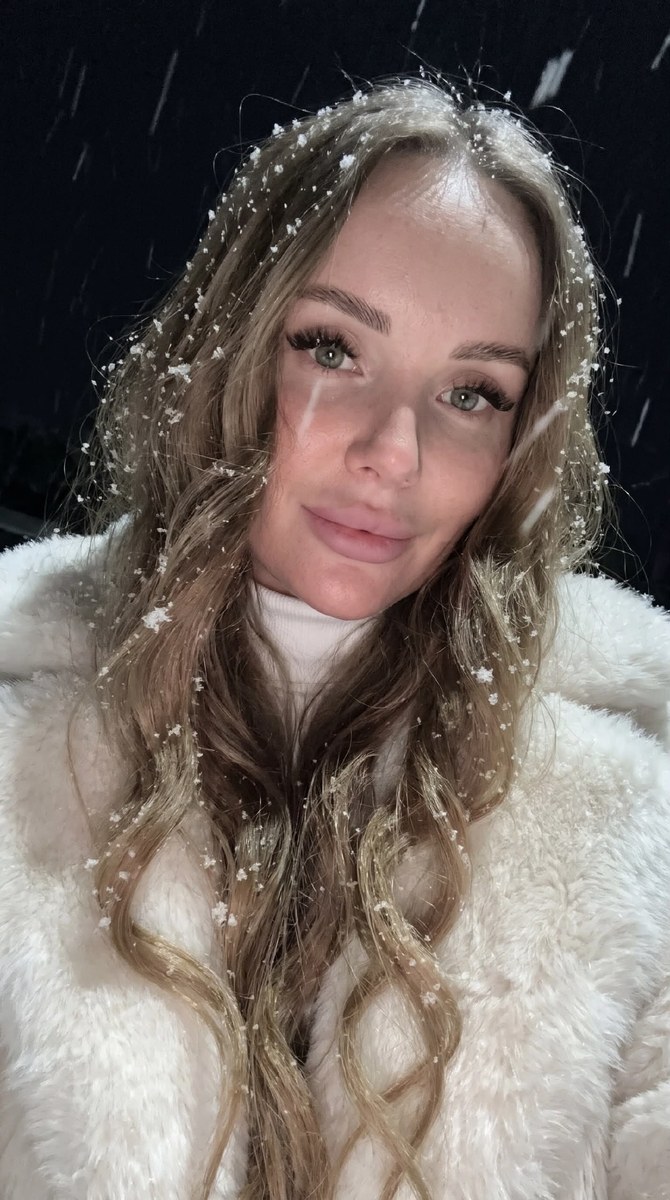
Create a spontaneous, photorealistic close-up selfie of the reference woman in a snowy winter night, preserving her appearance and facial features.
Example outputs
Prompt template
- Format
- Text
- Inputs
- Reference_photo (image) · Required
- Outputs
- Generated_image (image)
Using the uploaded photo as the reference, do not change the subject’s facial features. Strictly preserve the woman’s appearance 1:1, including the shape and proportions of her face, eyes, nose, lips, eyebrows, natural asymmetry, age, and eye and hair color.

Create a highly photorealistic nighttime selfie taken with an iPhone 17 front-facing camera, in a vertical 3:4 format. Use an extreme close-up from a low angle, with no phone visible in the frame. Her face is turned partly sideways; her head tilts slightly toward her shoulder and downward, closer to the camera. She looks directly into the lens with a soft, closed-mouth smile. The frame should feel spontaneous, as though she is taking a selfie during a snowfall. Part of the edge of a snow-white fluffy fur coat enters the frame.

Her very long, thick hair is loose, falling to her waist in soft, voluminous waves and partly covering her face. Loose strands fall across her cheek and near her eyes, with some strands standing out against the dark night. Her makeup is expressive: long lashes with an elongated, fox-like curve; neatly groomed, laminated brows; and matte, soft pale-pink lips with a slight red tint. Tiny snowflakes are visible on her lashes and individual hairs, with a few snow crystals naturally catching the light.

She wears a voluminous milky-white fur coat with a long, fluffy pile over a softly textured white turtleneck. Heavy snow falls in large flakes, crossing in front of the lens and settling on her hair, lashes, and coat. It is a dark winter night, with the background almost entirely lost in darkness. The main light source is the soft, cool glow of a phone screen outside the frame, delicately illuminating her face, eyes, lips, and the snowflakes. Keep natural light transitions on the skin, soft shadows, and realistic skin texture.

Use the look of a live iPhone 17 front-camera photo, with slight digital noise, muted cool tones, low exposure, soft sharpness, natural grain, and a slight blur on moving snowflakes. Render detailed skin, hair, fur, and snow. Create the atmosphere of a cozy winter night and a realistic, candid snapshot, without studio polish, plastic-looking retouching, or an artificial CGI effect.
What you'll create
A reference-guided woman leans her tilted face toward a low camera, with a white fur edge entering the crop. Falling snow and loose hair move through low-exposure cool light.
Usage instructions
Use a clear uploaded portrait as the required appearance reference; the prompt calls for a photorealistic vertical 3:4 night selfie. To make the face less obscured, reduce how much loose hair falls across it while retaining the close-up framing and snowfall.
Frequently asked questions
Should the phone appear in the frame?
No. The front-camera phone remains hidden.
Are moving snowflakes perfectly frozen?
No. Slight blur on moving flakes is part of the candid look.




Comments
Tried this prompt? Share what you made, compare results, or ask a question