Green-and-Yellow Editorial Portrait with Number 22
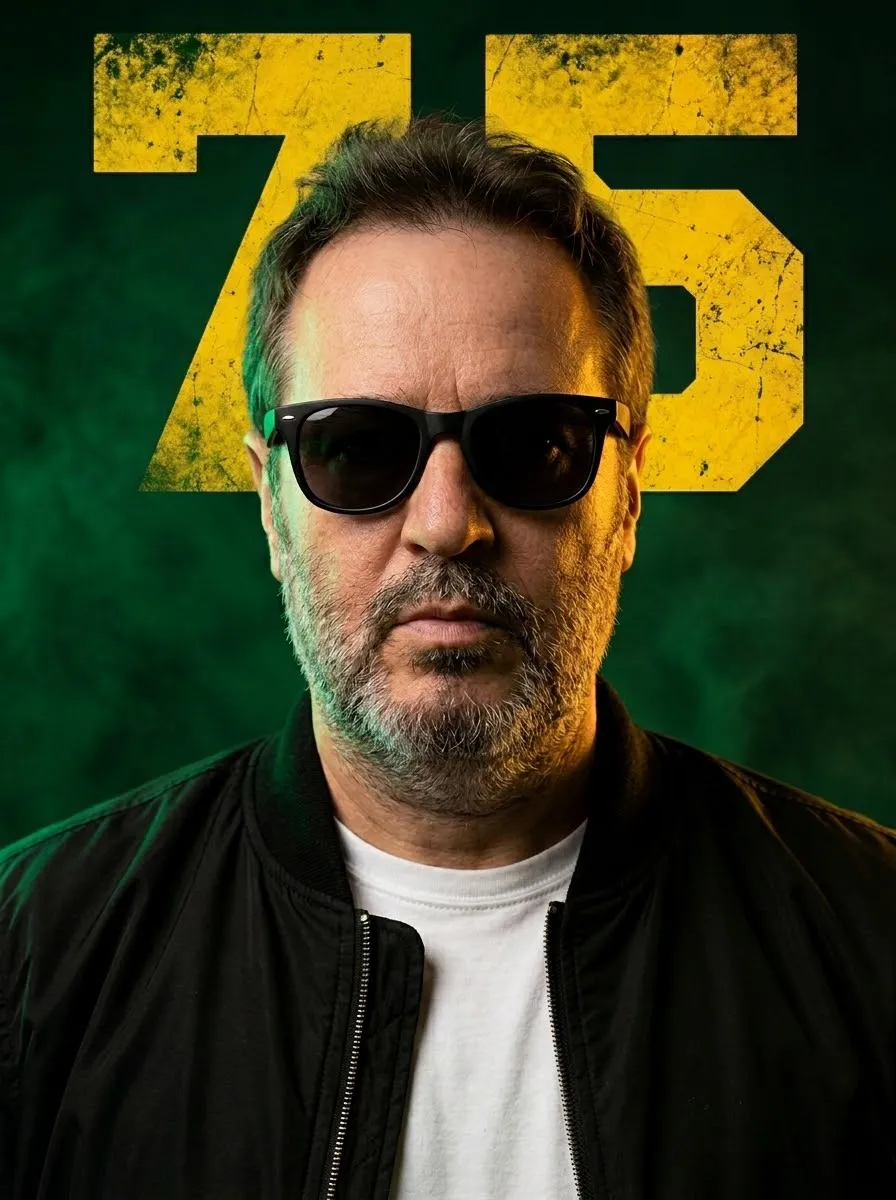
Transform a reference photo into an ultrarealistic editorial portrait, preserving the subject’s identity and original clothing and glasses.
Example outputs
Prompt template
- Format
- Text Parameterized
- Inputs
- reference_photo (image) · Required number (text) · Optional · Default: 22
- Outputs
- editorial_portrait (image)
Transform my photo into an ultrarealistic editorial portrait, preserving my face, skin tone, and personal features. Frame the image from the chest up, keeping the glasses and clothing from the photo. Use a deep green background, with green light on one side and yellow light on the other, plus soft frontal lighting and natural-looking skin. Add a large yellow number ${number:22} behind me, partially obscured by my head and shoulders. Use the look of an 85 mm lens, a centered composition, and high sharpness. Do not alter my identity or add watermarks.Replace the ${…} placeholders with your values
before using this prompt. See parameters
and defaults below
Parameters
Replace each placeholder with your own value, or use its default when one is provided
${number:22}
number
Default: 22
What you'll create
A centered chest-up portrait keeps the subject’s glasses and clothing beneath soft frontal light. Green and yellow side lighting meets a deep green background with a partially obscured yellow number.
Frequently asked questions
Is the background number fixed?
No; the number parameter defaults to 22 and can be changed.



Comments
Tried this prompt? Share what you made, compare results, or ask a question