Photorealistic T-Shirt Design with a Portrait
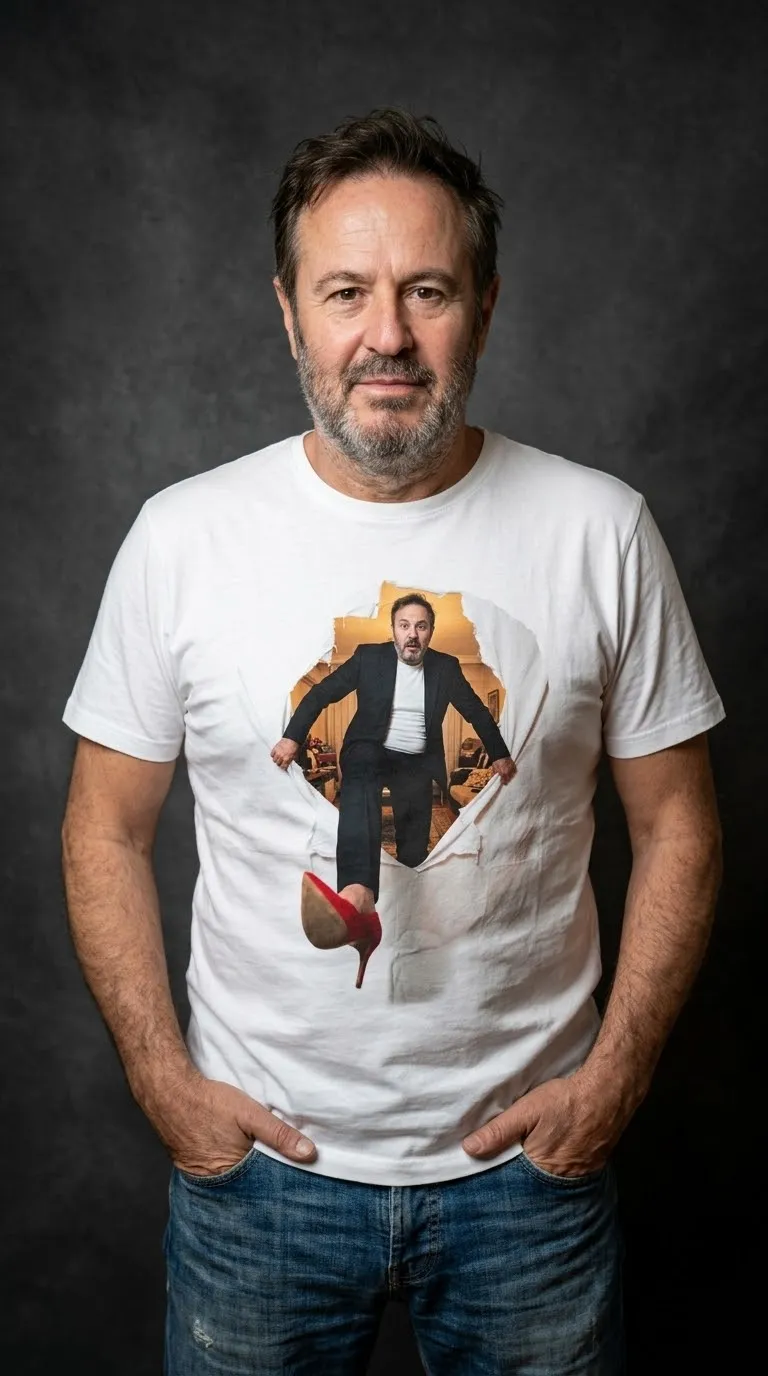
Create a playful, ultra-realistic 3D studio portrait featuring a person’s likeness and a custom graphic printed on a white T-shirt.
Example outputs
Prompt template
- Format
- Text
- Inputs
- First_uploaded_image (image) · Required Second_uploaded_image (image) · Required
- Outputs
- T_shirt_design_portrait (image)
Create a playful 3D studio portrait in ultra-realistic 8K quality, using the face of the person in the first uploaded image (Man taking outdoor selfie). Show him looking directly at the camera, wearing a white T-shirt and blue jeans, with his hands in his pockets, against a dramatic gray studio background. Place the illustration from the second uploaded image (Man stepping through torn white sheet) at the center of the character’s chest, sized to fit the chest area of the white T-shirt. Make the illustration’s outer rectangular background transparent, and adapt the illustration to the folds and shadows of the shirt.What you'll create
A man in a white tee and jeans stands against grey with hands in pockets. The supplied illustration of a man stepping through torn white material sits centered on the chest without its outer rectangle.
Frequently asked questions
What happens to the illustration’s rectangular background?
It becomes transparent.
Does the print follow the fabric?
Yes. It adapts to the shirt’s folds and shadows.




Comments
Tried this prompt? Share what you made, compare results, or ask a question