Cinematic Low-Light Smartphone Selfie
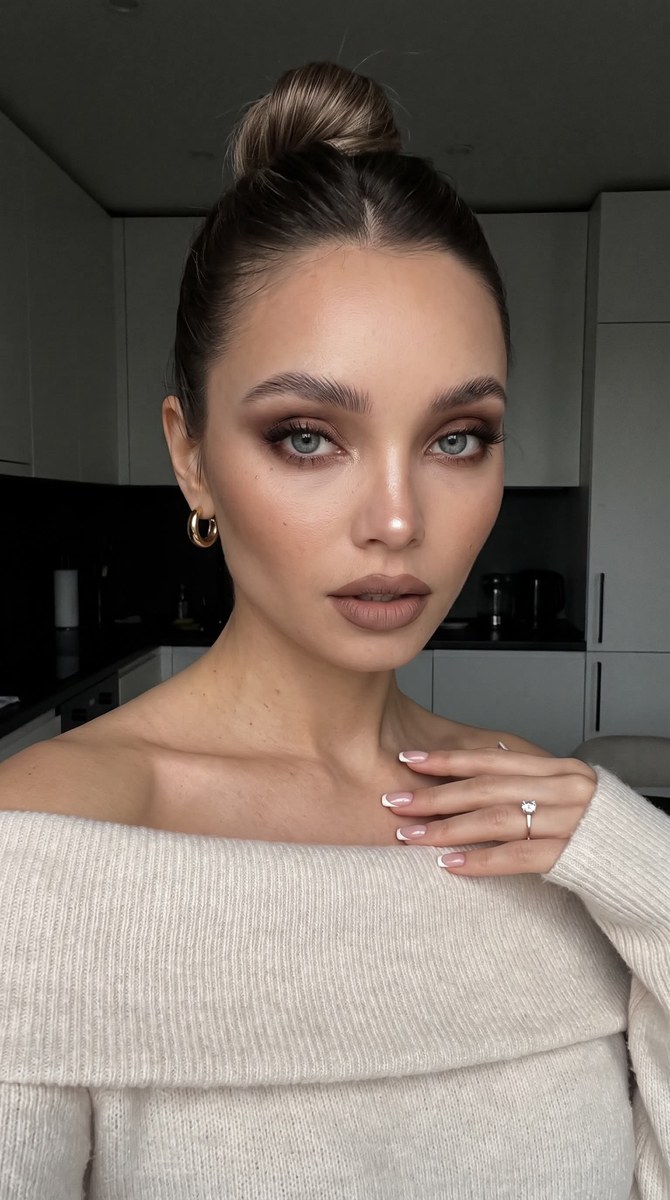
Create a realistic, cinematic front-camera selfie with warm makeup, dramatic shadows, and a subdued kitchen background.
Example outputs
Prompt template
- Format
- Text Parameterized
- Inputs
- Reference_photo (image) · Required Aspect_ratio (text) · Optional · Default: 9:16
- Outputs
- Photographic_selfie (image)
Create a photo without changing the subject’s facial features.

Make it look like a typical front-camera selfie taken with an iPhone 17 Pro. Use an ultra-realistic photographic style with a cinematic grain effect. Avoid plastic-looking skin and heavy smoothing.

Use subdued, overcast light from a window, contrasting with warm makeup and warm, tanned skin. Keep the overall exposure low, with dramatic shadows and the background falling into deep shadow. The face is lit by soft, subdued overcast light while the rest of the scene remains mostly in shadow. In the deep shadow behind the subject, show a glimpse of a modern, light-toned kitchen with black accents.

Makeup: warm chocolate smoky eyeshadow on the upper and lower lids; line the lower waterline with brown pencil and blend brown shadow along the lower lid. Curl and clearly separate the lashes. Keep the brows full and brushed into place with gel. Define the cheekbones with contour, and add a subtle highlight to the tip of the nose and the inner corners of the eyes. Use cool-toned matte brown lipstick with a defined brown lip line.

Hair: a sleek, high bun with a center part.

Clothing and accessories: a soft, delicate, light-cream knit sweater worn off the shoulders, with the neckline folded down and a long sleeve visible. Add small, thick gold hoop earrings and a tiny diamond pendant suspended from a clear thread around the neck.

Pose and expression: the subject gazes intently and sensually into the camera, with lips slightly parted and head tilted slightly to one side. One hand touches the collarbone with the fingertips; show a neat French manicure.

Make the photo look polished and expensive, but not posed. Use a ${aspect-ratio:9:16} aspect ratio.
Replace the ${…} placeholders with your values
before using this prompt. See parameters
and defaults below
Parameters
Replace each placeholder with your own value, or use its default when one is provided
${aspect-ratio:9:16}
aspect-ratio
Default: 9:16
What you'll create
The face emerges from subdued overcast window light while the room remains mostly dark. Warm makeup and tanned skin contrast with a faint modern kitchen visible behind the subject.
Frequently asked questions
Is the background fully black?
A glimpse of a light kitchen with black accents remains within the deep shadow.




Comments
Tried this prompt? Share what you made, compare results, or ask a question