Video
Character Animation
Storyboard
Dance Video
OpenAI GPT Image 2-5
Xai Grok
OpenAI GPT Image 2-5先畫16格舞步表
Turn a Character Reference into a Storyboard Dance Video
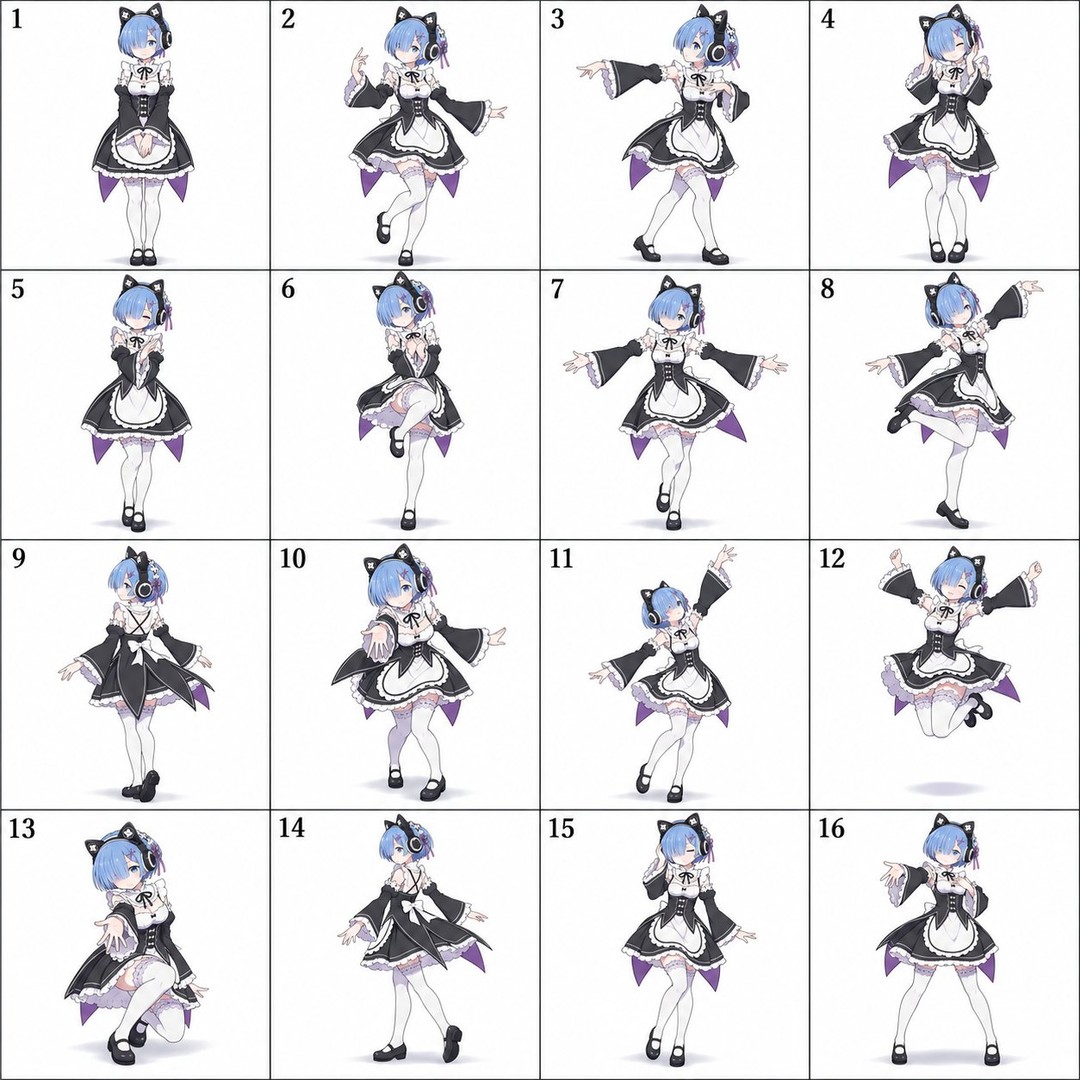
Create a 4×4 dance storyboard from a character reference, then use it to guide a short, continuous 2D dance animation.
Example outputs
Prompt template
- Format
- Text Parameterized
- Inputs
- Character_reference_image (image) · Required Hairstyle (text) · Required Accessories (text) · Required Clothing (text) · Required Storyboard_image (image) · Required Duration (text) · Optional · Default: 8 Action_count (text) · Optional · Default: 16 Seconds_per_action (text) · Optional · Default: 0.5 BPM (text) · Optional · Default: 120
- Outputs
- Dance_storyboard (image) Character_dance_animation (video, audio)
## Stage 1 — Create the dance storyboard
Using the uploaded character reference image, create one square 4×4 dance storyboard with 16 equally sized panels. Preserve the character’s face, hairstyle, colors, body proportions, outfit, accessories, and art style exactly; do not redesign the character. Choose a dance style that suits the character’s personality, such as lively, elegant, cool, cute, or composed. Show one coherent dance sequence with an opening, build, climax, and ending. Arrange the actions from left to right, then top to bottom. Each panel must contain one full-body character in a different pose, viewed from a fixed camera. Use a white background, thin grid lines, and label the upper-left corner of each panel from 1 to 16.

Avoid repeated poses, changes to the face or outfit, inconsistent proportions, extra limbs, cropped bodies, background objects, and other text.

## Stage 2 — Animate the storyboard
Using the generated storyboard image, create an ${duration:8}-second square 2D dance animation with one continuous, full-body shot. Follow the ${action-count:16} storyboard actions in order, changing to the next action every ${seconds-per-action:0.5} seconds and transitioning smoothly between poses. Keep the character’s appearance and outfit locked to the storyboard and reference. Specifically preserve the hairstyle: ${hairstyle}; accessories: ${accessories}; clothing: ${clothing}.

Use a fixed eye-level camera, a white floor, and a faint shadow. Set the rhythm to ${bpm:120} BPM and use instrumental music only. Do not cut, add other people, or show storyboard grid lines or labels.
Replace the ${…} placeholders with your values
before using this prompt. See parameters
and defaults below
Parameters
Replace each placeholder with your own value, or use its default when one is provided
${duration:8}
duration
Default: 8
${action-count:16}
action-count
Default: 16
${seconds-per-action:0.5}
seconds-per-action
Default: 0.5
${hairstyle}
hairstyle
Required
${accessories}
accessories
Required
${clothing}
clothing
Required
${bpm:120}
bpm
Default: 120
What you'll create
A reference character moves through one coherent dance sequence across a four-by-four grid, with full-body poses and numbered panels.
Frequently asked questions
Can character styling change between panels?
No, face, hairstyle, outfit, proportions, accessories and art style stay consistent.





Comments
Tried this prompt? Share what you made, compare results, or ask a question