Autumn Leaves Four-Panel Portrait Collage
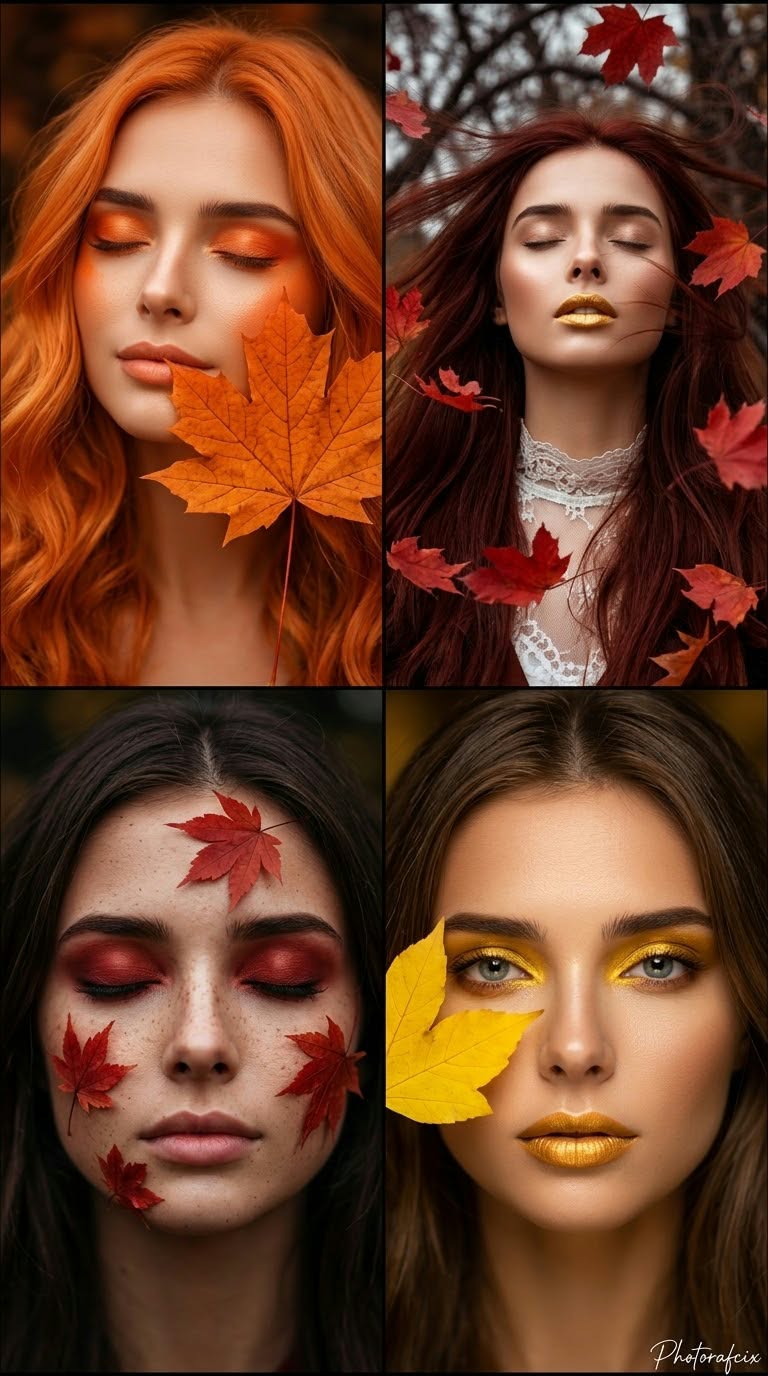
Create a cinematic, ultra-realistic digital illustration collage of four close-up portraits, with autumn leaves and hair as its central theme.
Example outputs
Prompt template
- Format
- Text Parameterized
- Inputs
- Reference_image (image) · Required Aspect_ratio (text) · Optional · Default: 9:16 Signature (text) · Optional · Default: Photorafcix
- Outputs
- Four_panel_portrait_collage (image)
Use the face from the reference image without changing it. Create an artistic digital illustration collage of four close-up portraits themed around autumn leaves and hair, with a feminine, elegant, sensual expression. Use a strong perspective, cinematic treatment, ultra-realistic 8K RAW quality, HDR, vivid colors, and a vertical ${aspect-ratio:9:16} composition.

The composition consists of four different portraits:
1. Top left: Vivid orange, wavy hair and a peaceful expression with closed eyes. A large maple leaf covers part of her face. Use orange makeup.
2. Top right: Long, windblown reddish-brown hair, closed eyes, and her head tilted slightly back. Red leaves swirl around her. Add gold-colored lips and a white lace collar detail.
3. Bottom left: Dark brown hair and closed eyes. Cover her eyelids with red eyeshadow and place red maple leaves on her face. Her skin is freckled.
4. Bottom right: Brown hair, open eyes looking at the camera, and golden-yellow eyeshadow. A yellow leaf covers part of her face; add gold-colored lips.

Lighting and shadows: Use soft, diffused studio lighting. Give the skin a smooth, glossy, luminous glow.

Background: Use dark, blurred backgrounds with an outdoor bokeh feel.

Color palette: Vivid orange, red, golden yellow, and dark brown tones.

Lens and depth of field: Use a very shallow depth of field. Keep the face sharply focused and the background completely blurred.

Texture and technical quality: Render ultra-realistic skin texture, glossy, silky strands of hair, and clearly visible leaf veins. Aim for a high-resolution, smooth, artistic finish. Add the handwritten signature "${signature:Photorafcix}" in the bottom-right corner.

Randomize the reference image's movements, poses, camera angles, and artistic effects each time.
Replace the ${…} placeholders with your values
before using this prompt. See parameters
and defaults below
Parameters
Replace each placeholder with your own value, or use its default when one is provided
${aspect-ratio:9:16}
aspect-ratio
Default: 9:16
${signature:Photorafcix}
signature
Default: Photorafcix
What you'll create
Orange and reddish hair, closed eyes and leaves close to the face connect four artistic portrait panels. Detailed leaf veins, silky hair and cinematic contrast create the seasonal digital-illustration finish.
Usage instructions
Frequently asked questions
Are the panel directions completely fixed?
Specific portraits are described alongside a request to randomize poses, angles and effects.
Can the canvas shape be changed?
The aspect ratio is a supplied parameter with a vertical default.





Comments
Tried this prompt? Share what you made, compare results, or ask a question