Cinematic Runway Portrait in an Oversized Tracksuit
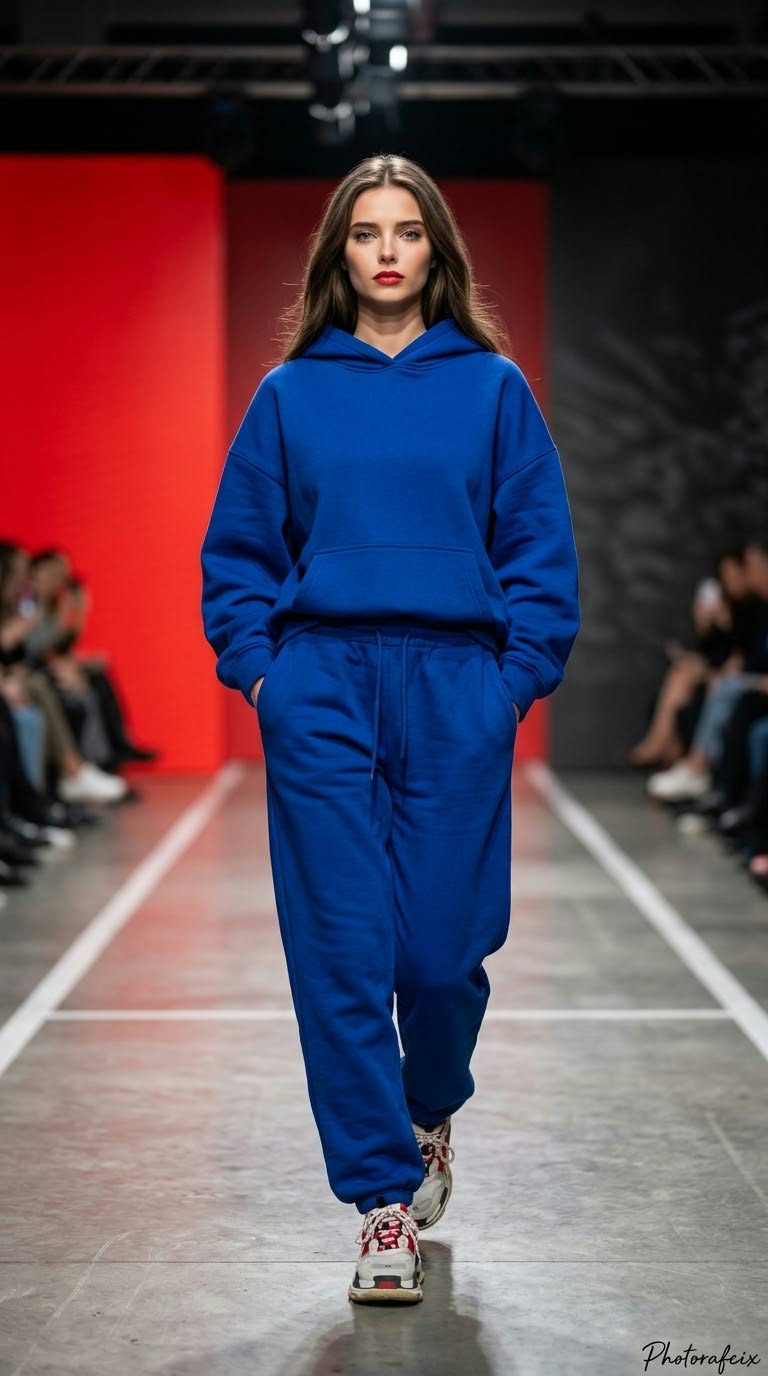
Create a full-length, photorealistic runway fashion portrait using a supplied face reference, with a bold red-and-black show setting and an oversized hoodie and matching sweatpants.
Example outputs
Prompt template
- Format
- Text Parameterized
- Inputs
- Reference_face_image (image) · Required Signature (text) · Optional · Default: Photorafcix
- Outputs
- Runway_fashion_photograph (image)
Use the face from the supplied reference image and do not alter it. Create a powerful-perspective, cinematic, ultra-realistic 8K RAW, HDR fashion photograph in a vertical 9:16 format, with vivid colors.

Subject and pose: An elegant woman walking on a fashion runway, styled with bold colors. She looks directly at the camera with a serious, expressionless, intensely focused model gaze. Her lips are slightly parted and wear red lipstick. She walks toward the camera with her shoulders straight, both hands in her pants pockets, and her legs mid-stride. Show her full body, including her shoes, with the subject centered. Her walk is feminine, confident, and powerful.

Outfit: An oversized hoodie sweatshirt in a color chosen randomly by the AI, paired with loose-fitting jogger sweatpants in the same color, with a drawstring waist. She wears red-and-white lace-up sneakers with white soles.

Lighting and shadows: Use soft but distinct studio/runway lighting. Add subtle highlights to the face and clothing, with a light gradient that darkens toward the background.

Background: A fashion runway, softly blurred with bokeh. Place a vivid red panel or wall on the left, and a dark gray/black area with floor lines on the right.

Color palette: Use a bold, monochromatic palette of fiery red, black, white, and skin tones.

Lens and depth of field: Use shallow depth of field with bokeh. Keep the model sharply in focus and the background softly blurred. Create the effect of an 85mm or 135mm runway lens.

Texture and technical quality: Make the image ultra-realistic. Show the thick cotton texture and wrinkles of the sweatshirt and individual strands of hair in crisp detail. Aim for high-resolution, professional fashion-photography quality. Add the handwritten signature "${signature:Photorafcix}" in the extreme bottom-right corner.

Each time, let the AI determine the clothing colors, movements, poses, camera angles, and artistic effects with completely original, unrestricted creativity.
Replace the ${…} placeholders with your values
before using this prompt. See parameters
and defaults below
Parameters
Replace each placeholder with your own value, or use its default when one is provided
${signature:Photorafcix}
signature
Default: Photorafcix
What you'll create
A reference-guided woman advances toward the camera with hands in pockets, red lips and an intensely focused gaze. Loose hoodie fabric and matching joggers move against a red-dark runway background.
Usage instructions
Provide the reference image that supplies the face; the signature has a default value that you can change. The outfit color is intentionally left to the model, while the prompt specifies the runway styling and red-and-dark background. For a different signature, replace its default without changing the requested placement.
Frequently asked questions
Is the outfit color predetermined?
No. It is left to random choice.
Can the shoes be cropped?
No. The full body and shoes remain visible.



Comments
Tried this prompt? Share what you made, compare results, or ask a question