Cinematic Street-Fashion Portrait on a Crosswalk
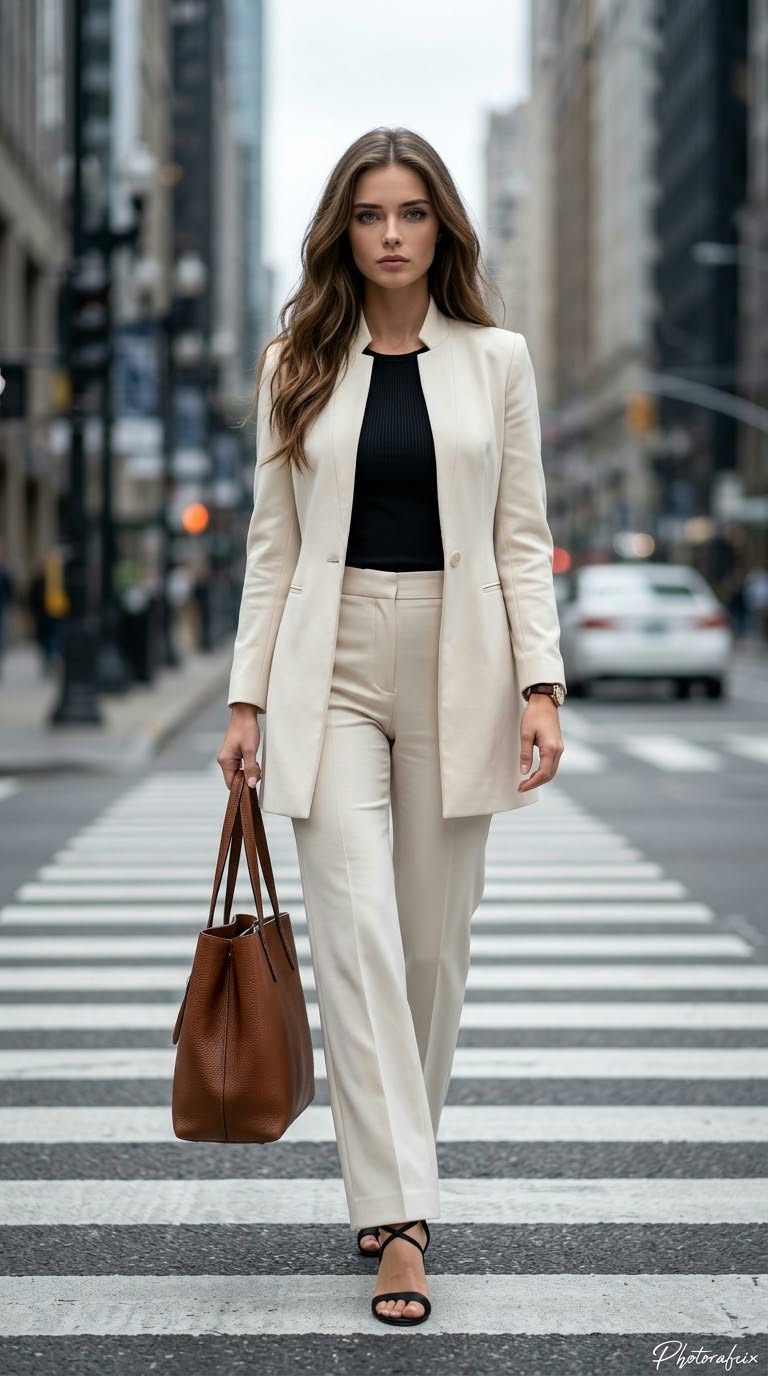
Create a full-length street-fashion photograph of a woman walking toward the camera on a city crosswalk. Use a reference image to preserve her face; the handwritten signature text can be customized.
Example outputs
Prompt template
- Format
- Text Parameterized
- Inputs
- Reference_image (image) · Required signature (text) · Optional · Default: Photorafcix
- Outputs
- Street_fashion_photograph (image)
Use the face from the provided reference image and do not change it. Use a strong perspective, cinematic styling, ultra-realistic 8K RAW quality, HDR, vivid colors, and a vertical 9:16 composition.

Subject and scene: Create a stylish, powerful street-fashion photograph of an elegant woman walking across a city street at a pedestrian crossing. She looks directly at the camera with a serious, authoritative, confident expression and closed lips, walking toward the camera with determined steps. She carries a large brown handbag with leather handles in her right hand. Her left arm hangs naturally at her side. Show her full length, including her shoes, and place her exactly in the center of the frame. Her posture is feminine, strong, and authoritative.

Outfit: She wears a long, single-button cream/beige blazer with a notched lapel, paired with matching high-waisted, wide-leg classic trousers. Under the blazer is a fitted black bustier or tank top. She wears black high heels with thin straps and open toes, and carries a large brown leather handbag. Add a watch on her left wrist.

Lighting and shadows: Use soft, slightly gray daylight on an overcast day. Avoid harsh shadows on her face; keep the clothing’s creases and lines distinct.

Background: Set the scene on a city street at a pedestrian crossing. Blur the background with bokeh, while keeping buildings, streetlights, traffic lights, and a white car in the distance discernible.

Color palette: Use a cool, pale, desaturated palette of cream/beige, black, brown, and gray-blue.

Lens and depth of field: Create the effect of a 50 mm or 85 mm lens, with moderate depth of field and bokeh. Keep the woman and her clothing sharp, with the urban background softly blurred.

Texture and image quality: Make the image ultra-realistic, with clearly visible fabric, leather, individual hair strands, and skin texture. Aim for high-resolution, cinematic, professional fashion-photography quality. Add the handwritten signature "${signature:Photorafcix}" in the lower-right corner.

Randomize the reference image’s movements, poses, camera angles, and artistic effects each time.
Replace the ${…} placeholders with your values
before using this prompt. See parameters
and defaults below
Parameters
Replace each placeholder with your own value, or use its default when one is provided
${signature:Photorafcix}
signature
Default: Photorafcix
What you'll create
Create a full-length, cinematic street-fashion photograph of a woman walking toward the camera on a city crosswalk. She wears a cream-and-beige tailored suit and carries a large brown leather handbag, against a softly blurred urban background in overcast light.
Usage instructions
Frequently asked questions
Can I change the signature?
Yes. Replace the default text in ${signature:Photorafcix}; the prompt places it as a handwritten signature in the lower-right corner.
How should the color direction be handled?
The prompt requests both vivid colors and a cool, pale, desaturated palette. These directions may compete, so the resulting balance is not fully specified.



Comments
Tried this prompt? Share what you made, compare results, or ask a question