Backstage Studio Double-Frame Portrait
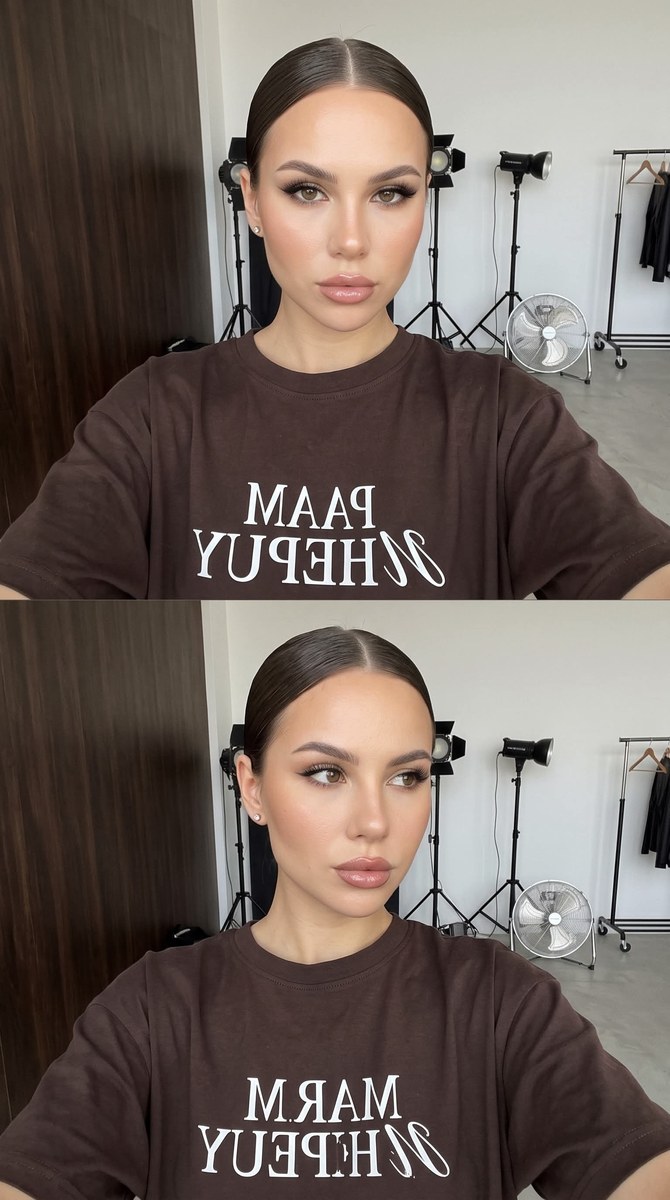
Create a candid backstage studio portrait using a reference photo to preserve the subject’s likeness. Customize the T-shirt color while keeping the stacked-frame composition, studio setting, and other specified details
Example outputs
Prompt template
- Format
- Text Parameterized
- Inputs
- Reference_photo (image) · Required shirt_color (text) · Optional · Default: dark brown or chocolate
- Outputs
- Portrait (image)
Use the provided reference photo for the subject. Preserve the face and likeness exactly; do not change facial identity.

Create a candid, unretouched backstage portrait between photo-shoot takes, as if captured in a photo studio with a high-angle selfie perspective. Show a woman in three-quarter view, her face turned slightly to the right. Her hair is smoothly combed back into a precise, strict sleek style with a center part and no loose strands. Give her eyeliner or winged liner, eyelash extensions, emphasized eyes, glossy lips, and stud earrings.

She wears an oversized ${shirt-color:dark brown or chocolate} T-shirt with a white chest print reading «МАР НЕРUY», mirrored and reversed, in a streetwear or brand-merch style. Use large mixed serif and italic lettering.

Frame the image vertically as a chest-up portrait showing the head, neck, and upper torso. Behind her, show a working photo or production studio: a dark walnut-colored wooden or plywood partition on the left, and a white wall on the right with professional lighting equipment. Include a studio light on a tall stand with a round spherical diffuser, an industrial floor fan on a metal stand nearby, and a clothing rail on wheels in the background. Keep the setting utilitarian, like a commercial or fashion-content shoot backstage.

Present the image as two identical frames joined vertically with no divider, creating an intentional visual repeat. Keep the content and camera angle the same in both frames; the only difference is the gaze: in the upper frame, she looks at the camera, and in the lower frame, she looks away.

Use diffused daylight and neutral white balance. Keep the background in focus and readable, without blur. Use a 9:16 vertical aspect ratio.
Replace the ${…} placeholders with your values
before using this prompt. See parameters
and defaults below
Parameters
Replace each placeholder with your own value, or use its default when one is provided
${shirt-color:dark brown or chocolate}
shirt-color
Default: dark brown or chocolate
What you'll create
This prompt creates a candid, chest-up studio portrait arranged as two identical-looking frames stacked vertically, with the subject’s gaze changing between them. It specifies a sleek hairstyle, a printed oversized T-shirt, and an unblurred commercial-shoot backdrop with studio equipment
Usage instructions
Frequently asked questions
What should differ between the two frames?
Keep the framing and scene the same; the upper portrait looks at the camera, while the lower portrait looks away
Can I change the T-shirt color?
Yes. The prompt allows a dark-brown or chocolate shirt; keep the white mirrored chest print as specified
What does the reference photo control?
The prompt asks to preserve the reference person’s face and likeness


Comments
Tried this prompt? Share what you made, compare results, or ask a question