Photorealistic Birthday Portrait with a Childhood Photo Banner
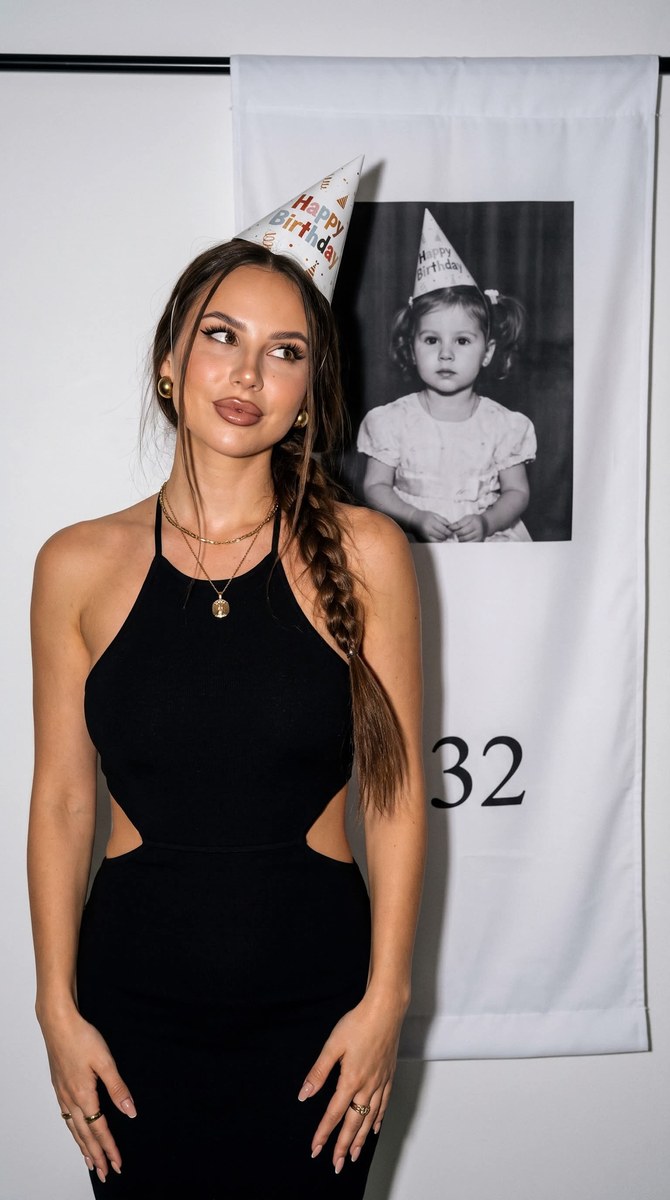
Create a detailed birthday portrait based on a reference photo, featuring a white banner with a childhood photo and age number. Customize the displayed age while keeping the requested portrait styling and composition
Example outputs
Prompt template
- Format
- Text Parameterized
- Inputs
- Reference_photo (image) · Required age (text) · Optional · Default: 32
- Outputs
- Birthday_portrait (image)
Create a photorealistic birthday portrait using the supplied reference photo.

Face: Use the face from the reference photo. Preserve the exact facial features (face shape, eyes, eyebrows, nose, lips, and cheekbones), expression, and overall likeness. Do not change the person’s facial identity. Keep the hair color and length exactly as in the reference. The gaze is directed to the side, with a playful, slightly pensive or shy half-smile.

Skin: Render expensive-looking, ultra-realistic skin with visible pores, soft peach fuzz, realistic texture, subtle tonal transitions, subsurface light scattering, and natural asymmetry. The skin should look healthy and professionally cared for, as if after premium cosmetic treatments. Give it a warm golden undertone, realistic depth, and a soft satin glow from diffused studio light. Avoid excessive smoothing, a plastic texture, CGI perfection, or beauty-filter effects. The skin is slightly tanned.

Hair: Long, thick, slightly wavy, glossy hair with natural texture. Wear it loose, with an elegant French or Dutch braid along one side falling over the shoulder for a stylish, romantic look. Also make the long, loose hair voluminous and perfectly straight; it must not look like a wig.

Makeup: Use sharp black winged eyeliner and long black lash extensions with a spiky, lash-ray effect. Give the lips a defined outline that is slightly darker than the center, with glossy lipstick or lip gloss for a wet-lip effect and an overlined shape. The lips are full. The gaze is alluring and directed straight at the camera.

Clothing: A stylish, fitted black halter dress with a high stand collar and bare shoulders, with a deep cutout at the sides or waist. Use substantial matte fabric that emphasizes the figure.

Jewelry and accessories: Add large, layered statement details. The main accent is a white paper party hat with a print. Add elegant gold stud earrings, a fine gold necklace with a pendant and a second layer for a layered effect, elegant gold rings, and a perfect nude manicure.

Pose and action: The woman stands in a playful, relaxed pose in front of a vertical banner. Tilt her head slightly to one side; direct her gaze upward and away from the camera. Her expression is calm, slightly playful, and pensive. Let one arm hang casually at her side.

Setting: A festive photo area with a large white vertical fabric banner in the background. The banner displays a black-and-white childhood photo of a little girl wearing a pink party hat, with an expression exactly matching the adult woman’s, and a large number ${age:32} visible at the bottom.

Lighting: Use bright, diffused studio lighting with a festive flash effect. Light the scene evenly, creating distinct but soft shadows and emphasizing the contrast between the black dress and the banner’s white background.

Technique: Sony A7 III, 85mm f/1.8, studio lighting, crisp detail, cinematic style, subtle grain, RAW photo, and high detail. Do not blur the background: keep the banner’s contours, the childhood photo, and the drapery folds visible and sharp.

Angle: Front view, with a slight turn of the head to one side. Position the camera directly in front of the subject at eye level.

Framing: Medium shot from the hips to the top of the head, showing the figure, the banner with the photo behind her, and all layers of jewelry.

Aspect ratio: 3:4. Photorealistic, highly detailed, very high quality. Use an iPhone 16 Pro look with a Live Photo feel, light digital noise and grain, soft sharpness, front-camera flash, and soft shadows
Replace the ${…} placeholders with your values
before using this prompt. See parameters
and defaults below
Parameters
Replace each placeholder with your own value, or use its default when one is provided
${age:32}
age
Default: 32
What you'll create
This prompt asks for a photorealistic birthday portrait of a woman in a fitted black halter dress, with layered gold jewelry and a party hat. A white banner behind her displays a black-and-white childhood photo and a large age number, with bright studio lighting and a sharp, detailed background
Generation settings
Usage instructions
Frequently asked questions
Can I change the age shown on the banner?
Yes. Change the age parameter to the number you want displayed
What should the reference photo control?
Use it to guide the adult subject’s facial features, identity, hair color, and hair length


Comments
Tried this prompt? Share what you made, compare results, or ask a question