Winter Portrait with Golden Lights
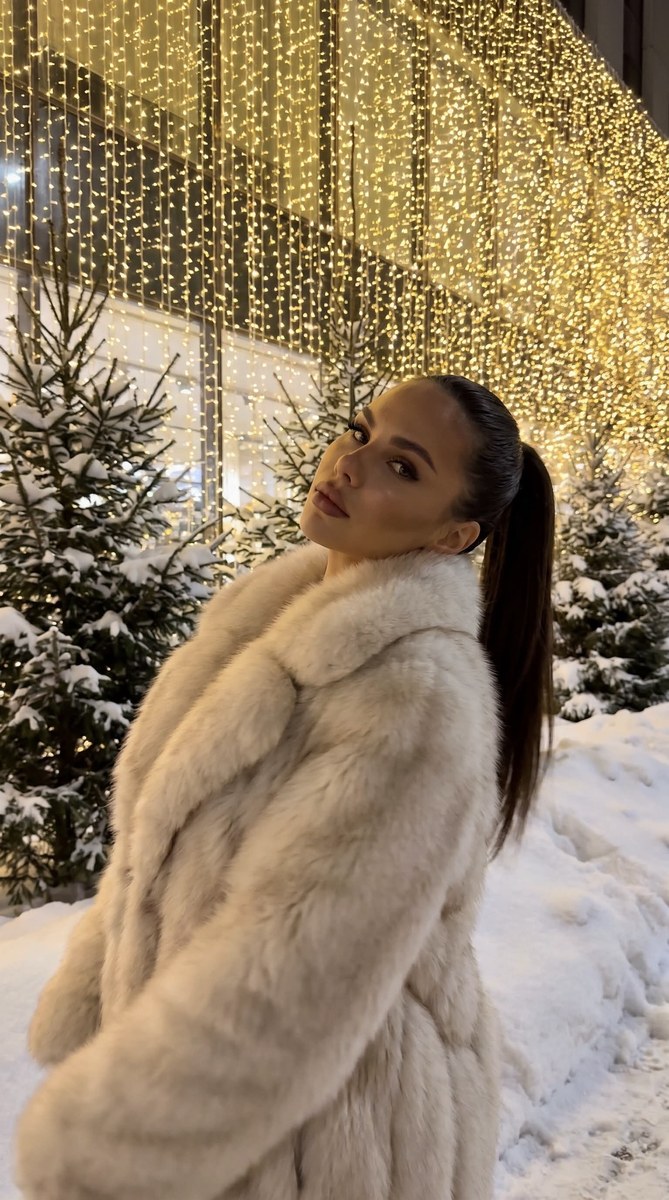
Create a realistic, waist-up winter portrait using a reference photo to preserve the person’s facial features. Customize the lip and coat colors while keeping the low-angle composition, snowy setting, and sharply visible golden lights
Example outputs
Prompt template
- Format
- Text Parameterized
- Inputs
- Reference_photo (image) · Required lip_color (text) · Optional · Default: dusty rose coat_color (text) · Optional · Default: milk-white
- Outputs
- Portrait (image)
Create a portrait using the supplied reference photo, preserving the person’s facial features.

Hair: styled in a sleek ponytail. Makeup: flawless, with ${lip-color:dusty rose} lips and a light tan.

Create a realistic photo as if taken with an iPhone camera; do not show a phone in the frame. Use a medium, waist-up shot from a slightly low angle. Place the person near the center and in the foreground. The photo should convey movement, and its image quality should resemble that of an iPhone 17.

Pose: show the person in semi-profile, turned sideways to the camera, with their head tilted slightly back.

Clothing: a voluminous, natural coat made of fluffy fox fur in ${coat-color:milk-white}, with a wide, soft collar.

Background: a winter outdoor setting with lush young fir trees covered in real snow and snowdrifts. A light-colored glass building facade is completely decorated with a dense curtain of golden lights, creating a solid, glowing background. Keep the background clearly visible and in focus, without blur.

Light the scene primarily with the many garland lights and illumination from below. Use muted colors and reduced exposure.
Replace the ${…} placeholders with your values
before using this prompt. See parameters
and defaults below
Parameters
Replace each placeholder with your own value, or use its default when one is provided
${lip-color:dusty rose}
lip-color
Default: dusty rose
${coat-color:milk-white}
coat-color
Default: milk-white
What you'll create
This prompt creates a realistic, waist-up portrait of a person in a fluffy fox-fur coat, posed in semi-profile against a snowy outdoor setting. Golden curtain lights illuminate the sharply focused background, while muted colors and low exposure shape the scene
Usage instructions
Frequently asked questions
Can I change the lipstick or coat color?
Yes. Change the lip_color or coat_color values while keeping the original dusty-rose lipstick and milk-white coat as defaults
Should the golden-light background be blurred?
No. The prompt specifically asks for the background to remain clearly visible without blur


Comments
Tried this prompt? Share what you made, compare results, or ask a question