Three-Frame Smartphone Selfie Collage
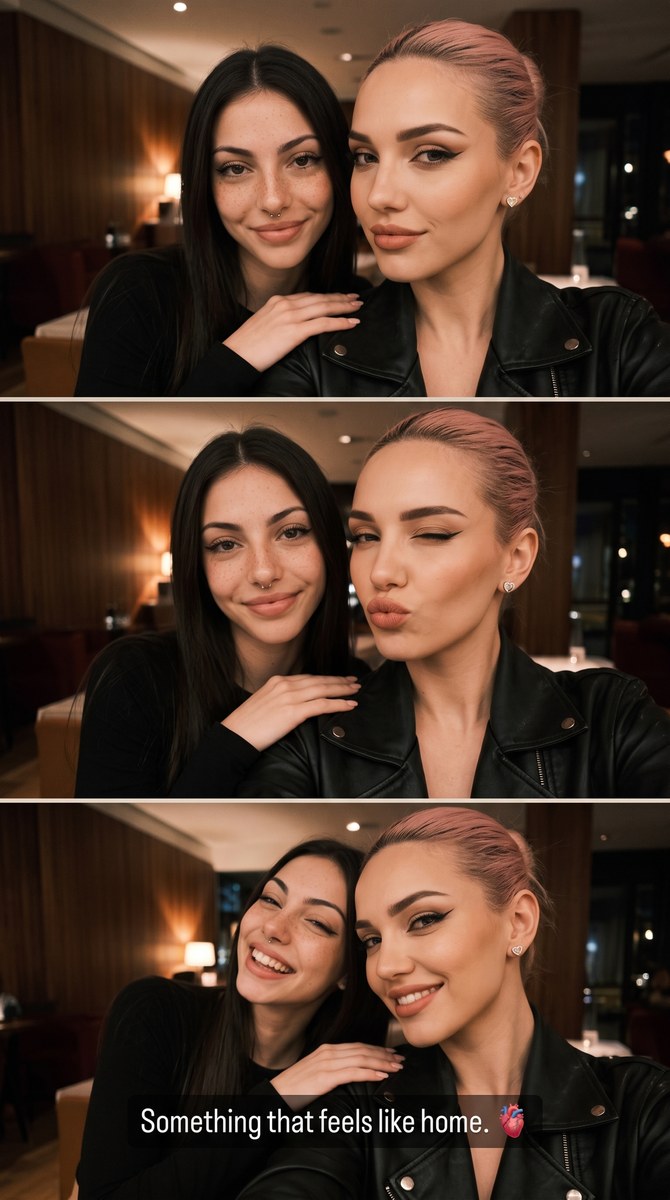
Create a vertical, realistic smartphone selfie collage of two friends in a warmly lit, dim venue, with three distinct expressions and a custom pop-up message.
Example outputs
Prompt template
- Format
- Text Parameterized
- Inputs
- Reference_photo (image) · Required Overlay_text (text) · Optional · Default: Something that feels like home. 🫀”
- Outputs
- Generated_image (image)
Using the uploaded photo as a reference, create a new image while keeping the referenced girl’s appearance—including her hair color and length—exactly the same.

Create a vertical smartphone-screen layout with three stacked selfie frames featuring two girls: the referenced person and her friend. The referenced person appears in the foreground on the right in every frame, wearing a black leather jacket. Her hair is slicked back into a high bun or ponytail. She wears small heart-shaped stud earrings and bold graphic winged eyeliner with a nude lip.

In the first frame, she looks toward the camera with a subtle, partial smile. In the second, she winks with one eye and pouts her lips. In the third, she smiles while leaning toward her friend. Her friend is on the left, wearing a black long-sleeve top, with straight, center-parted hair. The friend has one hand on the referenced person’s shoulder and smiles at the camera.

Set the scene in a warm, dimly lit interior, such as a restaurant or cinema, with wood-paneled walls and soft ambient lighting. Use faint, diffused evening light, natural shadows, and subtle grain to evoke a casual, spontaneous smartphone selfie collage.

Make the image look as if it were captured on an iPhone 15 Pro, with realistic iPhone 15 color reproduction, slight motion blur, natural lighting, and a cinematic, high-quality feel grounded in a real-life setting.

Add this pop-up text overlay at the bottom, reproducing it exactly: “${overlay-text:Something that feels like home. 🫀”}

Aspect ratio: 9:16.
Replace the ${…} placeholders with your values
before using this prompt. See parameters
and defaults below
Parameters
Replace each placeholder with your own value, or use its default when one is provided
${overlay-text:Something that feels like home. 🫀”}
overlay-text
Default: Something that feels like home. 🫀”
What you'll create
The reference person remains on the right in a leather jacket through a half-smile, wink and leaning smile. A friend at left rests a hand on the shoulder in a dim warm interior.
Generation settings
Aspect ratio: 9:16
Frequently asked questions
Does the reference person switch sides?
No. They stay foreground-right in every frame.
What default overlay text is requested?
Something that feels like home. 🫀







Comments
Tried this prompt? Share what you made, compare results, or ask a question