Black-and-White Motion-Blur Studio Portrait
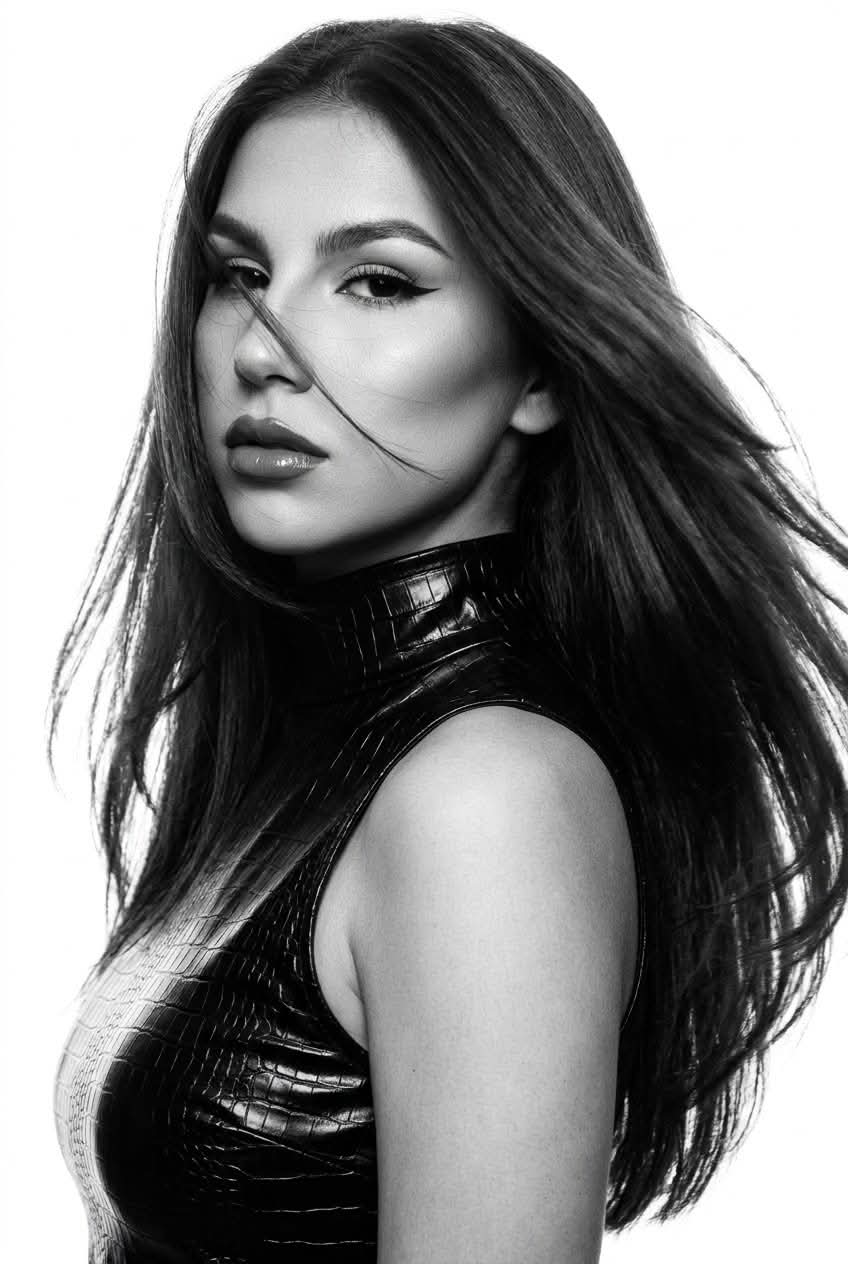
Create a high-resolution black-and-white studio portrait from a reference photo, preserving the subject’s facial features while contrasting a sharp face with dramatically motion-blurred hair.
Example outputs
Prompt template
- Format
- Text Parameterized
- Inputs
- Reference_photo (image) · Required aspect_ratio (text) · Optional · Default: 2:3
- Outputs
- Portrait (image)
Create a photo without changing the facial features of the person in the reference image.

Black-and-white professional photography with bright professional studio lighting and a very bright flash, against a clean white background. Extreme close-up, framed from the chest up. Ultra-realistic, high image quality at 4K, with natural textures, including skin with delicate pores and fine facial hair; avoid a plastic look or heavy smoothing.

Makeup: full glam. Natural-looking skin, very sculpted cheekbones, and contouring. A thin, long black winged eyeliner; lashes that appear longer from the inner to the outer corners of the eyes. Full lips, densely coated with glossy lipstick in a dark nude shade.

Hair: perfectly straight, very thick, long hair with volume at the roots, styled in layered cascading lengths.

Clothing: a very tight-fitting, sleeveless turtleneck made of thick, glossy, pure-black crocodile-textured leather.

Pose: standing sideways to the camera, head turned toward the shoulder. Give the subject a model-like gaze with the chin lowered and a strong, hunter-like look from beneath the brow.

Create the effect of hair in motion with pronounced motion blur, as if the woman has just turned toward the camera and the photo was taken mid-movement. Keep the face sharp and recognizable while the hair has strong motion blur. Some of the moving hair should partially cover the face. Keep all the hair within the frame; do not crop it at the edges. Place the woman primarily on the left side of the frame, with the hair filling the remaining space and fully visible.

Aspect ratio: ${aspect-ratio:2:3}
Replace the ${…} placeholders with your values
before using this prompt. See parameters
and defaults below
Parameters
Replace each placeholder with your own value, or use its default when one is provided
${aspect-ratio:2:3}
aspect-ratio
Default: 2:3
What you'll create
A reference-guided woman turns toward the camera in a black sleeveless leather turtleneck. Bright studio light and a white backdrop isolate her sharp face on the left while moving hair sweeps across the remaining frame.
Generation settings
Nano Banana Pro
Usage instructions
Frequently asked questions
Should the motion blur affect the face?
No. The face stays sharp and recognizable while the hair carries the strong blur.
Can the moving hair be cropped away?
The source explicitly asks to keep all the hair inside the frame.



Comments
Tried this prompt? Share what you made, compare results, or ask a question