Four-Panel Hairstyle Comparison Portrait
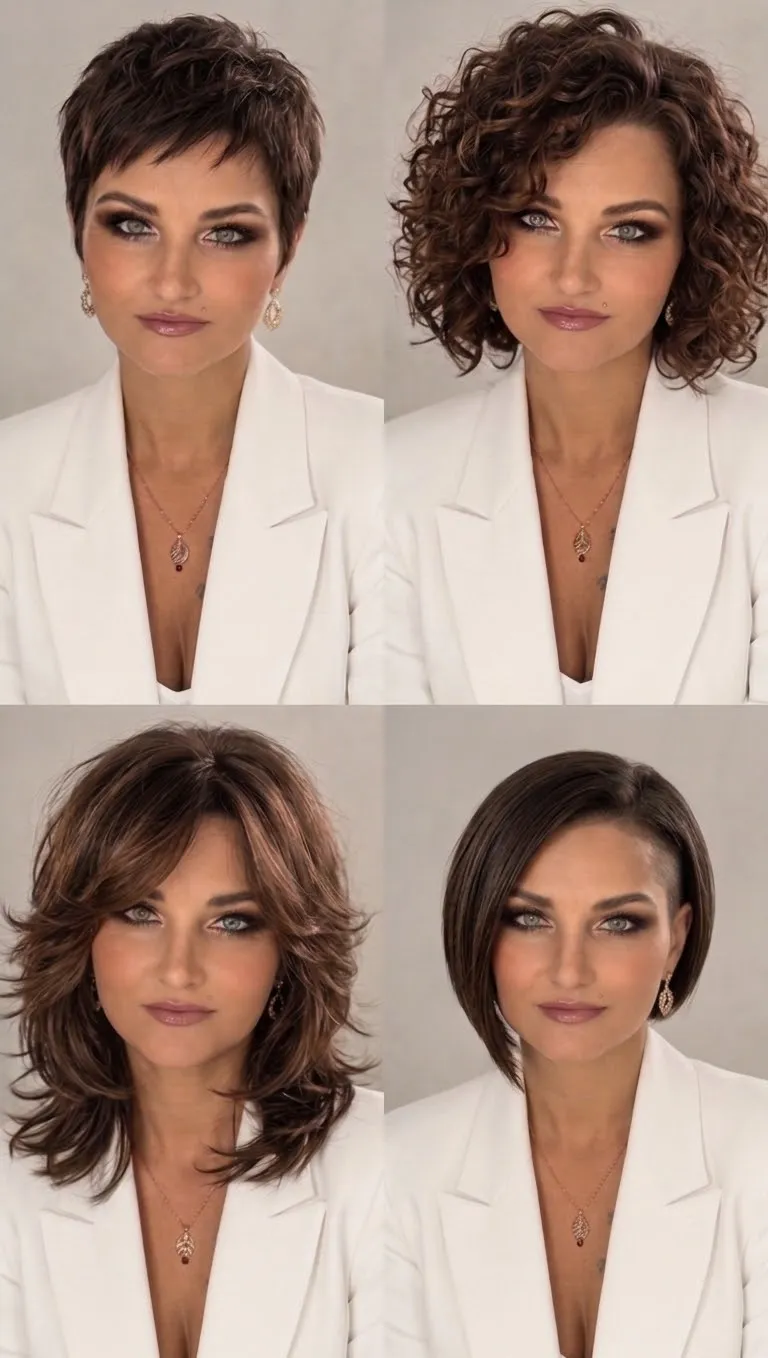
Create a studio portrait composite comparing four hairstyles on the same woman while preserving her distinctive facial features.
Example outputs
Prompt template
- Format
- Text Parameterized
- Inputs
- Reference_image (image) · Required signature (text) · Optional · Default: Adley
- Outputs
- Hairstyle_comparison_image (image)
Using the provided reference image, create a composite image divided into four equal panels. Show the exact same woman in every panel, preserving her natural facial features, grey-green eyes, and Monroe lip piercing.

- Panel 1: A textured short pixie haircut with soft layers.
- Panel 2: A voluminous shoulder-length curly bob with defined ringlets.
- Panel 3: A layered butterfly haircut with face-framing waves.
- Panel 4: A sleek asymmetrical angled bob with an undercut on one side.

Use studio lighting, professional photography, and a consistent portrait style across all panels. Dress her in a white blazer and use a neutral background. Add the signature “${signature:Adley}” at the bottom of the image in discreet calligraphy.
Replace the ${…} placeholders with your values
before using this prompt. See parameters
and defaults below
Parameters
Replace each placeholder with your own value, or use its default when one is provided
${signature:Adley}
signature
Default: Adley
What you'll create
Four studio portraits show a pixie, curly bob, butterfly cut and asymmetric undercut bob. Neutral surroundings and unchanged facial features make the different hair shapes easy to compare.
Frequently asked questions
Does each panel use a different person?
No. It is the exact same woman throughout.
Which cut includes an undercut?
The sleek asymmetrical angled bob.





Comments
Tried this prompt? Share what you made, compare results, or ask a question