3D Caricature Portrait with Iced Coffee
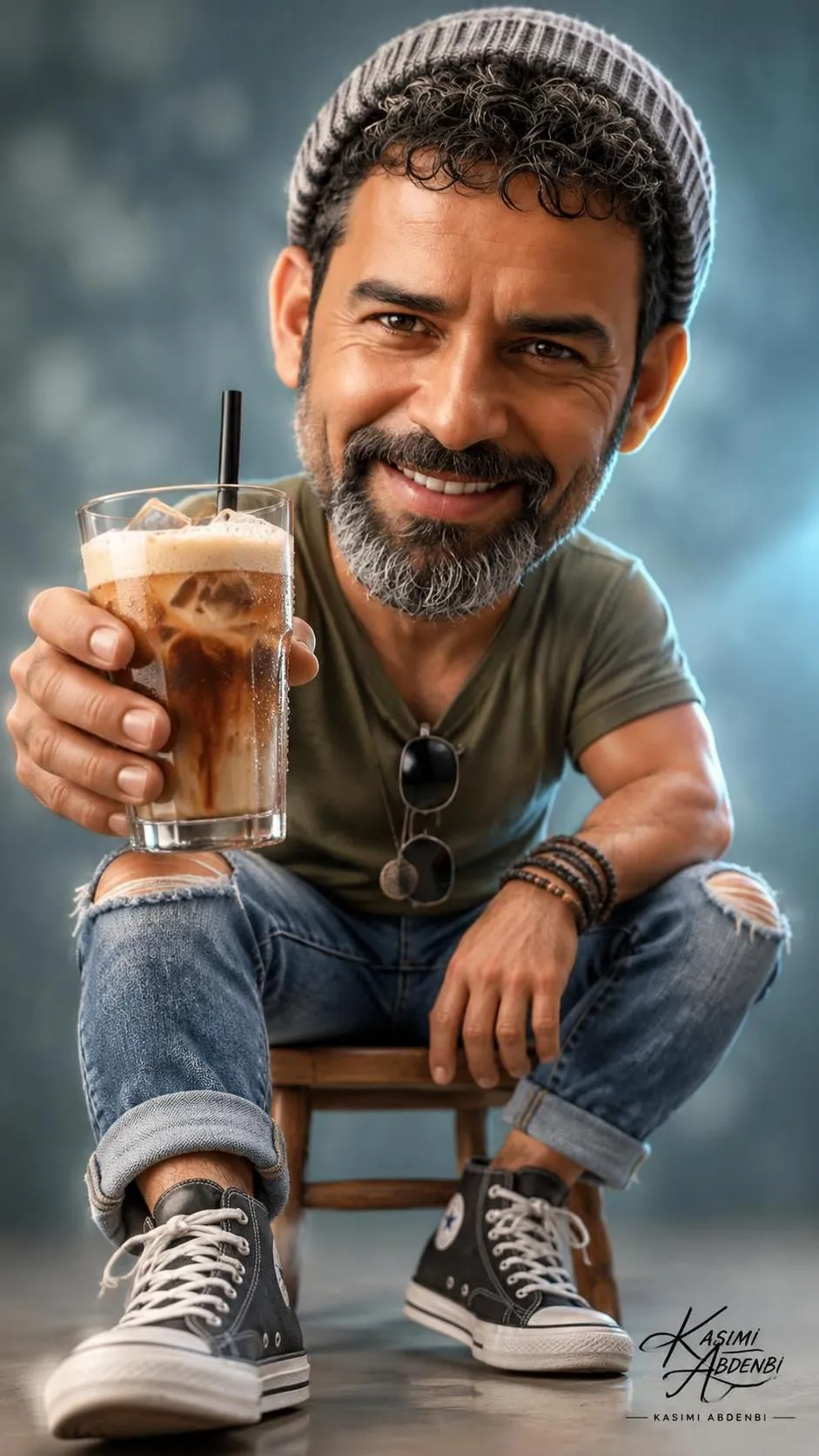
Create a stylized 3D caricature portrait based on an uploaded man’s image, with a detailed iced coffee prominently reaching toward the viewer. The aspect ratio can be customized; the original prompt uses 9:16.
Example outputs
Prompt template
- Format
- Text Parameterized
- Inputs
- Reference_image (image) · Required aspect_ratio (text) · Optional · Default: 9:16
- Outputs
- Caricature_portrait (image)
Stylized 3D caricature portrait of a man (image uploaded) with an oversized head and expressive features, seated on a small wooden chair, low-angle perspective, reaching a glass of iced coffee toward the viewer with a straw — realistic condensation, ice cubes, creamy foam and visible coffee texture; warm specular highlights on the glass. He wears a gray knit beanie, slight confident smile. Outfit: olive green t-shirt with black sunglasses hanging from the collar, ripped cuffed blue jeans, black-and-white high-top sneakers, layered leather and beaded bracelets, simple pendant necklace. Cinematic studio lighting with soft key light and cool rim light, subtle volumetric haze, shallow depth of field, soft bokeh background in cool teal-gray, high-detail skin texture with stylized smoothness, realistic fabric and shoe materials, photoreal yet whimsical caricature proportions, crisp micro details, high dynamic range, cinematic color grading, gentle vignette, ultra-detailed 3D render aesthetic, --ar ${aspect-ratio:9:16}Replace the ${…} placeholders with your values
before using this prompt. See parameters
and defaults below
Parameters
Replace each placeholder with your own value, or use its default when one is provided
${aspect-ratio:9:16}
aspect-ratio
Default: 9:16
What you'll create
Create a stylized 3D caricature portrait of a man seated on a small wooden chair and reaching a detailed glass of iced coffee toward the viewer. Use a low-angle perspective, cinematic studio lighting, and a cool teal-gray bokeh background, with photorealistic materials and whimsical proportions.
Generation settings
Usage instructions
Frequently asked questions
What should the uploaded reference image control?
Use the uploaded image as the reference for the man depicted in the portrait.


Comments
Tried this prompt? Share what you made, compare results, or ask a question