Low-Key Noir Portrait of a Man
Create a dramatic black-and-white profile portrait using a reference image. The prompt specifies the lighting, composition, camera-style cues, and 9:16 aspect ratio.
Example outputs
Prompt template
- Format
- Text
- Inputs
- Reference_image (image) · Required
- Outputs
- Portrait (image)
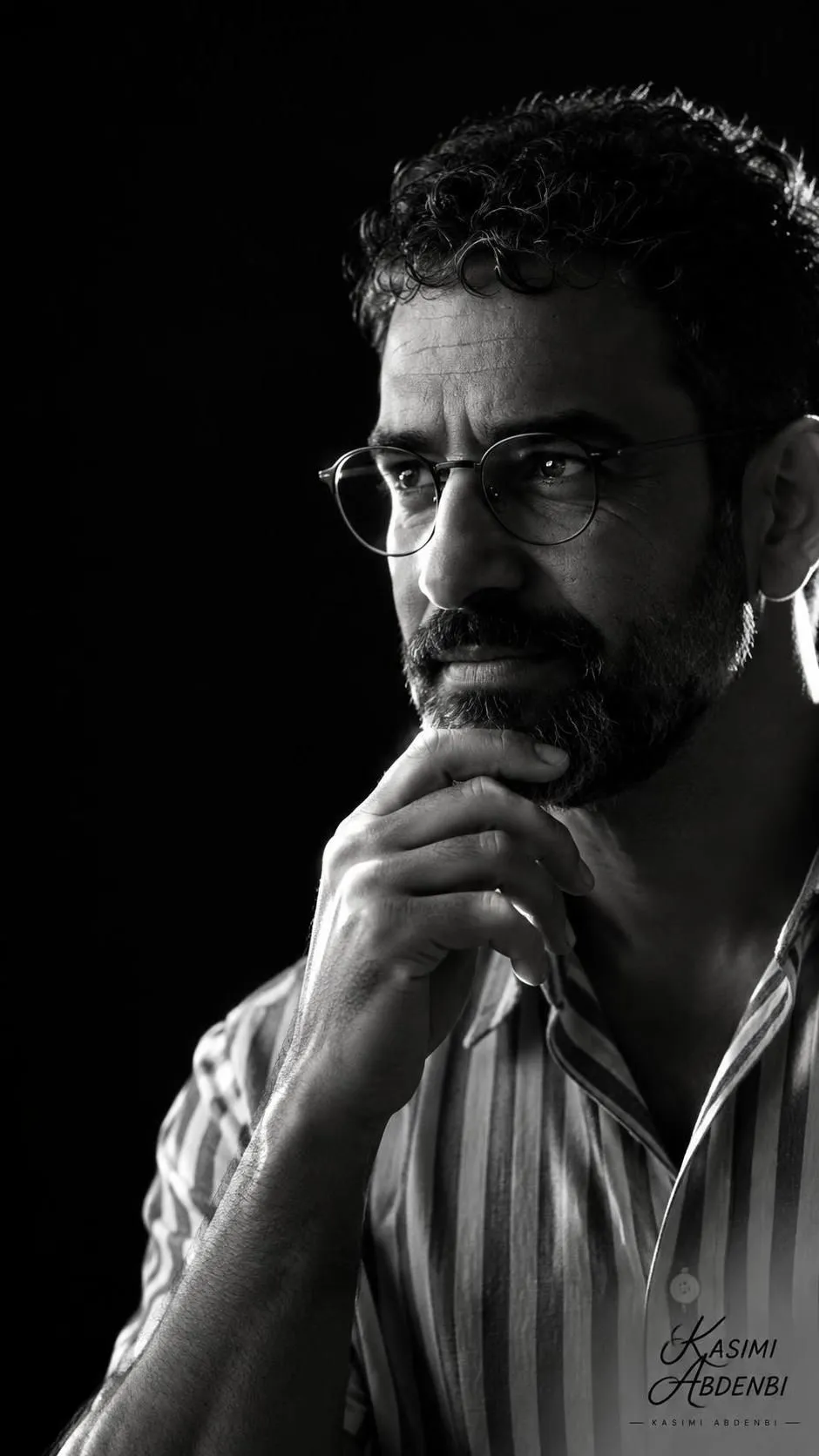
Create a low-key black-and-white portrait of the contemplative man in the uploaded reference image. Show him in strict profile, three-quarter view, wearing round glasses and a vertically striped short-sleeve shirt, with one hand thoughtfully resting on his chin.

Use a dramatic single hard rim light from the right, casting bright highlights along the cheek, glasses rims, fingers, and edge of the shirt. Leave the rest of his face and body in deep, velvety shadow against a pure black background. Use a vertical composition, medium close-up from chest to top of head, with generous negative space on the left and the subject placed on the right third for a cinematic, introspective feel.

Use shallow depth of field with soft falloff, sharp focus on the glasses and fingertips, preserved natural skin texture, and minimal retouching. Apply a high-contrast monochrome conversion with rich midtones, crushed blacks, subtle film grain, pronounced edge lighting, and a delicate catchlight in the lens. Create a moody, noir-inspired fine-art portrait aesthetic. Emphasize contouring with gentle dodge-and-burn, high clarity, crisp rim highlights, and preserved shadow detail for a striking, minimalist silhouette.

Camera-style cues: 85mm equivalent, f/1.8–2.8, ISO 100–400, 1/125–1/250s, single off-camera strobe with narrow grid or snoot. --ar 9:16
What you'll create
This prompt creates a fine-art black-and-white portrait of a contemplative man wearing round glasses and a vertically striped shirt. Hard rim lighting, a black background, and right-third placement establish its minimalist, noir-inspired composition.
Generation settings
Aspect ratio: 9:16
Usage instructions
Provide a reference image of the man to use for the portrait. The prompt builds the look around right-side hard rim lighting and a 9:16 vertical composition; changing the light direction is a direct way to adjust the contour highlights.
Frequently asked questions
What does the reference image control?
The prompt uses the uploaded image as the reference for the depicted man.
Can I change the lighting effect?
Yes. The prompt specifies a single hard rim light from the right; changing its direction or hardness will alter the highlighted contours and shadows.




Comments
Tried this prompt? Share what you made, compare results, or ask a question