Mixed-Media Pop-Art Sports Portrait
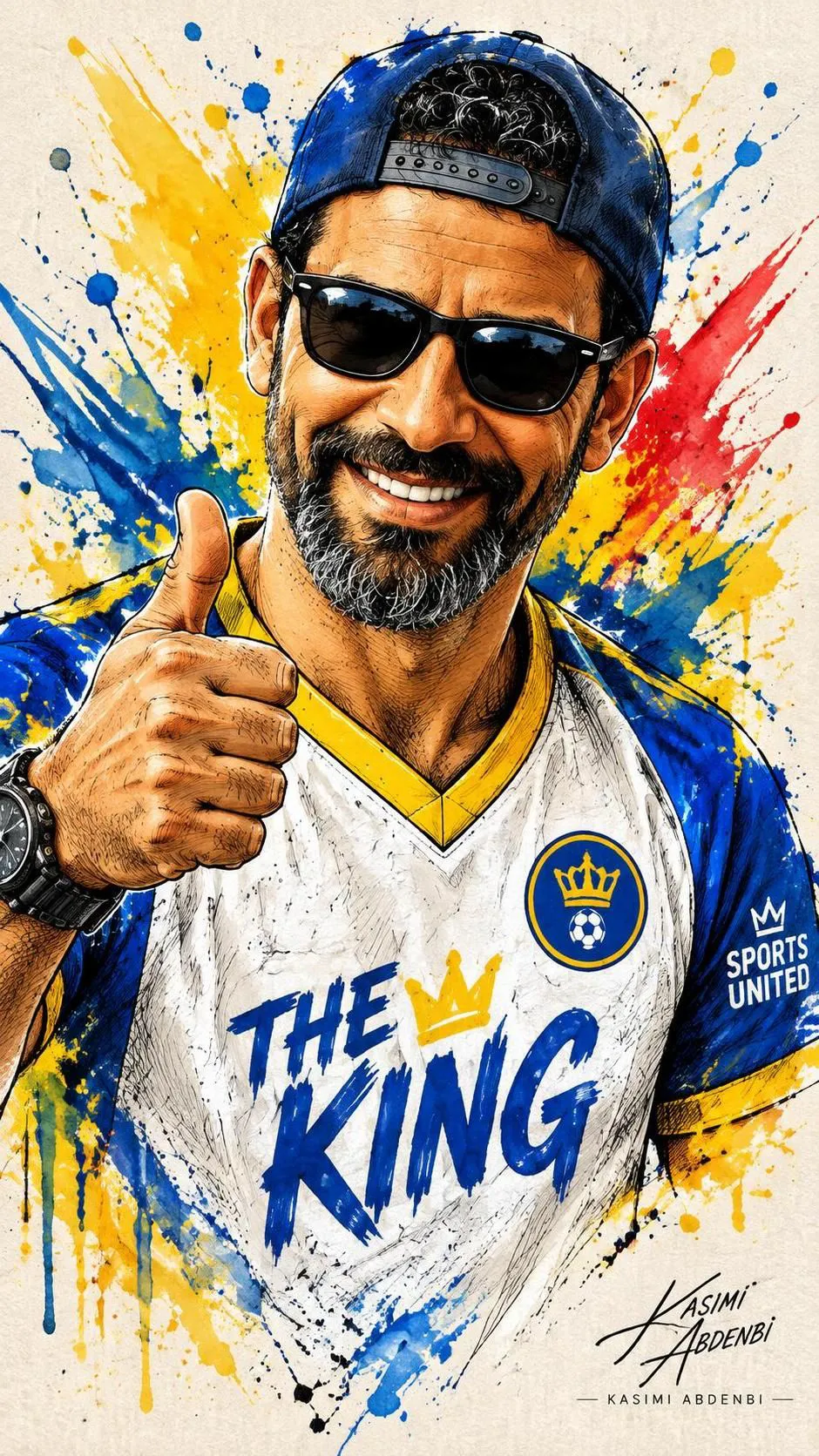
Create an energetic mixed-media sports portrait based on a reference image, with expressive ink work, vivid watercolor splashes, and a confident pop-art feel. Customize the jersey lettering while keeping the specified portrait details and vertical composition
Example outputs
Prompt template
- Format
- Text Parameterized
- Inputs
- Reference_image (image) · Required jersey_text (text) · Optional · Default: THE KING
- Outputs
- Portrait (image)
Create a three-quarter upper-body portrait of a smiling man based on the uploaded reference image. He wears a backward baseball cap and dark sunglasses and gives a thumbs-up near his face. Use a mixed-media illustration style, with expressive black ink sketching and cross-hatching for contours, bold pen strokes for facial features and clothing, and bright watercolor splashes and paint drips in yellow, blue, and red radiating behind him. He wears a white sports jersey with blue sleeves and yellow trim, prominent "${jersey-text:THE KING}" text and a circular team badge on the chest, small sponsor text on the sleeve, and a visible wristwatch. Add high-contrast highlights on the teeth and sunglasses, textured ink lines, and loose gestural strokes. Use an energetic diagonal composition and a playful, confident mood with an urban pop-art sports portrait aesthetic. Include a visible artist signature in a corner, a vibrant primary-color palette, crisp paper texture, dynamic splatter layering, slight paper bleed, and ink smudges for authenticity. --ar 9:16Replace the ${…} placeholders with your values
before using this prompt. See parameters
and defaults below
Parameters
Replace each placeholder with your own value, or use its default when one is provided
${jersey-text:THE KING}
jersey-text
Default: THE KING
What you'll create
This prompt creates a three-quarter upper-body portrait of a smiling man in a backward baseball cap and sunglasses, giving a thumbs-up. The energetic sports portrait combines cross-hatched ink, bold strokes, and bright watercolor splashes on textured paper
Generation settings
Usage instructions
Frequently asked questions
Can I change the text on the jersey?
Yes. Replace the default chest text while keeping the jersey’s other specified details
What does the 9:16 setting control?
It specifies a vertical aspect ratio for the composition




Comments
Tried this prompt? Share what you made, compare results, or ask a question