Orange Typography Collage Poster
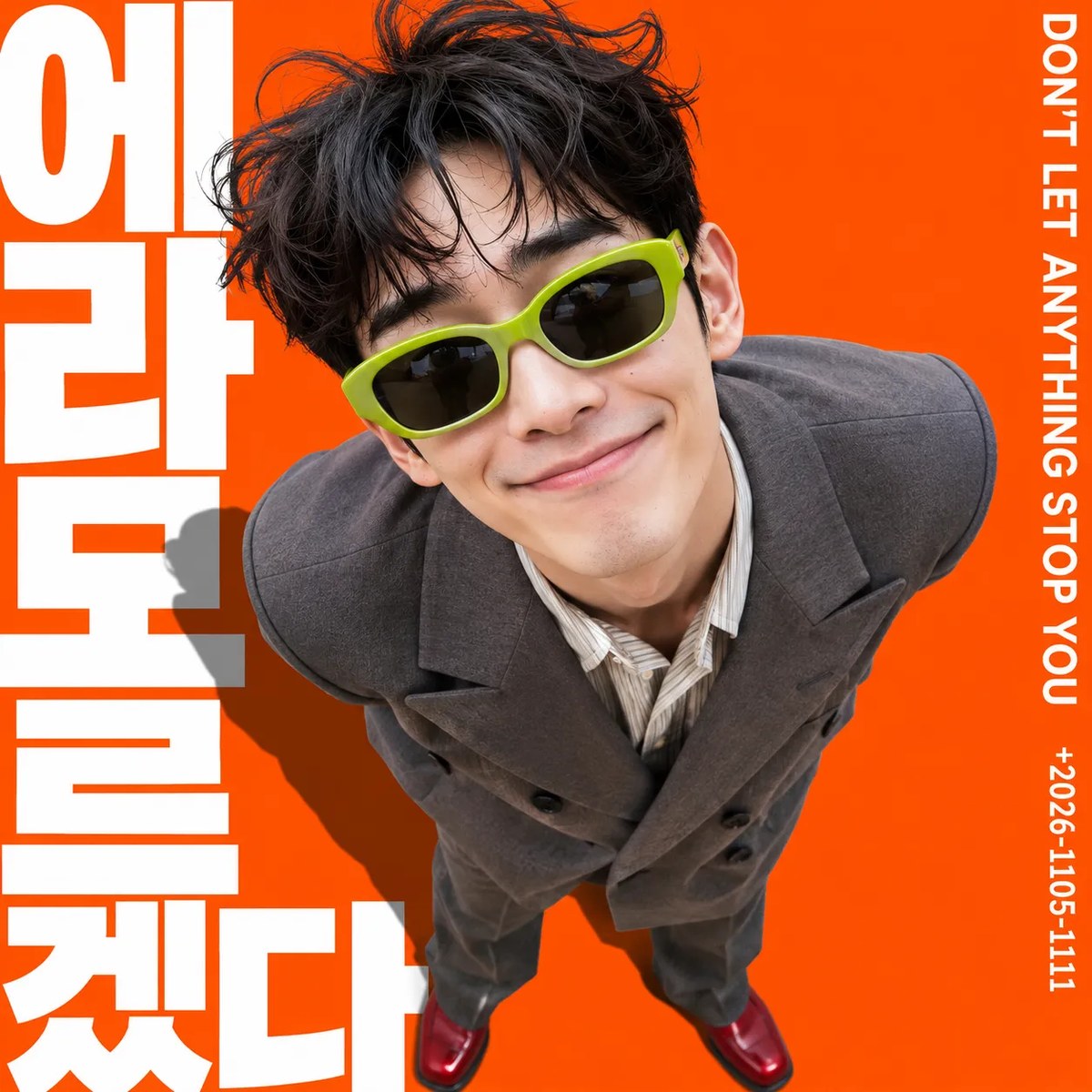
Create a studio-photo collage poster featuring a smiling person against a vivid orange background, with oversized vertical typography and a dramatic shadow.
Example outputs
Prompt template
- Format
- Text Parameterized
- Inputs
- Target_person_reference_photo (image) · Required right_slogan (text) · Optional · Default: DON'T LET ANYTHING STOP YOU date (text) · Optional · Default: 2026.11.05-1111 left_text (text) · Optional · Default: 에 라 모 르 겠다
- Outputs
- Poster (image)
Create a clean studio-photography collage poster on a square 1:1 canvas, filled edge to edge with a vivid solid orange color.

Use the supplied reference photo as the target person. Preserve their recognizable facial features, but remove the original photo’s lighting and background. The person should dominate the center of the composition, leaning their upper body forward and looking down toward the camera from an ultra-wide perspective. Keep their head near the top edge and show their jacket and red shoes down to the bottom edge. They are smiling broadly, tilting their head toward the right side of the frame, and bringing their face close to the lens. Keep both hands hidden behind their back.

Dress them in black-lens sunglasses with a thick bright-green plastic frame, an oversized gray double-breasted jacket, a light pinstriped shirt, and red shoes.

Place several lines of large, bold, white vertical lettering behind the person on the left. The letters should occupy most of the canvas height, have tight spacing, and be dramatically cropped at the edges. Part of the lettering should be obscured by the person, but none of it should overlap the face. Add a long, hard-edged dark-gray shadow diagonally across the large lettering on the left, following the person’s silhouette to create depth.

On the right edge, place thin white uppercase sans-serif text vertically, reading ${right-slogan:DON'T LET ANYTHING STOP YOU}. Below it, in the same vertical direction and at a smaller size, place ${date:2026.11.05-1111}. The large bold white vertical sans-serif text on the left should read ${left-text:에 라 모 르 겠다}. Render only the text values, without the surrounding braces.

Keep the person’s skin and gray jacket photographic, with natural photo texture and soft shading. Separate these from the background, lettering, and shadows, which should have a smooth, flat graphic appearance.
Replace the ${…} placeholders with your values
before using this prompt. See parameters
and defaults below
Parameters
Replace each placeholder with your own value, or use its default when one is provided
${right-slogan:DON'T LET ANYTHING STOP YOU}
right-slogan
Default: DON'T LET ANYTHING STOP YOU
${date:2026.11.05-1111}
date
Default: 2026.11.05-1111
${left-text:에 라 모 르 겠다}
left-text
Default: 에 라 모 르 겠다
What you'll create
A wide-angle photographic figure dominates a flat bright-orange poster. Gray fabric and red shoes contrast with smooth lettering and graphic shadows.
Frequently asked questions
Are the hands visible in front?
No. Both stay hidden behind the back.
Does the original photo background remain?
No. It is replaced by the vivid orange composition.




Comments
Tried this prompt? Share what you made, compare results, or ask a question