Luxury Fashion Runway Portrait
Create a photorealistic editorial runway image featuring the person from an uploaded face photo.
Example outputs
Prompt template
- Format
- Text Parameterized
- Inputs
- face_reference (image) · Required background_text (text) · Optional · Default: DULLER DULLER
- Outputs
- runway_portrait (image)
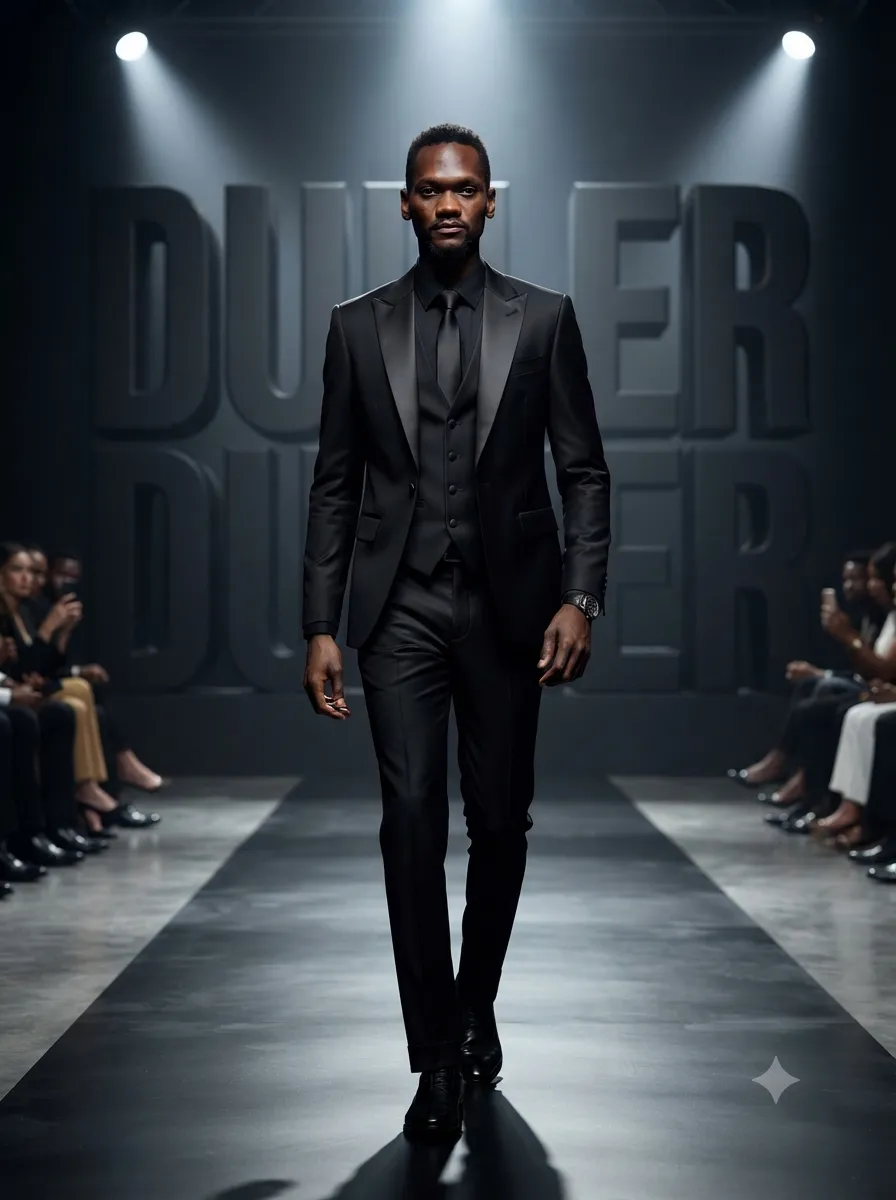
Using the face from the uploaded photo, create an ultra-realistic fashion runway scene featuring a stylish man walking confidently on a luxury runway. Dress him in a premium black formal outfit, and blend the reference face naturally with a matching skin tone. Place giant matte-black 3D typography reading “${background-text:DULLER DULLER}” in the background. Add cinematic runway spotlights, a luxury studio atmosphere, a confident model-walk pose, glossy floor reflections, and dramatic lighting. Give the image a stylish fashion-campaign look, with realistic detailed skin, premium editorial photography, sharp focus, and a high-contrast luxury mood. Use a vertical 3:4 composition and ultra-HD 8K detail.Replace the ${…} placeholders with your values
before using this prompt. See parameters
and defaults below
Parameters
Replace each placeholder with your own value, or use its default when one is provided
${background-text:DULLER DULLER}
background-text
Default: DULLER DULLER
What you'll create
A man walks confidently across a glossy runway under dramatic spotlights. The reference likeness blends into the model naturally, while oversized 3D lettering and floor reflections establish a high-contrast fashion-campaign setting.
Frequently asked questions
Is the background wording editable?
Yes. A background-text input controls the large 3D typography.


Comments
Tried this prompt? Share what you made, compare results, or ask a question