3D Instagram-Cube Fashion Portrait
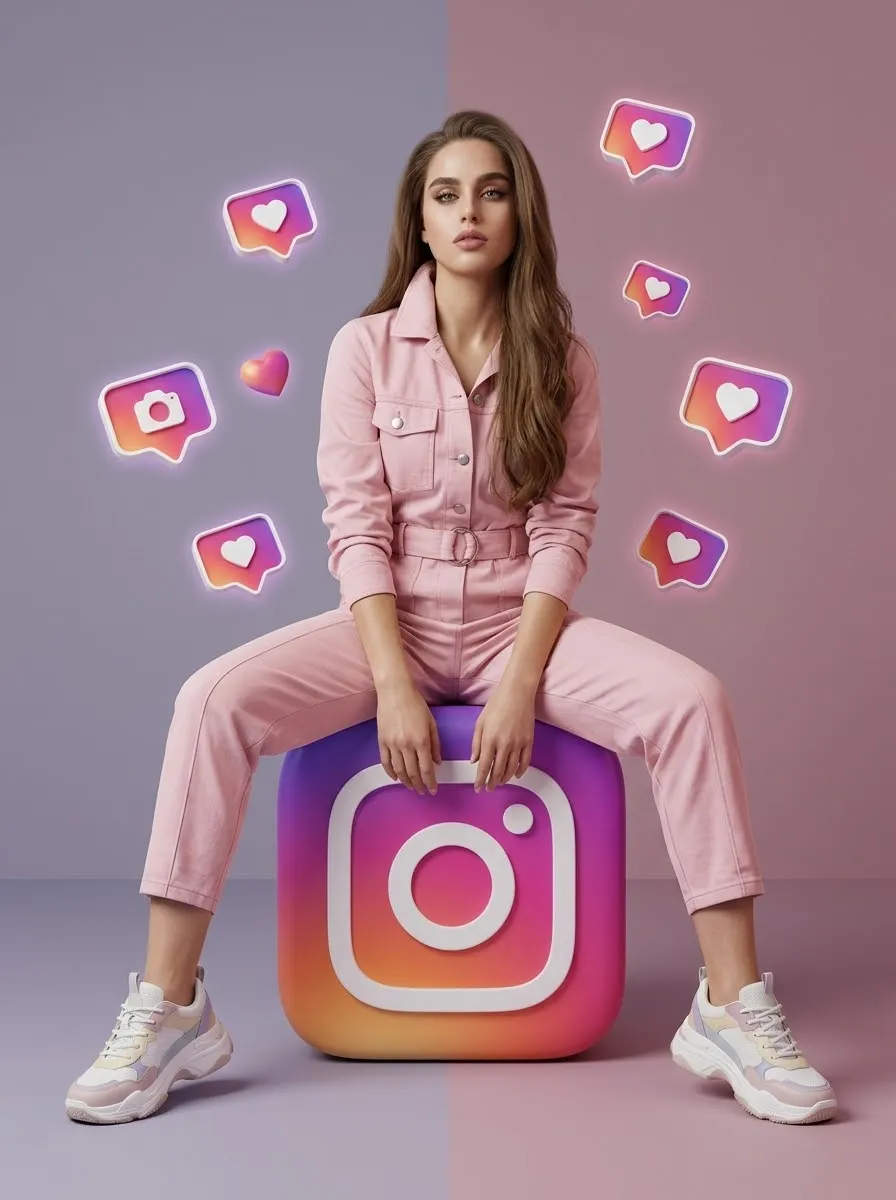
Create a premium 3D fashion portrait of a person seated on a giant Instagram-logo cube, using a reference photo to preserve their identity and appearance.
Example outputs
Prompt template
- Format
- Text
- Inputs
- Reference_photo (image) · Required
- Outputs
- Fashion_portrait (image)
Create an ultra-realistic, premium 3D Instagram-themed fashion portrait using the person in the uploaded reference photo. Match the reference image’s composition, model pose, camera angle, lighting, and overall visual style.

Preserve the person’s exact facial identity and features, hairstyle, skin tone, age, natural body shape, height, physique, and proportions. Do not beautify, slim, reshape, or otherwise alter their appearance. Adapt the outfit naturally to their original body structure.

Depict the person sitting confidently on top of a massive, freestanding, cube-shaped 3D Instagram app icon on the studio floor, facing directly toward the camera. Their legs should extend naturally on either side of the cube, knees bent, with both feet resting firmly on the floor. Their upper body leans slightly forward; both hands hang naturally between their legs and rest near the cube’s upper front edge. Give them relaxed shoulders, a confident fashion-model expression, direct eye contact, natural anatomy, and realistic weight distribution.

The cube should have beautifully rounded corners, realistic thickness, and a glossy Instagram gradient transitioning from purple and violet through vibrant pink and magenta to warm orange. Center a large, clean white Instagram camera symbol on its front surface.

Dress the person in a premium pastel-pink utility jumpsuit with a structured collar, front buttons, oversized chest pockets, long sleeves, a matching waist belt with a circular buckle, and relaxed trousers with elastic cuffs. Add chunky white sneakers with subtle pastel-pink, cyan, lime-green, and yellow accents.

Surround the person with multiple small, floating 3D Instagram-style notification bubbles, including pink, blue, and purple heart icons, white heart symbols, and profile notification icons. Arrange the icons naturally at different depths, with soft glowing edges, subtle depth of field, and tiny suspended golden light particles. Keep them secondary to the person.

Set the scene in a minimalist luxury studio with a seamless soft lavender-gray and dusty-pink gradient background. Use a smooth matte pastel floor with gentle pink illumination near the bottom. Create a clean, elegant composition with no visible softboxes, lighting fixtures, or other studio equipment. Use soft cinematic beauty lighting, warm diffused frontal illumination, subtle cool lavender rim lighting, natural skin highlights, soft ambient shadows, and realistic contact shadows beneath the sneakers and Instagram cube.

Use a full-body, front-facing fashion-advertising portrait with an eye-level camera angle and balanced, symmetrical composition. Center the person precisely. Keep the entire Instagram logo and both shoes fully visible, with elegant negative space above the person’s head. Use a vertical 3:4 aspect ratio.

Render with ultra-photorealistic, high-end fashion-advertising quality: realistic skin texture, detailed fabric, natural folds, physically accurate 3D materials, cinematic color grading, crisp focus, premium CGI, and 8K resolution. Maintain the reference image’s pose, outfit style, color palette, and composition. Do not include extra people, a distorted face, unnatural hands, extra fingers, floating feet, an incorrect Instagram logo, cartoon effects, or unnecessary text.
What you'll create
A reference person sits confidently on a freestanding app-shaped cube on the studio floor. Natural proportions, detailed clothing and physical material rendering support the dimensional editorial scene.
Frequently asked questions
Is the app icon a flat background graphic?
No. It is a massive cube supporting the seated person.
Can extra people fill the scene?
No. The template excludes them.




Comments
Tried this prompt? Share what you made, compare results, or ask a question