Nighttime City Portrait in a Chunky Knit Sweater
Create a realistic nighttime street portrait using a reference photo for the woman’s face, with a modern city scene in the background.
Example outputs
Prompt template
- Format
- Text Parameterized
- Inputs
- Reference_photo (image) · Required sweater_color (text) · Optional · Default: light gray/gray-beige
- Outputs
- Portrait (image)
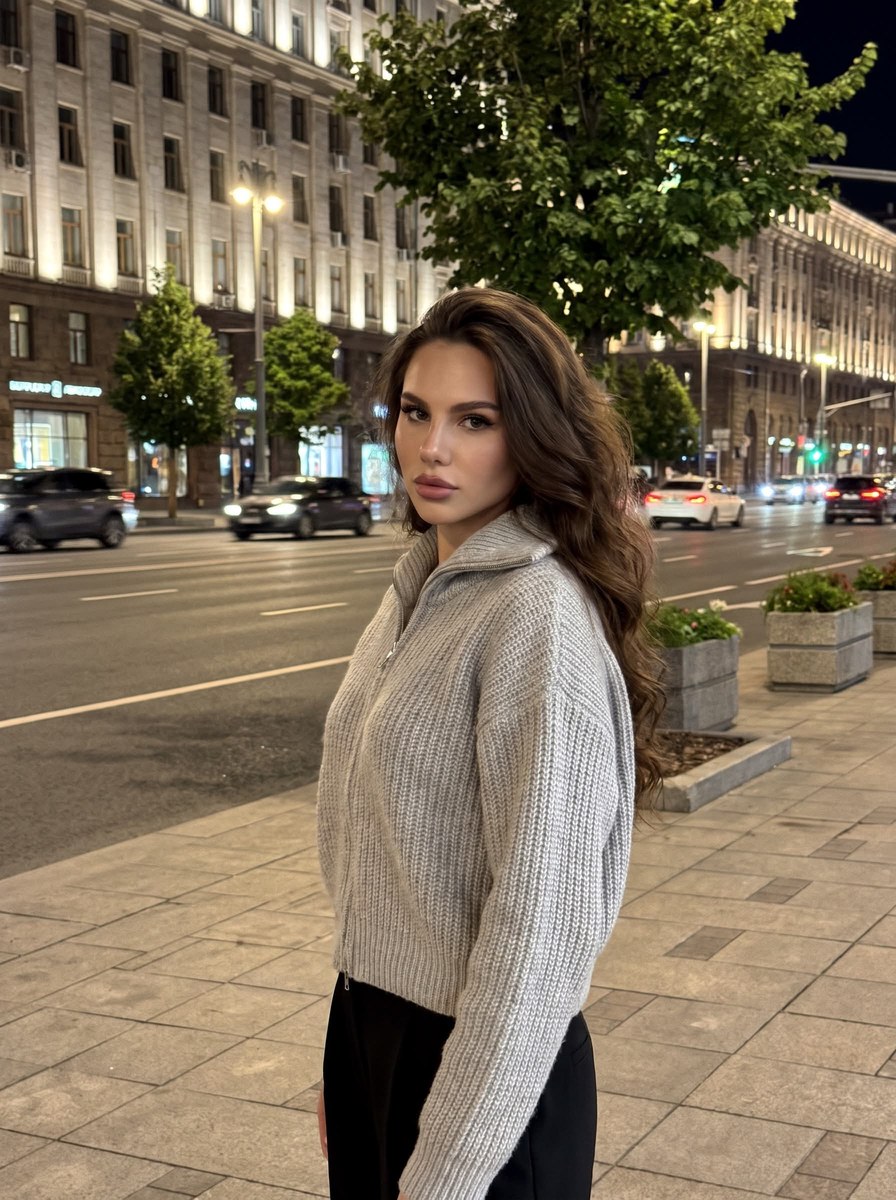
Create a highly photorealistic vertical 3:4 photograph, as if shot with the main camera of an iPhone 16 Pro Max in the evening or at night outdoors. A woman stands on a sidewalk beside a wide city road, her body turned slightly to the side and her head turned toward the camera. Frame her from the thighs up, as if photographed from about arm’s length with the camera slightly above chest level. Use the uploaded reference photo to guide her face.

She has long, loose hair styled with natural volume, falling freely over her shoulders and back. Her makeup is polished and expressive: shaped brows, defined eyes, long lashes, subtle contouring, a natural flush, and full lips outlined with a darker lip pencil.

She wears an oversized ${sweater-color:light gray/gray-beige} chunky-knit zip-up sweater with a high collar. Make the knit texture clearly visible, with voluminous sleeves and snug cuffs. Black trousers are visible below. Her hands rest naturally in front of her body.

Keep the nighttime city background fully in frame: a wide road, moving cars with natural slight motion blur, the sidewalk and paving stones in the foreground, green trees and flower beds, tall modern buildings with many illuminated windows, and streetlights. Convey the atmosphere of a large modern city at night.

Use realistic mixed lighting: streetlights illuminate her face and figure, with natural transitions of light across her skin and clothing. No flash. Do not cut out or replace the background, and avoid strong bokeh or artificial blur. The entire scene should look as though it was captured at once by a single camera.

Aim for maximum iPhone-photo realism, with natural skin texture, realistic hair, physically plausible shadows and reflections, natural perspective, and high detail. Do not make the face look plastic, and do not create a photomontage or a pasted-in figure.
Replace the ${…} placeholders with your values
before using this prompt. See parameters
and defaults below
Parameters
Replace each placeholder with your own value, or use its default when one is provided
${sweater-color:light gray/gray-beige}
sweater-color
Default: light gray/gray-beige
What you'll create
A woman stands slightly sideways by a wide city road, turning her head toward the camera. Loose long hair and polished makeup accompany natural city reflections and realistic low-light detail.
Usage instructions
Provide a reference photo to guide the woman’s face; the scene, framing, clothing, and lighting are specified in the prompt. Adjust `sweater_color` to choose between the stated light-gray and gray-beige options while keeping the nighttime city composition.
Frequently asked questions
Should the subject look pasted into the scene?
No. Photomontage or pasted-figure effects are excluded.
What camera distance is suggested?
Approximately arm’s length.


Comments
Tried this prompt? Share what you made, compare results, or ask a question