Amber and Teal Neon-Noir Fedora Portrait
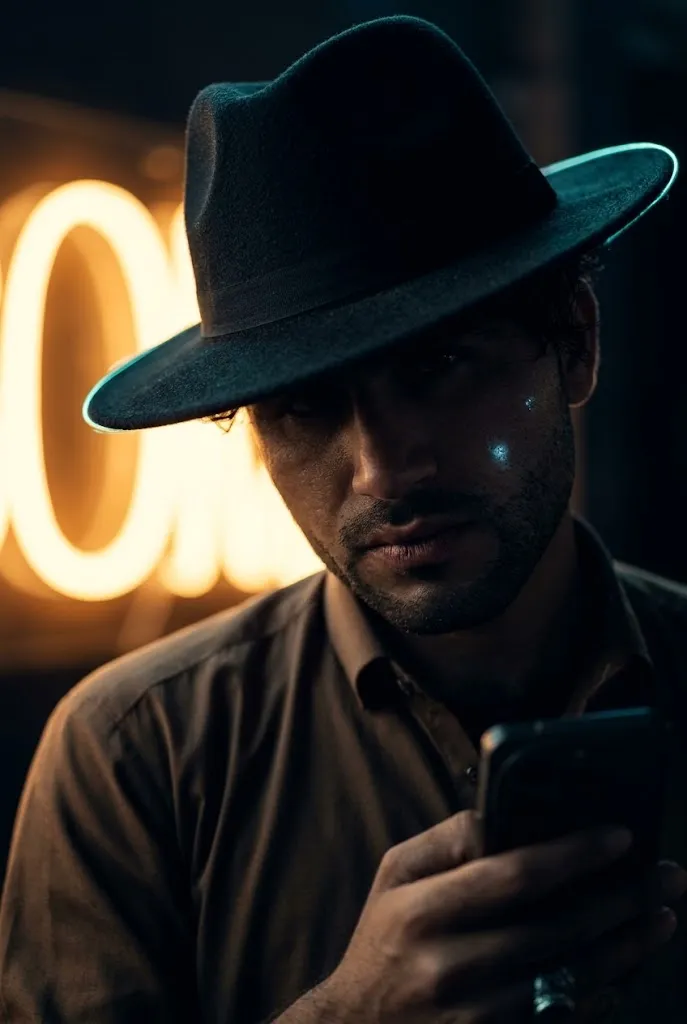
Transform a reference photo into a tightly cropped, photorealistic noir portrait while preserving the man’s identity, pose, clothing, and composition.
Example outputs
Prompt template
- Format
- Text
- Inputs
- Reference_image (image) · Required
- Outputs
- Portrait (image)
STRICT REFERENCE / FACE LOCK: Use the supplied image as the exact reference. Preserve the same adult man’s identity, facial structure, skin tone, hair, masculine appearance, pose, composition, crop, clothes, key props, and original aesthetic—no gender swap or redesign. Create hyper-realistic AI photography at ultra-high resolution with 8K, print-ready 300-DPI-look detail.

Keep the brim hiding most of his eyes, the gritty skin texture, and the warm amber glow blooming behind him on the left. Add a narrow, piercing icy-teal rim along the hat brim and a tiny cool glint on the cheek, contrasting with the original amber backlight. Preserve the intimate vertical crop, shallow depth of field, and raw cinematic portrait style; do not evenly illuminate the face or add props.

LIGHTING: Use a strong noir-style shadow pattern with very low facial exposure. Keep the face mostly obscured in darkness, with only subtle hints of the jaw, cheek, and mouth visible. Create high contrast between deep shadows and bright, controlled highlights, plus one sharp, focused colored accent light. Keep whites warm creamy ivory and shift blacks toward deep navy. Create a moody, Midjourney-inspired neon-noir extreme close-up of the same rugged man beneath a low, wide-brim textured black fedora.
What you'll create
A rugged man wears a low black fedora whose brim conceals most of his eyes. A warm amber bloom behind him contrasts with a narrow teal edge along the hat and a small cool cheek highlight in an intimate dark crop.
Usage instructions
Provide the reference image so the portrait can preserve the subject’s identity and original composition. The prompt pairs a warm amber backlight with a narrow icy-teal accent; adjust the accent’s placement or intensity if you want a different balance while keeping the face mostly in shadow.
Frequently asked questions
Should the colored accents reveal the entire face?
No; facial exposure stays very low, with only subtle jaw, cheek and mouth details emerging from the darkness.


Comments
Tried this prompt? Share what you made, compare results, or ask a question