Happy Weekend Smartphone Selfie with Miniature Clones
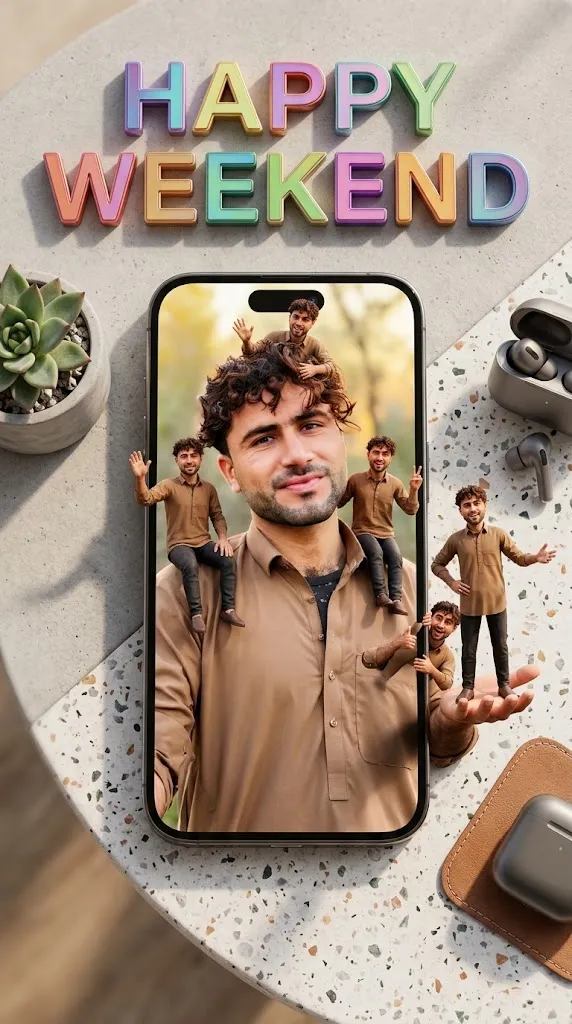
Create a photorealistic top-down scene of a cheerful man’s selfie on a smartphone, surrounded by tiny playful versions of himself, with colorful weekend typography.
Example outputs
Prompt template
- Format
- Text Parameterized
- Inputs
- theme_text (text) · Optional · Default: HAPPY WEEKEND clone_count (text) · Optional · Default: 6 aspect_ratio (text) · Optional · Default: 9:16
- Outputs
- Generatedimage (image)
Create an ultra-realistic, creative, and unique image with the theme “${theme-text:HAPPY WEEKEND}.” Show a large modern smartphone on a stylish minimalist table, viewed from above. On the smartphone screen, show a selfie of a cheerful, relaxed adult man surrounded by exactly ${clone-count:6} miniature clones of himself. All miniature men must have the same face, hairstyle, clothing, and appearance as the main man. Depict them as tiny, detailed 3D human figures interacting playfully around him: some sitting on his shoulders, standing on his hands, waving, making peace signs, smiling, and striking funny selfie poses. Integrate them naturally into the scene.

Place large, eye-catching “${theme-text:HAPPY WEEKEND}” typography at the top of the composition, using stylish, modern, colorful 3D lettering. Create a cheerful weekend atmosphere with vibrant colors, cinematic soft lighting, realistic shadows, beautiful depth of field, a creative composition, lifelike facial details, photorealistic textures, and ultra-detailed 8K quality. Use a vertical portrait composition with a ${aspect-ratio:9:16} aspect ratio. Show exactly ${clone-count:6} miniature male clones, keep their facial identity consistent, ensure all miniatures are clearly visible, and avoid distorted faces or extra characters.
Replace the ${…} placeholders with your values
before using this prompt. See parameters
and defaults below
Parameters
Replace each placeholder with your own value, or use its default when one is provided
${theme-text:HAPPY WEEKEND}
theme-text
Default: HAPPY WEEKEND
${clone-count:6}
clone-count
Default: 6
${aspect-ratio:9:16}
aspect-ratio
Default: 9:16
What you'll create
An overhead view shows a phone on a minimalist table, displaying an adult man surrounded by matching tiny figures. Playful poses and large dimensional lettering create an upbeat weekend composition.
Usage instructions
Use the theme text, clone count, and aspect ratio inputs to control the lettering, number of miniatures, and composition. The prompt calls for the miniatures to match the main man’s appearance and remain clearly visible; adjust the clone count if you want a different number, while keeping all miniatures legible in the frame.
Frequently asked questions
Should the miniatures have different identities?
No. All match the main man’s face, hairstyle and clothing.
Where does the selfie appear?
On the screen of the large smartphone.





Comments
Tried this prompt? Share what you made, compare results, or ask a question