Red-Toned Indoor Photo Composite
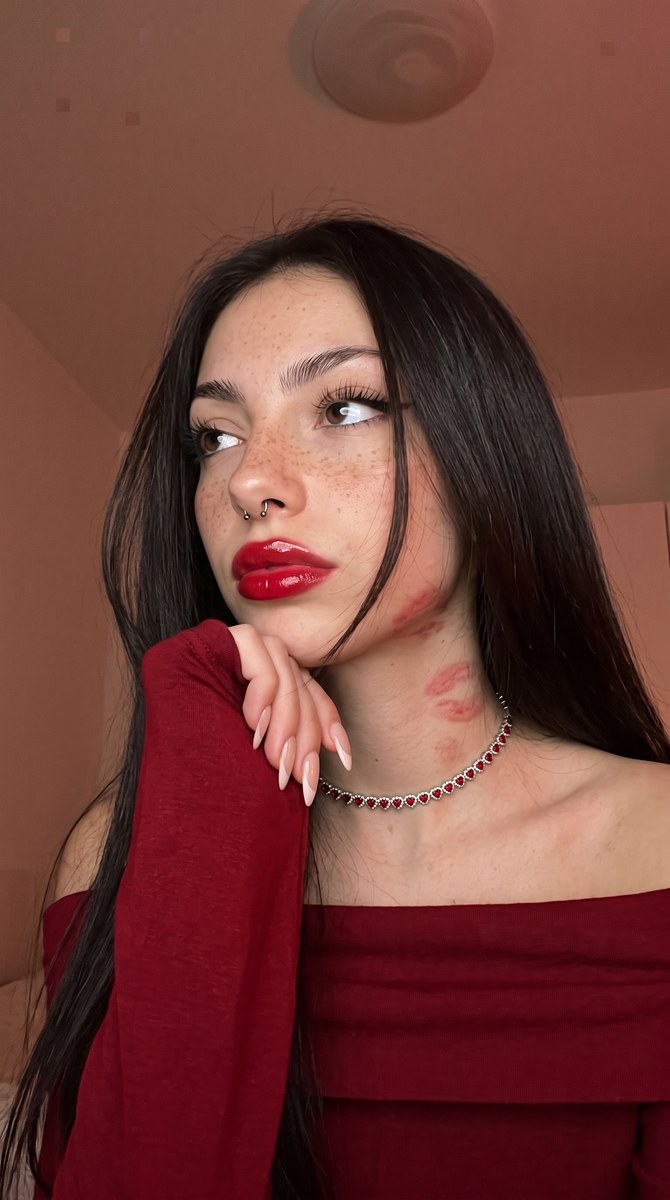
Blend a person from one photo into the setting of another as a warm, red-tinted vertical selfie.
Example outputs
Prompt template
- Format
- Text Parameterized
- Inputs
- Photo_1 (image) · Required Photo_2 (image) · Required aspect_ratio (text) · Optional · Default: 3:4
- Outputs
- Composite_selfie (image)
Create a photorealistic vertical selfie taken with an iPhone front-facing camera, in a ${aspect-ratio:3:4} aspect ratio. Use medium-high resolution, with sharp focus on the face and hair, enhanced contrast, warm indoor lighting with a red tint, saturated red tones, and even exposure without harsh highlights. Preserve realistic skin texture and expressive makeup. Keep the background discernible but softer in focus. Seamlessly integrate the person from Photo 2 into the setting of Photo 1.Replace the ${…} placeholders with your values
before using this prompt. See parameters
and defaults below
Parameters
Replace each placeholder with your own value, or use its default when one is provided
${aspect-ratio:3:4}
aspect-ratio
Default: 3:4
What you'll create
The integrated figure appears in sharp face-and-hair focus under warm indoor light. A discernible softer background, saturated reds and enhanced contrast create the realistic vertical phone portrait.
Usage instructions
Provide both source photos: Photo 1 supplies the setting, and Photo 2 supplies the person to integrate. The prompt specifies a 3:4 vertical composition; adjust that ratio only if you want a different framing.
Frequently asked questions
Which photo provides the environment?
Photo 1; Photo 2 provides the person.
Are harsh blown highlights requested?
No. Exposure stays even without harsh highlights.




Comments
Tried this prompt? Share what you made, compare results, or ask a question