The Dream and the Reality
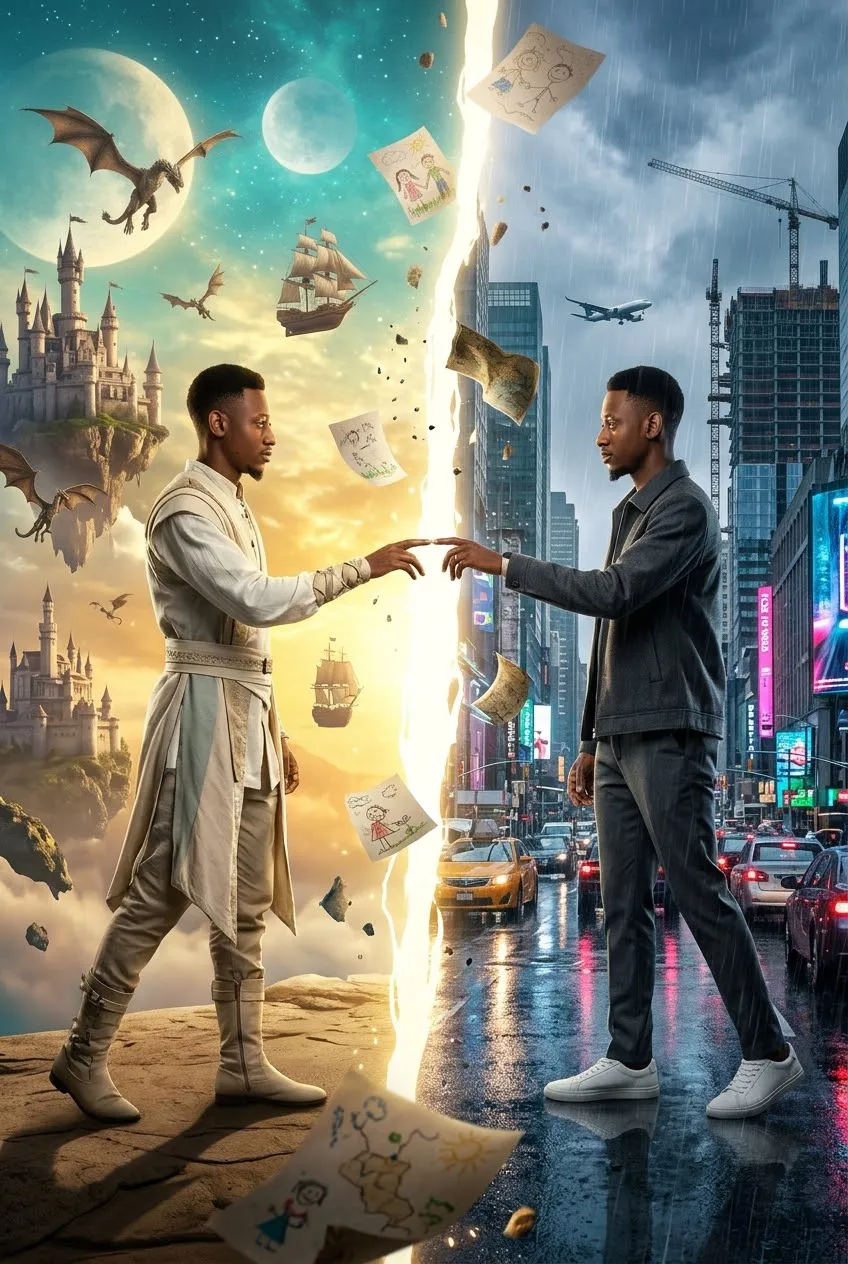
Create a cinematic, photorealistic portrait of a man reaching toward his counterpart across a fracture between a fantastical dream world and a rain-soaked city.
Example outputs
Prompt template
- Format
- Text Parameterized
- Inputs
- Reference_photo (image) · Required aspect_ratio (text) · Optional · Default: 2:3
- Outputs
- Cinematic_duality_portrait (image)
Create an ultra-photorealistic cinematic duality portrait titled “THE DREAM AND THE REALITY.” Match the provided reference photo’s face exactly. Both versions must have the same face, eyes, hair texture, skin details, and identity. Use an epic low angle and a full-body composition in a ${aspect-ratio:2:3} vertical format. Aim for IMAX Pro stage and Stage 5 quality.

Two identical versions of the same man stand on opposite sides of a colossal crack in reality that stretches from the ground into the sky.

At the center, a gigantic glowing fracture splits existence into two completely different worlds.

LEFT SIDE — THE DREAM

Dress this version in adventurous modern fantasy fashion: an ivory expedition jacket, light beige layered clothing, white high-top boots, and subtle silver accessories.

Behind him, show everything a child could dream of: floating castles above the clouds, ancient dragons soaring through golden skies, flying ships crossing the horizon, giant moons, floating islands, endless adventures, and crystal bridges connecting impossible worlds. Use bright celestial colors, dominated by gold, turquoise, white, and sapphire. Make this world feel limitless.

RIGHT SIDE — THE REALITY

Dress this version in premium modern luxury streetwear: a structured charcoal jacket, dark tailored trousers, clean sneakers, and minimal silver jewelry.

Behind him, show the real world: towering skyscrapers, rain-soaked streets, traffic lights, construction cranes, airplanes crossing the sky, neon reflections on wet asphalt, apartment buildings, and rush-hour city life. Use steel grey, white, black, and subtle warm city lights. Make this world feel grounded.

POSE AND INTERACTION

Both versions slowly reach toward each other across the fracture, their fingertips nearly touching. Neither side can fully cross. They make direct eye contact with each other.

LIGHTING

Illuminate the left side with golden dreamlight. Illuminate the right side with realistic city lighting and soft reflections from the rain. Create massive cinematic contrast.

DETAILS AND EFFECTS

Include floating pages from childhood drawings, fragments of maps, cracks in reality, and light particles crossing between the worlds. Show small pieces of the dream world drifting into reality and pieces of reality drifting into the dream.

MOOD

Convey that one world made him survive, the other made him believe, and neither world is complete without the other.

Use ultra-photorealistic 8K RAW detail, IMAX 70mm realism, deep focus, sharpness across the image, realistic skin texture, and a Stage 5 cinematic finish. Avoid blur, haze, noise, and a CGI look. Aim for masterpiece quality.
Replace the ${…} placeholders with your values
before using this prompt. See parameters
and defaults below
Parameters
Replace each placeholder with your own value, or use its default when one is provided
${aspect-ratio:2:3}
aspect-ratio
Default: 2:3
What you'll create
Two identical versions of a man stand across a crack that reaches from earth into sky. The dream side combines ivory expedition fashion with floating castles, dragons and flying ships in a full-body low-angle scene.
Frequently asked questions
Do the two figures have different identities?
No. Both versions retain the same face, hair texture and identity.
What divides the worlds?
A gigantic glowing fracture runs through the center from ground to sky.




Comments
Tried this prompt? Share what you made, compare results, or ask a question