Above the Empire: Blue-Hour Helicopter Portrait
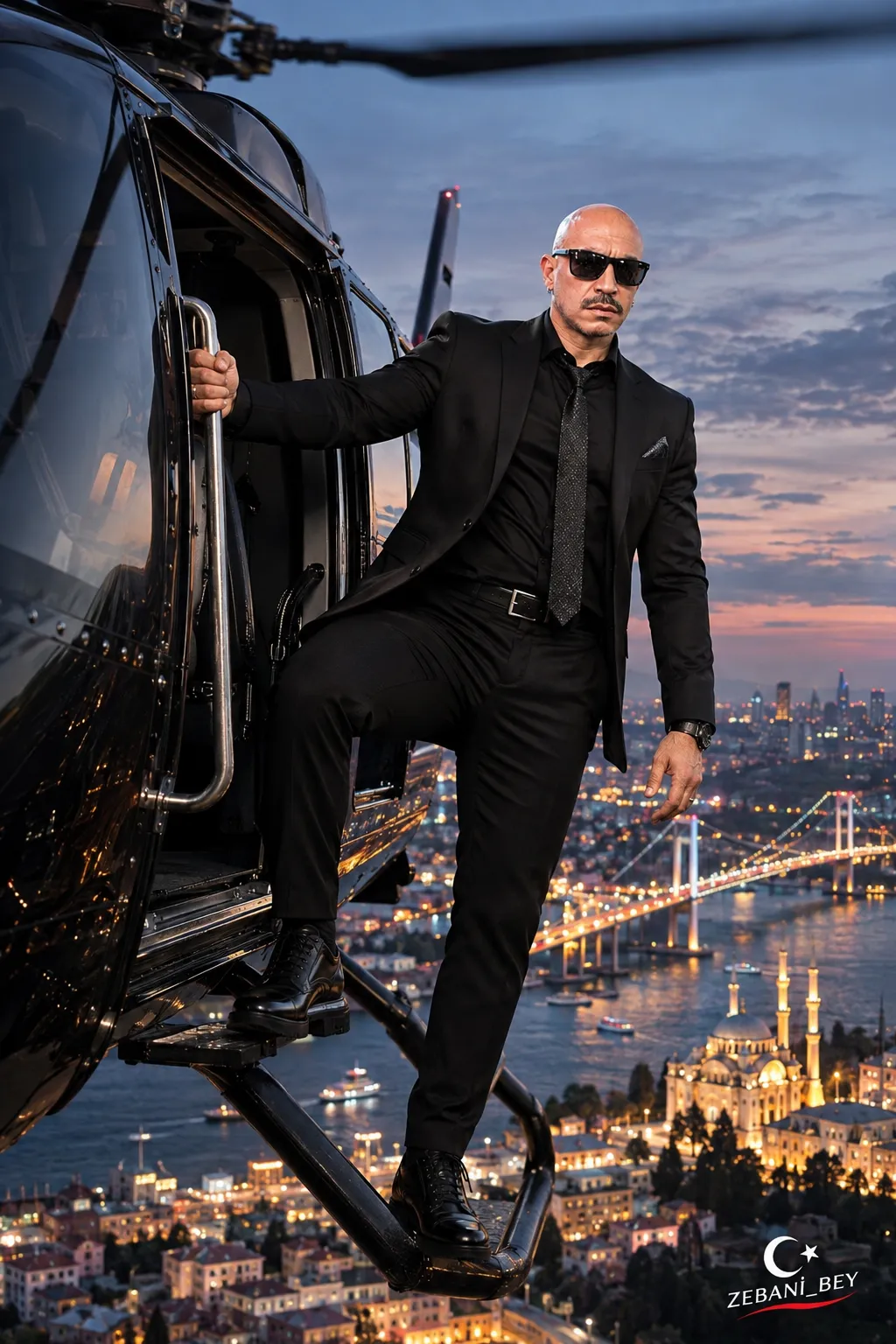
Create a cinematic, photorealistic aerial portrait of the person in a reference photo standing on the landing steps of a flying black luxury helicopter above an AI-selected city at blue hour.
Example outputs
Prompt template
- Format
- Text Parameterized
- Inputs
- Reference_photo (image) · Required signature (text) · Optional · Default: ZEBANİ_BEY
- Outputs
- Aerial_heliocopter_portrait (image)
Create an extreme-photorealistic, Hollywood-action-cinema aerial luxury editorial photograph in vertical 9:16, with 8K RAW HDR quality, set at blue hour just after sunset.

Use the real person in the uploaded reference photo as the sole and definitive identity source. Preserve their facial anatomy, head shape, eyes, nose, lips, jaw, natural facial asymmetry, age, skin tone and pores, facial hair, and hair or baldness exactly. Preserve their height, shoulder width, build, and body proportions. Do not beautify, make younger, redesign, or turn them into someone else. Preserve the reference photo’s clothing, sunglasses, jewelry, shoes, and all accessories without removing, changing, or redesigning them.

Show the person high above a visually striking city freely chosen by the model. The city, country, geography, architecture, background, and environmental atmosphere are the only areas of creative freedom. The city may feature famous historic landmarks, striking skyscrapers, monumental bridges, waterfronts, brightly lit streets, or distinctive architecture. Make its most recognizable landmark clearly visible in the background. Allow a different city and architectural atmosphere in each generation.

Include a huge, luxurious black helicopter in flight above the city. Give it a glossy black metallic body, aerodynamic and realistic design, wide panoramic cockpit windows, an open sliding side door, sturdy metal handholds, and landing gear with exterior steps. Show realistic rotor movement with slight motion blur and natural reflections of the sky on the metallic surfaces. Its engineering, components, and proportions must be consistent with real aircraft.

Pose the person confidently and comfortably on the metal landing steps extending outside the helicopter’s open side door. Their torso leans slightly out through the doorway; one hand grips the sturdy handhold beside the door, and the other arm hangs naturally. One leg is bent at the knee with the foot on the upper step; the other extends downward with the foot on the lower metal step. Keep the shoulders relaxed, body turned slightly toward the camera, head upright, and face directed toward the camera. Their gaze is toward the camera through the sunglasses in the reference photo. Give them a serious, calm, fearless, charismatic expression. Make the pose natural, anatomically correct, and physically believable. The helicopter’s strong airflow should move clothing, fabric, and any hair naturally, while preserving the reference subject’s hair or baldness.

Use a wide-angle aerial-cinematography composition: 24 mm lens, full-body shot, vertical 9:16. Place the camera outside the helicopter, facing the subject from a slightly elevated angle. The large black helicopter body fills the left part of the frame; place the subject in the center-right, fully visible from head to shoes. Clearly show the open door, handholds, and landing gear. Below the subject, show the chosen city as an impressive panorama, with its most important architectural landmark clearly recognizable in the lower-right background and at a perspective-appropriate scale. Convey the helicopter’s height and the scale of the city below. Keep the helicopter, subject, and iconic city architecture in the same frame without obscuring one another, with natural perspective and realistic scale.

Set the scene in the evocative blue hour just after sunset. Use soft steel-blue, pastel-blue, and light-gray sky tones. Illuminate the city streets, buildings, and architecture with warm golden-yellow, amber, and orange lights. Show cool blue reflections from the sky on the helicopter’s black metallic body. Light the subject’s face, clothing, and accessories naturally and cinematically. Create a strong but realistic contrast between the cool sky and warm city lights. Choose atmospheric details that suit the selected city’s geography and architecture.

Make the image look like a professional air-to-air photograph taken beside a genuinely flying luxury helicopter, and like a promotional still from a million-dollar Hollywood action film. Use realistic human photography, luxury-lifestyle editorial and aerial fashion photography, physically accurate lighting, natural skin pores, authentic fabric textures, realistic atmospheric perspective, professional cinematic color grading, HDR, and 8K RAW quality. Include realistic metal reflections, natural city lights, slight wind movement, cinematic depth of field, and anatomically coherent details.

Do not use anime, cartoons, illustration, artificial 3D characters, plastic skin, deformed hands, extra fingers, anatomical defects, incorrect helicopter parts, unrealistic architecture, incorrect perspective, blurred faces, altered identity, artificial lighting effects, or physically inconsistent imagery.

Add a small, elegant crescent-and-star symbol followed by ${signature:ZEBANİ_BEY} in the lower-right corner. Keep the signature legible, professional, and harmonious with the cinematic atmosphere without disrupting the composition.
Replace the ${…} placeholders with your values
before using this prompt. See parameters
and defaults below
Parameters
Replace each placeholder with your own value, or use its default when one is provided
${signature:ZEBANİ_BEY}
signature
Default: ZEBANİ_BEY
What you'll create
A reference-guided person stands on exterior helicopter steps above a city, with the black fuselage on the left and their full figure at center-right. Cool sky reflections contrast with warm streets below, while wind movement and blurred rotors emphasize the airborne setting.
Usage instructions
Frequently asked questions
Is one particular city required?
No. The city is left open, but its most recognizable landmark should remain visible at a plausible scale.
Does the template describe a real documented flight?
No. It requests a cinematic aerial image and a photographic appearance, not evidence of an actual flight.




Comments
Tried this prompt? Share what you made, compare results, or ask a question