Restore and Upscale a Damaged Vintage Photo
Repair damage, improve facial detail while preserving identity, restore natural color and lighting, and upscale an old photo.
Example outputs
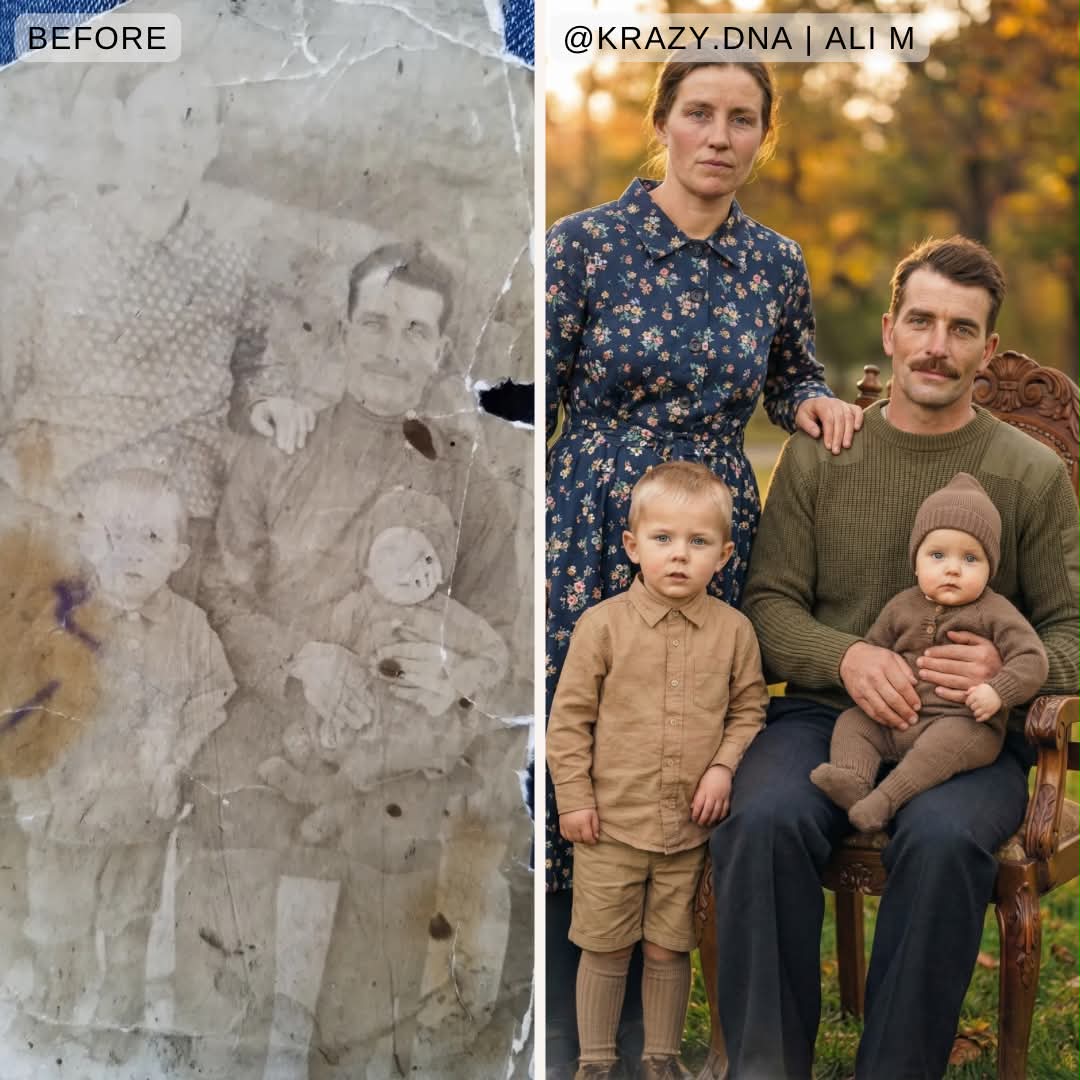
Prompt template
- Format
- Json Parameterized
- Inputs
- Damaged_photo (image) · Required watermark_text (text) · Optional · Default: ali.thinq watermark_position (text) · Optional · Default: on ear / Neck
- Outputs
- Restored_photo (image)
{
  "task_meta": {
    "task_type": "photo_restoration",
    "target_quality": "high_definition_8k",
    "style_preset": "photo_realistic"
  },
  "restoration_requirements": {
    "damage_repair": {
      "actions": [
        "fill_scratches",
        "repair_tears",
        "fix_creases",
        "remove_dust_spots"
      ],
      "reconstruction_method": "context_aware_infilling",
      "texture_goal": "realistic_material_matching"
    },
    "color_grading": {
      "goal": "restore_natural_vibrancy",
      "lighting": "balance_natural_illumination",
      "tone": "correct_fading_and_discoloration"
    }
  },
  "facial_enhancement": {
    "priority": "identity_preservation",
    "skin_texture": {
      "description": "smooth_but_textured",
      "details": "visible_pores_and_micro_details",
      "avoid": [
        "plastic_look",
        "waxy_skin",
        "oversmoothing"
      ]
    },
    "features": {
      "eyes": "sharpen_and_clarify",
      "structure": "enhance_natural_definition"
    }
  },
  "post_processing": {
    "text_overlay": {
      "content": "${watermark-text:ali.thinq}",
      "position": "${watermark-position:on ear / Neck}",
      "size": "small",
      "font_type": "clean_sans_serif",
      "color": "auto_contrast"
    },
    "upscale": {
      "enabled": true,
      "factor": 4,
      "model": "ESRGAN_4x"
    }
  }
}
Replace the ${…} placeholders with your values
before using this prompt. See parameters
and defaults below
Parameters
Replace each placeholder with your own value, or use its default when one is provided
${watermark-text:ali.thinq}
watermark-text
Default: ali.thinq
${watermark-position:on ear / Neck}
watermark-position
Default: on ear / Neck
What you'll create
A repair brief fills scratches and tears, corrects fading and balances illumination before a four-times upscale with a small configurable overlay.
Frequently asked questions
Should restoration erase pores into waxy skin?
No. Visible pores and microdetail are preserved without excessive smoothing.


Comments
Tried this prompt? Share what you made, compare results, or ask a question