Cinematic Dark-Fashion Editorial Portrait
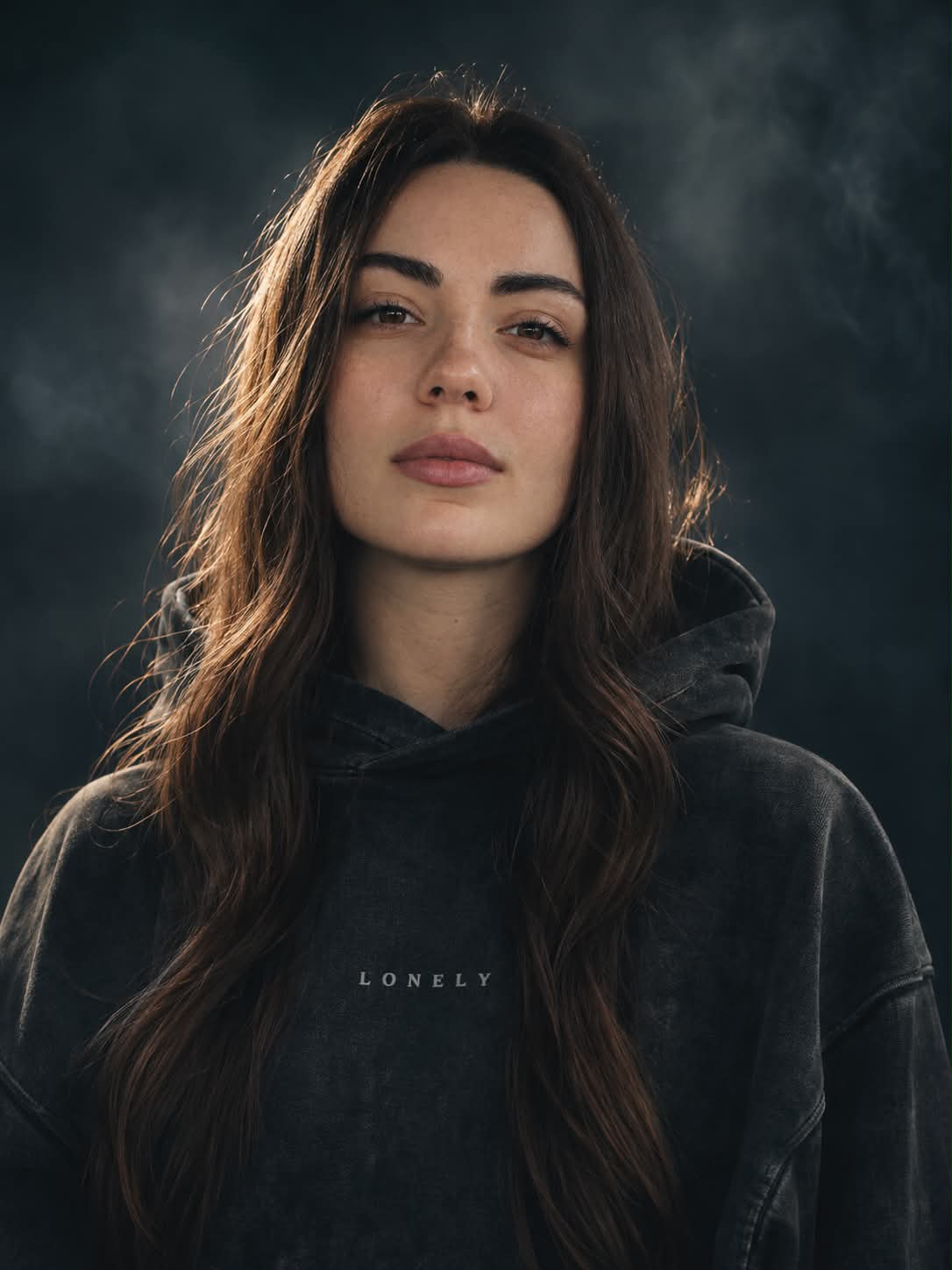
Create a close-up fashion portrait with a detached expression, a washed-black hoodie, and a moody charcoal backdrop. Customize the small chest print while retaining the prompt’s cinematic editorial look
Example outputs
Prompt template
- Format
- Text Parameterized
- Inputs
- chest_text (text) · Optional · Default: LONELY
- Outputs
- FashionEditorialPortrait (image)
CLOSE-UP EDITORIAL PORTRAIT OF A EUROPEAN FEMALE MODEL, EARLY 20S, CENTER FRAME, STANDING STILL AND HOLDING EYE CONTACT WITH THE CAMERA. EXPRESSION STOIC, EMOTIONALLY DETACHED, CINEMATIC. NATURAL WARM-BRUNETTE HAIR SLIGHTLY WAVY FRAMING HER FACE NATURALLY, NOT COVERED BY HOOD. WEARING A FADED WASHED-BLACK OVERSIZED HEAVYWEIGHT HOODIE WITH ${chest-text:LONELY} PRINTED ON CHEST IN SMALL MUTED WHITE. AND FORMS, STRONGLY OUT OF FOCUS. BACKGROUND: MINIMAL, DARK CHARCOAL FOG GRADIENT, SOFT BACKLIT RIM LIGHT ON SUBJECT. SHOT: 85MM F/L.Z, EXTREME SUBJECT ISOLATION, CINEMATIC COMPRESSION. COLOR GRADE: CRUSHED BLACKS, COOL CYAN SHADOWS, NEUTRAL SKIN TONES, ANAMORPHIC LENS DISTORTION. CAMPAIGN-GRADE FASHION PHOTOGRAPHY, PURE EDITORIAL ARTReplace the ${…} placeholders with your values
before using this prompt. See parameters
and defaults below
Parameters
Replace each placeholder with your own value, or use its default when one is provided
${chest-text:LONELY}
chest-text
Default: LONELY
What you'll create
This prompt creates a close-up fashion-editorial portrait of a brunette woman in a washed-black oversized hoodie. Soft rim lighting, a dark fog-gradient background, and cool-toned cinematic grading shape the scene
Usage instructions
Frequently asked questions
Can I change the word printed on the hoodie?
Yes. Change the chest-text input; its default is “LONELY”
What gives the portrait its cinematic editorial look?
The prompt specifies an 85 mm lens, strong subject isolation, soft backlit rim light, crushed blacks, cool cyan shadows, and anamorphic distortion








Comments
Tried this prompt? Share what you made, compare results, or ask a question